What is Bounce rate on Google Analytics and how to reduce it?

Introduction:

In this article you can learn what is bounce rate on Google analytics and how to assess it entirely. It will give you the insight into whether your industry standard is correct or up to the mark. A bounce occurs when a user arrives on a website or homepage and leaves without taking any further action, such as valuable clicks or navigating into the site. In another sense, the user did not initiate any subsequent request to the Google server regarding the specific page or site.

The Bounce Rate is defined as “the proportion of sessions that result in a bounce or null activating the Google Analytics server.”

The bounce rate of a website is computed when someone visits a single page and does nothing before leaving. More precisely, the bounce rate of a website indicates how many visitors leave a page without taking any action, such as purchasing something, completing a form, watching video or clicking on a link. If there is no engagement with the landing page, and the visitor follows the single-page visit to the site’s homepage the user bounces. The template for landing page must be standardized. The bounce rate on your site can tell you something about your website’s quality and the “quality” of your audience. The key to attract an engaged audience is to find a good match between your site’s purpose and your audience.

You may find your Google Analytics data whenever you want by logging into your account.

We can relate with the experience of having witnessed the increase in that number.

However, it is crucial to be aware of how numbers can be deceptive.

Bounce rate on Google Analytics

Bounce Rate of a website on Google Analytics

Bounce rate is determined in the following manner according to Google:

The proportion of all sessions on your site is found out by determining who viewed only a single page and made only a single request to the Analytics server by dividing single-page sessions by all sessions. It is better to say that it compiles all the single-page sessions and divides them by all sessions. Data tables with reports that include charts, such as the Acquisition, Behavior, and Conversion tabs, have the bounce rate measure. It is located in the left menu bar.

Why Tracking Google Analytics bounce rate is critical?

Bouncing throughout your site’s pages helps you better understand how visitors are interacting with the pages on your site, allowing you to make marketing and optimization decisions based on their bouncing behavior.

Tracking bounce rate, for example, might be especially useful for landing pages. Making an effort to get users to a landing page to capture their information, but only to see them abandon without following through to the remainder of your site is a big waste of resources.

Why does it happen that way?

It is crucial to understand the most prevalent causes that individuals bounce prior to learning about particular methods for reducing bounce rates. The page they landed failed to meet their expectations.

Here’s an example. Imagine you wish to purchase a new pressure cooker. When you search for “buy pressure cookers with free shipping”, that’s how you’ll find your answers.

As you see, you’ll get free shipping on your search results. Now you choose to click on it. However, when you click on the link, you are instead taken to the website’s homepage. What will you do? Instead of trudging through long-tail keywords, you will bounce back to Google to search for a page about pressure cookers.

The compelling reasons that cause this bounce-back rate are:

A stunning Appearance can decrease your Bounce Rate. If the site has a bad/ poor design, your Bounce Rate will be extremely high. Always look for some tips to design a website to improve the website appearance.

User experience is the crucial part of creating a well-functioning website. In addition, your site should be simple to use. To drastically decrease the bounce rate of your website, make your content and layout as simple to read and navigate as possible.

When you load a page, it gives you exactly what you’re looking for. That is correct. Bounces are not always negative. For all intents and purposes, a bounce is a message that your page delivered precisely what someone was looking for. The tips for website design available both online and offline will be a helpful guide for this purpose.

Do you believe that high bounce rates are alarming?

It is contingent on the situation.

Yes, a high bounce rate is terrible. A high bounce rate is normal when it comes to single-page sites like blogs or websites that provide various forms of material that are supposed to be used for single-page sessions.

Tips to reduce your bounce rate

Explore the patterns of bounce rate that can be observed from various views. For instance:

  • The Audience Overview report shows your site’s total bounce rate.
  • Each channel grouping is broken down into bounce rates in the Channels report.
  • The bounce rate data for each source-medium pair is offered in the All Traffic report.
  • Individual page bounce rates are included in the All Pages report.

SEO factors for bounce rate

You can observe whether the bounce rate is completely uniform if it’s high overall, but you should dive into the numbers if it appears to be driven by a particular channel, pair of sources, or some pages.

To better understand how complex the issue is, look into what correlation your content has with your marketing and see whether the pages you have linked to can guide readers to the next steps you want them to take. Learn how to write a website content and then proceed writing the websites content.

An exceptionally high bounce rate may indicate that your channel’s marketing efforts are not reaching their intended target. In this case, have a glance at your channel’s content to make sure your adverts are targeted appropriately. Make sure your tracking code is correctly implemented, especially if the problem appears to be more prevalent. You should also consider your website’s general design and investigate the design of its many components, such as the wording, graphics, color, and call to action buttons. You may optimize to test alternative versions of your web pages to evaluate which designs entice users to interact more.

One way to capture more user involvement on single-page sites is to track and detect non-interaction events. You can integrate these non-interaction events into the site to increase user engagement and identify single-page sessions that do not bounce.

A practical and easy-to-implement technique to decrease your bounce rate

Embedding Videos:

Put Video Sales Letter or YouTube videos on your page to increase your site’s views and engagement. While putting video on website more than doubled their average time on page, a study discovered that video content increased overall site traffic by over 150 percent. The length of the video also matters a lot. The videos must be short and precise. When you embed videos, the Bounce Rate goes down and time on the page goes up. Detailed analysis of the impact of embedded videos on Bounce Rate shows that they both increase and decrease bounce rate. While the study found that pages with video marketing strategy had a much lower bounce rate (11%) than those without, data indicates that video-containing pages had a lower bounce rate than non-video pages.

Website loading time:

Google observed that slow website load time is associated with greater bounce rates. Since you have a benchmark score and techniques on how to increase the website speed, consider these best practices:

  • Pre-compressing images is one of the leading causes of loading page times. However, you don’t have to strip off photos every time you add an image.
  • Look for a quick hosting provider. Your host can have a significant impact on how quickly your site loads. And if you’re still on a cheap monthly plan, then it might be time to think about upgrading to a more legitimate host.
  • Reduce the number of unused plugins and scripts. Run Google Page Speed test and take a note of all resources that slow down your page.
  • Keep your content simple and accessible.
  • Speed test a site every now and then.

Let me rephrase it this way:

If it’s challenging to read, it’s unlikely that you’ll finish it.

Your Bounce Rate will definitely be off the charts if your content looks like this.

How to reduce website bounce rate

  • Creating internal links:

Create internal links throughout your page. More than likely, you’re already aware of the importance of internal links for search engine optimization. Your site’s Bounce Rate may not be related to the external links you’ve included.

So why? Internal links help you to take your users to other locations on your website and thereby reducing bounce rate.

  • Ergonomic Design:

Let customers be impressed with your fantastic design. As previously indicated, individuals abandon websites with bad designs. But there was one thing I did not mention: Its unique design can make your page like a superglue. In that case, you should put more effort into an exceptional design. Always use a standard template for responsive website creation.

  • Optimize your mobile user experience:

A majority of all online traffic now originates from mobile devices, according to Search Engine Land. You need to get your site to perform well on smartphones and tablets if you want to keep bounce rates low.

  • Reference other blog posts and related resources:

By providing links to other blog entries on your site, you help to keep visitors from bouncing from your website. The internal connection is somewhat like this. You are exposing posts that your site readers may be interested in reading next.

  • Utilize exit-Intent Popups:

Popups could have the unfortunate side effect of increasing your bounce rate. Improve your content by using upgrades. Specific lead magnets called ‘Upgrades’ will give your audience better content. So instead of giving everyone the same ebook, you talk about things that are 100% relevant to their interests.

It’s time to wrap up

You can examine your marketing efforts by looking at your bounce rate. If you measure the results of your efforts after reading this article, you may determine if you are living up to your visitors’ expectations. Despite this, you want your visitors to take an interest in your site. The bounce rate is a valuable tool to analyze pages to select which pages should receive greater attention. Making your pages more welcoming for visitors and providing them with what they expect also contribute to a great website.

Advertisement in YouTube: A Complete Guide

Introduction:

In this article we have discussed about advertisement in YouTube and the ways you can use it to grow your businesses. As of February 2022, YouTube had a user base of about 467 million users in India. This was the greatest audience ever reached by ads in the nation during that particular year. According to a report by research specialists, Facebook came in second place within the same time period with roughly 330 million users. Because YouTube ads are interactive, they might encourage users to go to your landing page or website, which could improve leads and sales.

What is YouTube advertising?

YouTube is a dedicated platform that is specifically designed for video advertising. Brands can use YouTube advertising to get in front of a large consumer base via the YouTube platform. It enables businesses to produce and publish videos that will be viewed by millions of people while also targeting them at particular demographics. With the help of this platform, businesses can produce interactive and engaging advertisements as well as track the effectiveness of their marketing initiatives.

Is YouTube Advertisement effective?

There is no universally applicable answer to this question. The effectiveness of YouTube advertising will depend on a number of factors, including the type of advertisement being delivered, the channel or videos being advertised to, and the target demographic. However, in general, YouTube advertising can be successful if it is used effectively and targets the suitable demographic. First and foremost, YouTube advertising needs to be relevant to the particular channel or content it is targeting.

How to advertise in YouTube?

There are many ways to advertise in YouTube. You can create a YouTube channel and promote your videos there, or use Google AdWords  to promote your videos to specific demographics. You should link your Google Ads account with your YouTube Channel. You can also purchase ads on YouTube, or use a video marketing firm to create and promote videos for you. YouTube advertising can be used to promote a business, sway consumer behavior, boost sales, or foster brand loyalty.

Advertisement in YouTube

  1. Grow Sales

You can target your customers through number of options available, through channels your potential customer likely to visit. Re-targeting helps you target people who visited your website or channel to grow sales. You can do SEO to rank your video in the search results to get organic traffic.

  1. Influencing Buying Decision

Videos that explain why your product or service is the greatest choice for your customer and provide concrete evidence for that claim convert best, so take advantage of it.

  1. Brand Awareness

You can find and target people who share interests in product or services similar to yours. You can introduce your product to those who are unfamiliar with it already.

Ads in YouTube Videos:

On YouTube, there are numerous different kinds of advertisements. Pre-roll, in-video, and post-roll ads are a few of the most popular ad formats. Pre-roll advertisements appear before the video begins, in-video advertisements appear throughout the video, and post-roll advertisements appear after the video has finished playing.

  1. True View Skippable Instream Ads:

Utilizing YouTube’s skippable instream advertising has a lot of advantages. They mostly contribute to rapid and seamless loading speeds for your videos. Additionally, skippable ads keep your ad inventory under control, which can help you save time and money. The advertisers will only be charged when a user watches advertising for at least 30 seconds or until the end of the video, or when the viewer takes an action, such clicking on a call-to-action. On YouTube, skippable TrueView advertisements must be between 12 and 6 minutes in length. Last but not least, skippable ads are a powerful tool for audience targeting and raising brand awareness.

  1. Non-Skippable Instream Ads:

Non-skippable advertisements can start in the beginning, during or at the end of the main video. These ads may run for 15 to 20 seconds. If you’re promoting a new product or a major event, use non-skippable advertising to draw clicks. Since non-skippable ads cannot be avoided, it is preferable to add a call to action in these videos (CTA). 

  1. Overlay Ads:

Banners that float at the bottom of the video are overlay advertisements. This form of advertising should be added to your existing in-stream video campaigns. A banner ad is a fantastic way to market your service or products without being intrusive. 

  1. Bumper Ads:

While bumper video advertisements can’t fully tell a story in just six seconds, they make a fantastic supplement to longer video campaigns promoting new products or events. If you want to make the most of the six seconds it is better to include only the important aspect of your product or brand you want people to remember.

  1. Discovery Ads:

The discovery ads, as their name suggests, show up as related videos on the search results pages when someone searches on YouTube using terms related to your product or service.

Important Metrics and YouTube Analytics

With the help of YouTube Analytics, you can monitor how your viewers are interacting with your videos and which types of contents are most popular. You may see details such as the number of viewers, how long they have watched the videos, and the channels they are using to see your video. Additionally, you can monitor how many people have subscribed to your channel and how your videos are being shared. You can leverage these metrics to get the maximum out of your advertisement in YouTube.

Budget and Bidding in YouTube Advertisement

    1. Budgeting

Compared to other online advertising platforms, YouTube has very different budgeting for advertisements. You must decide how much you wish to spend each day or each week before placing a bid. You can determine what is ideal for your company if you plan out your budget in advance.

  1. Bid & Advertiser

Make sure to only promote on channels where your target audience is present. You should also set and adhere to a daily/weekly budget. To accomplish this you can use Google Ads, where you may modify your bids based on the outcomes you want.

       3.Quality Score

The percentage of views your video receives when compared with others is called Quality Score. More views are likely to come from a video with a better quality score. Upload videos with a 1080p resolution and keep the duration under 60 seconds to raise your quality rating.

  1. Video Length

The more duration your video has, the more viewers it will likely attract. Videos longer than two minutes typically perform better than shorter ones.

  1. Your Audience

If you want to advertise a specific product, pick a channel that appeals to your target market. If you’re selling furniture, for instance, pick a channel that caters to household items.

  1. Timing

Avoid selecting a time slot during peak hours when a lot of people are online. Nowadays, the majority of people check their phones before going to bed, so refrain from posting videos right before night.

  1. Engagement

Having interesting material is just as crucial as having engaged viewers. Make sure the call-to-actions in your video are crystal clear. Use written captions as well to aid viewers in understanding the video.

Benefits of YouTube advertisement

What are the benefits of YouTube Ads?

1. Increased Exposure: Businesses can reach a wider audience by running YouTube advertising  on popular channels and videos.

  1. Improved Engagement: Ads on YouTube are interactive, which can encourage viewers to click through to your website or landing page. This can lead to increased sales and leads.
  2. Targeted Reach: Ads can be targeted to particular demographics based on factors like age, geography, interests and hobbies. This can make it easier for you to successfully reach your intended audience.
  3. Affordable: YouTube ads are affordable and can be customized to fit your needs.

     5. Rapid Results: YouTube advertising are easy to use and yield instant results.

Conclusion:

If you are a beginner to YouTube advertisement, start with a simple campaign and work your way up. It is obvious that using video advertising is an effective strategy to reach your target audience and generate leads. When planning and implementing your video ad campaign, there are a few things to keep in mind. First, make sure your video is engaging and interesting to watch. Second, be sure your video is optimized for search engine optimization (SEO). Finally, be sure to monitor your progress and modify your campaign as needed. You can make sure your video advertising is successful by using these suggestions. To reach a wide audience use video advertisements and track the results. Start utilizing YouTube advertising right away! It can be a very effective strategy for your company.

What Are Backlinks in SEO?

Introduction:

Understanding what are backlinks in SEO and how to create them will help you get exposure and ranking on search engines. It is well known that marketers want a sizable quantity of high-quality backlinks in order to rank highly on the major search engine results pages. Undoubtedly, improving your exposure and ranking on search engines will help your business. 60 percent of marketers say they start seeing positive returns from link building within a few months of using link building strategies, and they’re willing to spend 5–10% of their overall budget to it. Here you can learn the different methods to build backlinks to rank your website high in search results.

What are backlinks in SEO? Are backlinks still important 2022?

A clickable link from one website to another is known as a backlink. Backlinks are frequently utilised in SEO to improve a website’s authority. Backlinks are crucial for SEO since they can elevate the position of your website in search engine results pages (SERPs).

Backlinks one of the most crucial SEO factors without them it can be difficult for your website to rank well in search engine results pages.

When you develop a website, you should make sure that you are building links with high quality websites that can help you spread your message to a larger audience. Creating backlink is a great way to achieve this.

Backlink is a link between your website and other websites that are relevant to your business or topics.  When such a website links to your website it is called backlink. Backlinks are crucial because they help your website rank higher in the search engine result pages.

Why backlinks are important in SEO?  

If you want to rank higher building links from authority websites is one of the best techniques to increase your chances of ranking higher in search engine results pages (SERPs).

A link from a high-quality website is typically regarded as an endorsement by that website and this can help increase the visibility of your website in search engine results pages.

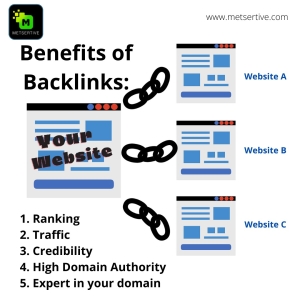
Benefits of Backlinks in SEO

  1. They increase website traffic:

Here are a few benefits for why backlinks are so crucial for SEO. Backlinks have several advantages, but one of the most significant is that they can increase website traffic. A website linking to yours informs search engines that your website is worthy of linking to.

  1. Position you as an expert in your domain:

When you share more insights, original data and experience you are positioning yourself as a pioneer in your domain.

  1. Increase your credibility

Websites link with you when they think your content will provide value to their visitors this in turn boosts your credibility.

How does a backlink work?

A link from one website to another is known as a backlink. A backlink directs users to the website it points to when they click on it. Backlinks are significant because they can help a website rank higher in search engine results pages, (SERPs). Backlinks are crucial since they can increase a website’s traffic.

What are the different types of backlinks in SEO?

There are two types of backlinks based on how the search engine perceives the link. Do-Follow links and No-Follow links.

Types of Backlinks in SEO

1.Do-Follow Links:

Do-Follow links give your website authority by serving as a vote for it. Do-Follow links are links from websites with a high domain authority.

Example:

If your website is about garden implements a link from a website about seeds and manure will give more weightage than links from irrelevant sites like fitness or weigh loss.

Try to get one or two links from one website instead of getting 100 links from one website and it is better to get 50 links from 50 different websites.

Links from high domain authority websites like .govt websites and .edu sites, User Generated Contents (UGC) and Sponsored Links.

2.No-Follow links:

No-Follow links don’t pass on authority they are meant for driving traffic to your website. Example social media links.

There are many different types of backlinks in SEO. Some of the most common types of backlinks are website links, blog links, social media links, and article links.

Website Links:

Website links are the most common type of backlink in SEO. A website is said to have a backlink when a link from it points to another website. Backlinks are crucial in SEO because they help increase the ranking of a website in search engine result pages (SERPs).

Blog Links:

In SEO, blog links are also common. A blog is said to have a backlink when it points to another blog. Backlinks are crucial in SEO.

Social Media and Article links:

Here are some tips for building social media links and article backlinks:

  1. Use social media links to connect your website to popular social networks.

Social media links and article backlinks are important aspects of a website’s online presence. When done correctly, they can help increase site traffic and improve rankings in search engines.

Social media sites like Facebook, Twitter, LinkedIn, and other social networks are great platforms to promote your website. Ensure that you include links to your website in your posts and profiles, and encourage your followers to visit your site.

  1. Add article backlinks to your website.

Articles are a great way to promote

Backlinks from Article are a great way to increase the authority of a website. They are links from other websites that are written about your topic. You can increase the authority of your website by getting links from high quality, reputable websites.

The best way to get article backlinks is to publish engaging and high-quality content. You can also ask other bloggers to link to your content. In order to locate and rank good quality article backlinks, you can also use tools like Ahrefs.

When evaluating a link, it’s important to ask yourself the following questions:

Is the Anchor text (clickable text) properly formatted with your target keyword and also tells the search engine what your webpage is about?

Is the link from a reputable source?

Is the link pointing to your blog’s main content or a specific post?

How to create backlinks?

There are a number of ways to create backlinks in SEO. Some popular methods include article marketing, guest blogging, and social media outreach.

Article Marketing

Article marketing is one popular way to create backlinks for your website. Writing and publishing high-quality articles on relevant subjects, sharing them on your blog and other relevant websites, is known as article marketing.

Guest Blogging

Guest blogging is another popular way to create backlinks. When you write an article for another website as a guest blogger, you include a link to your own blog in the text.

Use search strings in Google to find opportunities for Guest Post:

“Your Keyword” + “Guest Post”,

“Your Keyword” + “Write for us”

Social Media Outreach

Social media outreach is one strategy for building backlinks. Social media outreach is the process of linking with bloggers and media influencers to promote your business on their websites and increase traffic to your website.

One of the most crucial things you can do for your SEO efforts is to build backlinks. This is because backlinks are a crucial component in determining how search engine spiders assess the significance of a web page.

There are a few things you need to keep in mind when creating backlinks:

  1. Make sure your links are quality links.
  2. Make sure your links are relevant to your target audience.
  3. Make sure your links are from high-quality websites.
  4. Monitor your backlink metrics to see how your link building is affecting your SEO rankings.

How many backlinks do I need to rank?

You will require links from top-notch websites if you want to rank on Google. As a general rule of thumb, you should strive for at least 50 backlinks. However, your ranking will increase as your number of backlinks increases. Using the Moz Toolbar, you can find out how many backlinks are needed to rank in Google.

Are backlinks still important in 2022?

Yes, backlinks are still important in 2022. They might even be more crucial than they already are. Backlinks are links from other websites that point back to your website.

Backlinks are crucial since they help your website rank higher in search engine results pages (SERP). This is crucial if you want to increase the amount of organic traffic that comes from search engines.

Therefore, be sure to maintain a close eye on your backlink profile and step up your link acquisition activities if you want your website to be successful in 2022.

Conclusion:

Learning what are backlinks in SEO and how to build them will help you get your website indexed more quickly, increasing the likelihood that you’ll show up in the search results. Backlinks not only help you rank higher, but they also increase your credibility and establish you as a leader in your field. The quality of your backlinks is one of the most crucial aspects to take into account while building the authority of your website or blog. While having a mix of do-follow and no-follow links is important, it is even more crucial to make sure that the links you do have come from reliable sources and are relevant to your business.