CRM Integration Best Practices for Lead Management

If you’ve ever felt like leads are slipping through the cracks, your CRM might not be working as hard as it could. A customer relationship management system should do more than store contacts; it should actively help you track, nurture, and convert leads at every stage of your funnel.”

The truth? It’s not about just having a CRM; it’s about connecting it to everything else you do.

That’s what CRM integration in lead management is all about:
1. Capturing every lead, wherever they come from.
2. Tracking their journey without manual spreadsheets.
3. Nudging them with the right message, at the right time, automatically.

Selecting the best CRM for small business lead management can be the difference between chaotic follow-ups and a predictable sales pipeline. A well-integrated CRM turns chaos into clarity—helping you respond faster, nurture smarter, and convert more leads without working 12-hour days.

Stat to consider:
Companies with strong sales and marketing alignment, powered by CRM integration, achieve 20% higher sales win rates.

In this guide, we’ll walk through:
1. Why CRM integration matters for lead management
2. Best practices that work for SMEs
3. Tools and real-world examples
4. Common mistakes to avoid

Let’s turn your CRM into your growth engine.

Why CRM Integration Matters in Lead Management

Imagine this:
A potential customer downloads your lead magnet, checks your pricing page, and even chats with your bot. But because your systems aren’t talking to each other, this hot lead sits untouched for days.

That’s lost revenue.

The Challenge Without Integration:

  • Leads are scattered across forms, chat, email, and social.
  • Manual updates cause delays and errors.
  • Follow-ups are inconsistent.
  • You don’t know which leads are warm vs. cold.

The Benefits of CRM Integration:

1. Centralized Lead Data
Every form fill, chat conversation, and email click is logged automatically in one place, giving you a 360° view of your lead’s journey.

2. Better Segmentation and Scoring
Integration allows you to segment leads by behavior (visited pricing page, downloaded guide) and score them automatically for sales readiness.

3. Automated Nurturing Workflows
Leads can trigger tailored email sequences or retargeting ads without you lifting a finger.

4. Sales and Marketing Alignment
Your sales team knows exactly when to step in, thanks to clear lead stages and triggers.

5. Lead tracking software
Using lead tracking software within your CRM helps you visualize each prospect’s journey, ensuring no high-potential lead slips through the cracks.

Example:

A B2B SaaS company integrates HubSpot CRM with its website forms and email marketing. When someone downloads a whitepaper:
1. They’re added to HubSpot with tags for the specific topic.
2. They automatically enter a 4-email nurturing sequence tailored to that topic.
3. If they visit the pricing page twice, their lead score increases, triggering a notification for the sales team to follow up.

Result? Faster, more relevant follow-ups and higher conversion rates.

 Tip:

Before you start adding integrations, map your customer journey first:

  • Where do your leads come from (ads, social, referrals)?
  • What actions show interest (downloads, webinar sign-ups)?
  • When should sales step in?

Once you know your journey, you can integrate your CRM at each touchpoint to streamline your lead management system.

 Core CRM Integration Points for Effective Lead Management

Your CRM is only as powerful as the data it collects—and that starts with integrating the right touchpoints in your lead journey. Lead capture automation ensures every website form or ad lead goes straight into your CRM, ready for nurturing.

Here are key integration points you shouldn’t skip:

 1. Website Forms

Where it fits: Top of funnel (lead capture).
Instead of leads sitting in your inbox or a Google Sheet, CRM integration captures every form fill automatically.

Example: Using HubSpot or Zoho CRM, when a lead downloads your free guide, it is instantly logged, tagged (e.g., “Lead Magnet: SEO Guide”), and enters a nurture workflow.

Tip: Always include source tagging (e.g., FB Ads, Organic, Referral) for tracking which channels drive the best leads.

  2. Email Marketing Platforms

Where it fits: Nurturing & engagement tracking.
Sync your CRM with Mailchimp, ConvertKit, or ActiveCampaign to track opens, clicks, and bounces for behavior-based lead scoring.

Example: If a lead clicks on your “Pricing” email twice, your CRM can auto-flag them as warm and notify your sales team.

Tip: Use email behavior (opens, clicks) to trigger workflows like “send case study” or “invite to webinar.”

 3. Live Chat & Chatbots

Where it fits: Qualification & real-time capture.
Connect chat tools like Drift or Intercom to your CRM so chats automatically create or update lead records.

Example: A visitor asks about your pricing in chat → CRM updates lead with “Pricing Interest” tag → triggers a follow-up email or a sales call.

Tip: Use chatbots for FAQs while capturing emails to funnel into your CRM seamlessly.

 4. Social Media Lead Forms

Where it fits: TOFU lead capture via ads (LinkedIn, Facebook).
Integrate your CRM to auto-import leads from social forms with no manual export hassle.

Example: A Facebook Lead Ad for a free webinar feeds directly into your CRM, adds the “Webinar Sign-up” tag, and triggers a confirmation + reminder sequence.

Tip: Test lead form questions carefully to qualify leads without overwhelming them.

 5. Calendars & Scheduling Tools

Where it fits: BOFU (sales-readiness, consult booking).
Integrate scheduling tools like Calendly or SavvyCal to automatically push booked calls into your CRM with lead source, time, and notes.

Example: When a lead books a demo, the CRM tags them “Demo Booked” and moves them to your sales pipeline.

Tip: Set up automatic email confirmations and reminders from your CRM for booked calls to reduce no-shows.

By aligning these touchpoints, your CRM becomes a living, breathing map of your lead’s journey, allowing you to act at the right moment without scrambling.

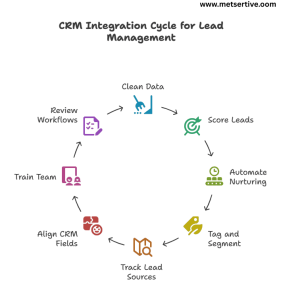
Best Practices for CRM Integration in Lead Management

Integrating your CRM is more than toggling a switch—it’s about using it effectively to nurture and convert leads consistently. Integrated CRM helps manage customer lifecycle management, guiding leads from first touch to post-purchase retention.

CRM integration in lead management best practices.

Here are best practices to follow:

1. Keep Your Data Clean and Organized

Messy data = confused teams + wasted opportunities.

Example: If “John Smith” enters your CRM three times with slightly different emails, your sales team might call him twice—or not at all.

Tip: Use your CRM’s deduplication tools and schedule a monthly cleanup to merge duplicate records.

 2. Use Lead Scoring to Prioritize High-Intent Leads

Not all leads are equal. CRM integrations allow you to assign lead scores based on:

  • Pages visited (Pricing Page = +10)
  • Email opens and clicks (+5)
  • Demo booked (+20)

Example: A lead with a score above 50 triggers a notification for your sales team to follow up immediately.

Tip: Start simple, and refine your scoring based on which leads actually convert.

 3. Automate Nurturing Workflows

Your CRM should trigger nurturing sequences based on lead behavior, so your team doesn’t manually send every email.

Example: Downloading a guide triggers a 5-part educational email series automatically.

Tip: Map workflows with clear goals (educate → engage → convert) and use CRM analytics to measure performance.

You can automate lead nurturing with CRM workflows, sending timely content and alerts based on user actions without manual intervention

 4. Tag and Segment Based on Behavior

Use tags to group leads by interest, stage, or source, allowing for personalized follow-ups.

Example: Tag leads as “Webinar Attendee,” “Pricing Interest,” or “SEO Lead Magnet” for targeted nurturing.

Tip: Personalization can increase open rates by 26% (Campaign Monitor).

 5. Use Lead Source Tracking Consistently

Knowing where your leads come from helps you double down on what works and stop wasting budget on what doesn’t.

Example: If 60% of your qualified leads come from LinkedIn while only 5% come from a Google Ads campaign, you can confidently reallocate your spend and efforts.

Tip: Use UTM parameters on your links and map them into your CRM’s lead source fields automatically using tools like HubSpot or Zapier.

 6. Align CRM Fields with Your Sales Process

Your CRM should mirror how your team actually sells, not just generic pipeline stages. True CRM integration fosters marketing and sales alignment, ensuring that your nurturing campaigns and sales follow-ups work together seamlessly.

Example: If your process includes a “Demo Scheduled” stage before “Proposal Sent,” ensure your CRM stages reflect this to avoid confusion and missed follow-ups.

Tip: Involve your sales team in defining these fields to ensure they match reality, not just theory.

 7. Train Your Team on CRM Usage Regularly

Even the best CRM integration fails if your team doesn’t know how to use it effectively.

Example: A team might forget to log calls or update deal stages, leaving your pipeline data unreliable for forecasting and nurturing.

Tip: Host short monthly training sessions or “CRM clean-up sprints” to reinforce habits, share workflow hacks, and answer questions live.

 8. Review and Refine Workflows Regularly

Your CRM isn’t “set it and forget it.”
Check what’s working:

  • Are your nurturing sequences getting replies?
  • Are leads converting after certain touchpoints?

Example: If your webinar leads aren’t converting, tweak your post-webinar sequence to include a case study and a limited-time offer.

Tip: Review workflows quarterly to align with updated offerings and audience behaviors.

Following these best practices ensures your CRM integration is not just a tech checkbox but a strategic growth engine for your lead nurturing funnel.

Recommended Tools for CRM Integration

Your CRM is the hub, but its true power comes from what it connects to. When choosing tools, prioritize those that support CRM workflow automation to reduce manual work and increase consistency in your lead management.”Here’s your SME-friendly toolkit to integrate seamlessly:

1. CRM Platforms

HubSpot
All-in-one CRM with built-in email, chat, and ad integrations, plus lead scoring and workflow automation.
Tip: Use HubSpot’s visual workflow builder to see your nurturing flows at a glance.

Zoho CRM
Budget-friendly CRM with solid integrations and customization.
Tip: Great for SMEs needing lead scoring and workflow automation without enterprise pricing.

Salesforce
Powerful and customizable, best for scaling teams with complex pipelines.
Tip: Use Salesforce’s AppExchange to add integrations for social media, chat, and ad platforms.

2. Integration Tools

Zapier & Make (Integromat)
Connect your CRM to 5,000+ apps without coding.

Example: New Calendly booking → Create/Update lead in CRM → Trigger confirmation email.

Tip: Start with key Zaps (form submissions, lead ads, calendar bookings) and expand as needed.

3. Email Marketing Tools

Mailchimp, ActiveCampaign, ConvertKit
Sync email campaigns with CRM to track opens, clicks, and automate lead scoring. Linking email drip campaigns CRM can ensure timely follow-ups that align with lead behavior.”

Example: Lead clicks your pricing email twice → CRM tags “High Interest” → Notifies sales.

Learning how to integrate CRM with email marketing tools like Mailchimp or ActiveCampaign can supercharge your nurturing efforts

4. Live Chat & Chatbot Tools

Intercom, Drift, Tidio
Capture chats directly into your CRM while qualifying leads in real time.

Scenario: A website visitor asks about pricing, enters their email in chat → CRM auto-tags “Pricing Interest” → Starts follow-up sequence.

5. Scheduling Tools

Calendly, SavvyCal
Integrate directly to create/update CRM records when leads book demos or consultations.

Example: A lead books a call → CRM tags as “Demo Booked” and moves to BOFU nurturing stage.

6. Paid Ads Platforms

Facebook, LinkedIn, Google Ads
Integrate lead form submissions directly into your CRM, automatically tagging source and campaign for tracking ROI.

 Tip:

Before investing in tools, map your lead journey. Choose integrations that eliminate manual entry and align with your lead management strategy.

Real-World Case Studies

See how SMEs actually use CRM integration to supercharge their lead management and nurturing:

Case Study 1: Coaching Business Automating Consult Bookings

Problem:

A business coach manually tracked leads from webinar signups to consult calls, missing follow-ups.

CRM Integration:

Used HubSpot + Calendly to auto-create leads and tag them as “Webinar Attendee” when they booked calls.

Result:

1. 40% increase in consult call bookings.
2. Faster response times, leading to more paid clients.

Takeaway: Automate your booking pipeline to move leads seamlessly from interest to action.

Case Study 2: E-commerce Brand Personalizing Outreach

Problem:

An online store struggled to convert high-value shoppers who abandoned carts.

CRM Integration:

Integrated Shopify with ActiveCampaign to tag high-value cart abandoners and trigger a personalized email + SMS series.

Result:

1. 28% cart recovery rate.
2. Increased AOV (Average Order Value) due to targeted upsells.

Takeaway: Use CRM tags and workflows to prioritize warm leads for personalized re-engagement.

 Case Study 3: B2B SaaS Improving Demo Conversions

Problem:

A SaaS company wasted time on low-quality demo leads.

CRM Integration:

Linked LinkedIn Lead Gen Forms to Salesforce, adding auto-lead scoring (based on job title, company size, engagement).

Result:

1. 3x higher conversion rate from demo to paid plan.
2. Sales team focused only on high-intent leads.

One SaaS client implemented a lead scoring system within their CRM, helping the sales team focus on high-intent leads and improving conversion rates.

Takeaway: Integrate lead forms with CRM and use lead scoring to prioritize high-potential prospects.

Case Study 4: Digital Marketing Agency Streamlining Follow-Ups

Problem:

Follow-ups were delayed after discovery calls, leading to lost opportunities.

CRM Integration:

Connected Calendly + Zoho CRM, auto-tagging leads post-call and triggering a 3-email follow-up sequence with case studies and testimonials.

Result:

1.Reduced follow-up delay from 3 days to instant.
2. Improved close rates by 25%.

Takeaway: Automate post-call nurturing to keep leads warm and engaged.

Case Study 5: Online Course Creator Maximizing Lead Magnet Downloads

Problem:

Thousands downloaded free guides, but few converted to course buyers.

CRM Integration:

Used Mailchimp with HubSpot to tag leads based on the guide topic and send a tailored email drip series, followed by webinar invites.

Result:

  1. 19% increase in webinar attendance.
  2. 15% boost in course enrollments.

Takeaway: Align your lead magnets with CRM tagging and follow-up drips for targeted nurturing.

Key Lesson:

These SMEs didn’t add tools for the sake of it. They:

  • Mapped their customer journey.
  • Integrated touchpoints with their CRM.
  • Used automation for timely, personalized nurturing.

You can do the same to transform your lead management into a conversion engine.

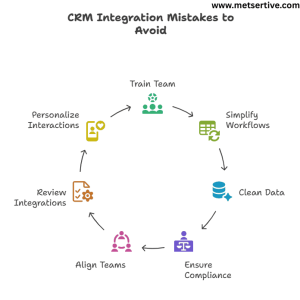
Common CRM Integration Mistakes to Avoid

CRM integration can transform your lead management, but many SMEs fall into avoidable traps that drain resources and hurt conversions.

CRM Integration mistakes to avoid

Here are 7 mistakes to avoid (with examples and fixes):

1. Not Training Your Team on CRM Usage

What happens:
Your CRM captures and organizes leads, but if your sales and marketing teams don’t know how to use it, follow-ups get delayed or missed.

Example: Leads tagged “High Intent” are ignored because the sales team only checks emails.

Fix: Run a simple CRM training workshop and document SOPs (Standard Operating Procedures) for your team.

2. Overcomplicating Workflows Without Testing

What happens:
Complex automations may break, sending leads the wrong emails or dropping them from workflows.

Example: A new lead receives a demo invite before the welcome email.

Fix: Start with simple, clear workflows. Test them internally before scaling.

3. Failing to Clean and Deduplicate Data Regularly

What happens:
Duplicate or outdated lead data confuses your tracking and messes up reporting.

Example: The same lead receives multiple emails for the same webinar.

Fix: Use your CRM’s deduplication and cleanup tools monthly to maintain a clean database.

4. Ignoring GDPR and Data Compliance

What happens:
Collecting leads without proper consent can lead to legal issues and lost trust.

Fix: Add consent checkboxes on forms, clear opt-in messaging, and easy unsubscribe options in emails.

5. Not Aligning Sales and Marketing Teams

What happens:
Leads may be marked as “sales-ready” by marketing but aren’t contacted promptly, or sales doesn’t know which nurturing emails leads have received. Ignoring CRM integration for sales teams often leads to missed opportunities, as the team may not know which leads are ready for outreach.

Fix: Hold monthly alignment meetings. Define when a lead becomes sales-ready and log activity in your CRM for visibility.

6. Setting and Forgetting Your Integrations

What happens:
Your workflows and triggers might stop working due to updates, API issues, or tool changes.

Example: Your webinar tool updates its API, breaking the integration that tags attendees in your CRM.

Fix: Schedule a quarterly audit of your CRM integrations and test workflows regularly.

7. Missing Personalization Opportunities

What happens:
You send the same generic follow-up to every lead, regardless of their behavior, interests, or funnel stage.

Example: A lead who downloaded an advanced SEO guide gets a beginner’s “What is SEO?” email.

Fix: Use your CRM’s tagging and segmentation to send relevant, stage-appropriate content.

Key takeaway:
CRM integration should make your lead management clean, clear, and actionable, not messy and confusing. Avoid these mistakes to keep your system running like a well-oiled machine.

Conclusion: 

If you want your leads to convert consistently, your CRM can’t live in a silo.

When your CRM is fully integrated:

  • You capture leads from every channel without leaks.
  • You respond faster and nurture leads automatically.
  • You personalize follow-ups without manual chaos.
  • You track what’s working and what’s not—so you can improve.

In a world where leads expect speed, relevance, and trust, CRM integration isn’t a tech upgrade. It’s your competitive edge. CRM integration is a core strategy for sales funnel optimization, shortening sales cycles while maintaining personalization.

Remember:
You don’t need a complicated system to start. Even integrating your forms, email marketing, and calendar with your CRM can significantly shorten your sales cycle and boost conversions.

Next Step: Put Your CRM to Work

You now know how to capture, track, and nurture leads seamlessly.
The next move? Build your Lead Nurturing Funnel around this integrated CRM system so you can:

  1. Personalize your messaging
  2. Send the right content at the right time
  3. Turn more leads into customers without chasing every single one manually

Explore our actionable guide: How to Create a Lead Nurturing Funnel That Converts

How to Create a Lead Nurturing Funnel That Converts

If you’re tired of leads ghosting you after they download a freebie or attend a webinar, you’re not alone.

Most businesses think getting a lead’s email is the finish line. In reality, it’s just the starting point.

A lead nurturing funnel is your system for turning “sort-of-interested” prospects into ready-to-buy customers—without nagging or spamming. It’s the bridge between interest and decision.

And it works: Forrester reports that companies with effective lead nurturing generate 50% more sales-ready leads at a 33% lower cost. A clear lead nurturing strategy helps you systematically build trust while moving leads through your funnel.

In this guide, you’ll learn:

  1. What a lead nurturing funnel actually is (without the fluff)
  2.  How to build a lead nurturing funnel
  3.  The stages you need to guide leads toward buying
  4.  Content to use at each step
  5.  Tools to automate your funnel without overwhelm
  6.  Mistakes to avoid so you don’t waste leads

Whether you’re running a B2B SaaS, e-commerce, or coaching business, you’ll walk away knowing how to build a funnel that doesn’t just collect emails—it converts them.

What Is a Lead Nurturing Funnel?

Imagine you walk into a store just to browse, and immediately, a salesperson says, “Want to buy this right now?”

You’d back away, right?

That’s what happens when you skip nurturing and go straight for the sale.

A lead nurturing funnel is your structured system to build trust and readiness across these stages:

  1. Awareness – Leads discover you through a blog, social post, or ad.
  2. Interest – They download a guide, sign up for a webinar, or engage with your content.
  3.  Consideration – They evaluate if you’re the right fit, reading case studies or testimonials.
  4.  Decision – They’re ready to take action: book a call, start a trial, or purchase.

Real-World Scenario:

A small HR SaaS platform was getting webinar signups but zero demo bookings. They realized their “follow-up” was a single email: “Book a demo now.”

They shifted to a nurturing funnel:

  1. Post-webinar thank-you email with a key takeaway.
  2.  Follow-up email with a customer success story.
  3.  A value email addressing a common HR pain point.
  4.  Personalized email inviting them to book a call.

Result? Demo bookings increased by 47% within two months, and leads came into calls already warmed up.

Quick Tip:

Think of your funnel as dating, not speed dating. If your funnel asks for commitment before building trust, leads will bounce.

Lead Nurturing Funnel vs. Sales Funnel

While a sales funnel is the entire journey from stranger to customer, a lead nurturing funnel focuses on the “middle” stage—the critical period after someone opts in but before they purchase.

Your nurturing funnel’s job is to:

  1. Educate
  2.  Overcome objections
  3.  Build trust
  4.  Keep your brand top-of-mind

so that when the moment is right, your lead says, “Yes, I’m ready.”

Why This Matters:

Without a structured lead nurturing funnel:

  • Leads go cold because they don’t know what to do next.
  •  You lose potential customers to competitors who keep in touch.
  •  You waste ad spend on leads who drop off without converting.

With a nurturing funnel in place:

  • You warm leads systematically.
  •  You convert higher-quality customers.
  •  You reduce your sales cycle.

Next:

Now that you know what a lead nurturing funnel is and why it’s the missing piece for your business, let’s dive into the core stages you need and how to build them step-by-step.

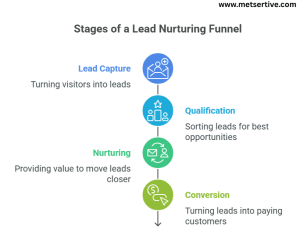
Core Stages of a Lead Nurturing Funnel

A lead nurturing funnel isn’t a one-email wonder. It’s a structured journey guiding your leads toward readiness without pressure. A nurturing funnel should be designed to convert marketing leads into sales qualified leads, ready for your sales team

stages of a lead nurturing funnel

Here’s how to break it down:

1️. Lead Capture

What it is: The moment you turn a visitor into a lead.

How:

  • Lead magnets (eBooks, checklists)
  • Webinar signups
  • Free trials
  • Newsletter opt-ins

Scenario:
A marketing consultant offers a “10-Step LinkedIn Content Checklist” in exchange for email addresses, turning visitors into warm leads.

Tip: Keep forms simple. More fields = fewer signups.

2️. Qualification

What it is: Sorting leads to focus on the best opportunities. Before nurturing leads, implementing a lead qualification process ensures you focus on the right prospects

How:

  • Use lead scoring to track behavior (opens, clicks, visits).
  • Segment based on interests or industry.

Scenario:
A SaaS company assigns +10 points when a lead visits the pricing page and +20 when they attend a webinar, indicating high interest.

Tip: Use CRM tools like HubSpot or Zoho to automate scoring

3️. Nurturing

What it is: Consistently providing value to move leads closer to a decision.

How:

  • Email drip campaigns with education and social proof.
  • Retargeting ads to re-engage website visitors.
  • Social media touchpoints.

Scenario:
An HR software sends a 5-email drip campaign post-webinar:

  1. Thank you + webinar replay
  2. Related blog/resource
  3. Customer success story
  4. Overcoming a common objection
  5. Invite to book a call

Tip: Don’t rush to sell. Educate first, then offer solutions.

4️. Conversion

What it is: Turning leads into paying customers.

How:

  • Personalized demo invites
  • Free trial upgrades
  • Consultation calls
  • Clear CTAs on emails and landing pages

Scenario:
After nurturing, a lead books a call through a personalized invite that says, “Let’s map out your HR automation plan.”

 Tip: Add a time-limited incentive (e.g., “Get your first month free if you book this week”) to encourage action.

Recap:

Your funnel stages should flow:
Lead Capture → Qualification → Nurturing → Conversion

When built intentionally, this funnel moves leads from “just curious” to “ready to buy” systematically.

Crafting Content for Each Funnel Stage

Now that you know the funnel structure, it’s time to feed it with the right content at each stage. Customer journey mapping allows you to align your funnel stages with your leads’ actual needs and questions at each step.”

1. Awareness (Top of Funnel)

Goal: Attract and educate.

Content:

  • Blog posts
  • Social media content
  • Infographics
  • Educational videos

Example:
A B2B SaaS company writes a blog, “5 Signs You Need Automated HR Processes,” to attract HR managers.

Tip: Add CTAs like “Download our HR Automation Checklist” to capture leads.

2. Interest (Mid Funnel)

Goal: Deepen engagement.

Content:

  • Lead magnets (guides, checklists)
  • Webinars
  • Quizzes

Example:
A quiz, “How Efficient Is Your Hiring Process?”, collects emails while providing value.

Tip: Use quizzes to segment leads based on their needs automatically.

3. Consideration (Lower Mid Funnel)

Goal: Build trust and address objections.

Content:

  • Case studies
  • Testimonials
  • Comparison guides
  • Email drips with social proof

Example:
A SaaS sends an email with a mini-case study: “How Company X Reduced Turnover by 32% Using Our Software.”

Tip: Use client logos and testimonials in retargeting ads for credibility.

4. Decision (Bottom of Funnel)

Goal: Prompt action.

Content:

  • Free trials
  • Demo offers
  • Consultations
  • Time-sensitive offers

Example:
An HR tool sends a “Your Personalized Demo Awaits” email with a one-click booking link.

Tip: Use urgency carefully—pair it with value, not pressure.

Crafting the best email sequences for lead nurturing involves understanding your audience’s pain points and aligning content with funnel stages.

Putting It All Together:

Scenario:
1. A lead reads your blog → downloads your HR checklist (Awareness → Interest).
2. They receive a 5-part drip sequence with case studies and resources (Consideration).
3.  They are invited to a free demo with a personalized CTA (Decision).
4.  They convert and enter your customer onboarding flow.

Next Up:

You now know how to structure your lead nurturing funnel and feed it with content that matches your buyer’s journey.

Next, we will cover the best tools to automate your funnel so you can scale without dropping the ball.

Tools to Automate and Manage Your Lead Nurturing Funnel

Building a lead nurturing funnel is one thing. Running it manually? Impossible as you scale.

That’s where automation tools come in—Automated lead nurturing workflows save you time, maintain consistency, and ensure leads don’t slip through the cracks.

Here’s what you need in your tech stack:

1. CRM Platforms

Your CRM (Customer Relationship Management) tool is the brain of your funnel. It tracks leads, segments them, scores them, and aligns your sales and marketing teams. CRM lead tracking is critical for monitoring where each lead is within your funnel and tailoring your nurturing efforts.”

Examples:

  • HubSpot: User-friendly, great for SMEs, integrates email, forms, and landing pages.
  • Zoho CRM: Affordable, customizable, solid for small businesses.
  • Salesforce: Best for advanced customization and larger teams.

Scenario:
A B2B SaaS uses HubSpot to automatically move leads who download a guide into a mid-funnel nurturing drip, while notifying sales when they visit the pricing page.

Tip: Use CRM tags to segment leads by funnel stage automatically.

2. Email Marketing Automation

Email is still your lead nurturing backbone. Use automation to send drip email sequences, segment lists, and personalize communication at scale. Well-timed drip email campaigns are the backbone of a high-converting lead nurturing funnel. Automated email follow-ups ensure your leads receive consistent value while freeing up your time.”

Examples:

  • ActiveCampaign: Powerful automation workflows with CRM and lead scoring.
  • Mailchimp: Great for simpler drips and broadcast emails.
  • ConvertKit: Ideal for creators and coaches.

Scenario:
After a lead attends a webinar, ActiveCampaign sends a 5-part email series with case studies and a CTA to book a demo.

Tip: Use personalized subject lines (“Hey Sam, ready to simplify HR?”) to boost open rates.

3. Lead Scoring & Behavioral Tracking

Assign points for actions like:
+10 for webinar signup
+20 for pricing page visit
-5 for inactivity

This helps you prioritize hot leads and trigger workflows when leads are ready.

Tools: HubSpot, ActiveCampaign, Zoho CRM.

Scenario:
When a lead hits 50 points, your system automatically notifies sales to follow up with a personalized invite.

 Tip: Review your scoring every 6 months to match current lead behavior.

4. Retargeting Platforms

Retargeting keeps your brand top-of-mind by showing ads to leads who’ve visited your site but haven’t converted.

Platforms: Google Ads, Facebook/Instagram Ads, LinkedIn Ads.

Scenario:
An e-commerce brand uses Facebook retargeting ads to offer a 10% discount to visitors who abandoned their cart.

Tip: Use testimonial or product demo video ads for warm retargeting audiences.

5. Chatbots & Conversational Tools

AI chatbots can answer FAQs, qualify leads, and book calls while you sleep.

Examples: Drift, Intercom, ManyChat.

Scenario:
A chatbot on your demo page asks, “Want to see how this works for your business?” and books a calendar slot directly.

Tip: Combine chatbots with human handoff for complex queries.

Summary:

To automate your funnel:
1. Use a CRM as your central hub.
2.  Automate email nurturing and behavioral tracking.
3.  Retarget non-converting leads.
4.  Use chatbots for real-time engagement.

Start simple—layer in tools as your funnel scales.

Measuring Funnel Performance

If you can’t measure it, you can’t improve it.

Tracking key metrics will help you see where leads drop off, what’s working, and how to refine your funnel for more conversions.

Here’s what to track:

 1. Email Metrics

  • Open Rates: Are your subject lines grabbing attention?
  • Click-Through Rates (CTR): Is your content engaging?
  • Reply Rates: Are leads interacting?

Scenario:
Your welcome email has a 55% open rate but a 2% CTR. Test a new CTA or reposition your offer to increase clicks.

Tip: A/B test subject lines with and without personalization.

 2. Conversion Metrics

  • Lead-to-customer conversion rates.
  • Time taken from lead capture to conversion (sales cycle length).
  • Funnel drop-off points.

Scenario:
You notice leads drop after email 3 in your drip. Refine that email with a customer story or clearer CTA.

Tip: Use Google Analytics or your CRM’s funnel reports to visualize where drop-offs occur.

3. Lead Score Movements

Track how leads progress through your scoring system. Are they engaging, or going cold? Using lead scoring in your lead nurturing funnel helps prioritize hot leads and improves conversion rates.

Scenario:
A lead’s score increases rapidly after a webinar and pricing page visit—automatically trigger a sales follow-up.

 Tip: Use lead decay to subtract points for inactivity, keeping your pipeline clean.

 4. Retargeting & Ad Metrics

  • CTR on retargeting ads.
  • Conversion rate from retargeting campaigns.
  • Cost per conversion.

Scenario:
Retargeting testimonial video ads have a 2.4x higher ROAS than static ads—scale what works.

How to Use These Metrics:

1. Identify which stage of your funnel needs attention.
2. Test and tweak emails, CTAs, or ad creatives.
3.  Prioritize hot leads for personalized outreach.

Recap:

  • Your funnel isn’t “set and forget.”
  • Measure consistently to optimize performance.
  • Small tweaks compound into big conversion lifts.

Integrating your lead nurturing funnel with your sales pipeline management ensures that leads transition seamlessly from interest to purchase. Regular marketing funnel optimization helps you improve conversion rates and reduce lead drop-offs.

Next:

Now that you know how to automate and measure your lead nurturing funnel, we’ll dive into:

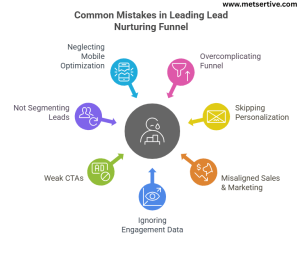
Common Mistakes to Avoid in Your Lead Nurturing Funnel

Even the best-intentioned funnels can leak leads if you’re not careful. Here are the most common pitfalls to watch for—and how to fix them.

Mistakes in Lead Nurturing Funnel

Mistake 1: Overcomplicating the Funnel

If your funnel has 15 emails, 6 retargeting stages, and 10 lead score triggers… you’re likely confusing your audience and yourself.

Scenario:
A coaching business had a 12-email drip but only 2 emails were consistently getting replies.

Fix:
Start simple: 3–5 core emails, clear CTAs, and retargeting only for warm leads.

Tip: You can always layer complexity later—simplicity scales.

Mistake 2: Skipping Personalization

Sending generic emails like “Hi there, check out our product” will get you ignored.

Scenario:
A SaaS company improved its open rates by 28% simply by adding “Hi [First Name]” and tailoring content based on lead behavior.

Fix:
Use merge tags, segmentation, and behavior-based triggers to personalize.

Mistake 3: Misaligned Sales & Marketing

If marketing is nurturing one way while sales is pitching another, you’re sending mixed signals.

Scenario:
A lead receives nurturing emails focusing on education, then a sales rep cold calls with aggressive closing lines.

Fix:
Have a shared lead scoring system and regular meetings between sales and marketing teams to align messaging.

Mistake 4: Ignoring Engagement Data

If you’re not checking open rates, CTRs, or drop-offs, you’re flying blind.

Scenario:
An e-commerce brand kept sending promo emails to leads who never opened them, damaging deliverability.

Fix:
Clean your list regularly and adjust content based on what your audience engages with.

Mistake 5: Using Weak or Vague CTAs

Saying “Learn More” everywhere won’t move leads forward.

Scenario:
A consulting firm switched from “Learn More” to “Book Your Free Strategy Session” and saw a 32% increase in conversions.

Fix:
Make CTAs specific, clear, and aligned with the funnel stage.

Mistake 6: Not Segmenting Leads

Sending the same content to cold leads and warm leads will lower engagement.

Scenario:
A SaaS was sending trial extension offers to leads who had never signed up for a trial.

Fix:
Segment based on actions (e.g., content download, demo request) to tailor messaging.

Mistake 7: Neglecting Mobile Optimization

Half of your leads open emails on mobile. If your emails aren’t mobile-friendly, you’re losing them.

Scenario:
A lead clicks your email on mobile, but the landing page is cluttered, causing them to drop off.

Fix:
Test your funnel on mobile devices and simplify designs for easy reading and CTA clicks.

Recap:

Avoid these pitfalls, and your lead nurturing funnel will work with you, not against you.

  1. Keep it simple
  2. Personalize
  3. Align sales and marketing
  4. Track and optimize
  5. Use clear CTAs
  6. Segment
  7. Optimize for mobile

Real-World Examples of Lead Nurturing Funnels That Convert

Nothing beats seeing how a lead nurturing funnel works in practice.

Here are lead nurturing funnel examples for small businesses you can model to generate conversions efficiently:

Example 1: B2B SaaS – Webinar to Demo Funnel

Business: A HR SaaS platform.
Goal: Convert webinar signups into demo bookings.

Workflow:
1. Lead attends webinar (Lead Capture).
2. Automated thank-you email with replay (Nurturing).
3. Follow-up email with customer case study (Nurturing).
4. Personalized demo invite email (Conversion).
5. Retargeting ad to warm leads with testimonial video.

Result: 47% increase in demo bookings within 2 months.

Takeaway: Combine education (webinars) with post-event nurturing and clear CTAs.

Example 2: E-commerce – Cart Abandonment Funnel

Business: An online sustainable fashion store.
Goal: Recover abandoned carts.

Workflow:
1. Cart abandonment detected (Lead Capture).
2.  SMS reminder 30 minutes later (Nurturing).
3. Email with “You left these behind” + social proof (Nurturing).
4. Retargeting ad offering 10% off for 48 hours (Conversion).

Result: 21% cart recovery rate increase.

Takeaway: Use multi-channel, time-sensitive touchpoints to reclaim lost revenue.

Example 3: Coaching Service – Free Resource to Strategy Call Funnel

Business: A business coach.
Goal: Turn freebie downloads into paid coaching calls.

Workflow:
1. Visitor downloads “10-Step LinkedIn Content Checklist” (Lead Capture).
2. Welcome email with checklist and quick tip video (Nurturing).
3. Email sharing a client success story (Nurturing).
4. Email with a CTA to book a free strategy session (Conversion).
5. Reminder SMS a day before the booked call.

Result: 37% lead-to-call conversion rate.

Takeaway: Free resources paired with storytelling and clear CTAs warm leads effectively.

Pro Tips for Implementing Your Funnel:

1.Map your funnel on a whiteboard before building it.
2. Start small—add complexity as you see results.
3. Use tools like HubSpot or ActiveCampaign to automate steps.
4. Test one funnel at a time to refine before scaling.

Conclusion:

A lead nurturing funnel is your ticket to predictable, scalable growth. By aligning your content, channels, and tools, you convert warm leads without being pushy.

Start with:

  1. Simple funnel stages
  2. Personalized, relevant content
  3. Automation tools to save time
  4. Tracking and refining consistently

Your lead nurturing funnel is a key part of your overall customer conversion funnel, ensuring prospects transition seamlessly to becoming customers. When you’re ready to deepen your nurturing strategy, explore our Nurturing Lead: The Complete Guide and related advanced cluster pieces to build a system that keeps working while you sleep.

Social Proof in Lead Nurturing to Turn Skeptics into Customers

Ever found yourself double-checking a purchase because others loved it too? That’s social proof in action—a powerful psychological phenomenon rooted in what behavioral scientists call herd behavior or authority bias . When we see real people (not brands) vouching for something, it instantly boosts our trust.

For SMEs and B2B brands, social proof is a lead nurturing superpower. It bridges that gap when prospects say, “I like what I see—but I need confidence before I commit.” Whether they’re early in the funnel or just at the decision phase, strategically placed testimonials, case studies, or even influencer shout-outs can make all the difference. Social proof is one of the most powerful psychological triggers in marketing, driven by how we trust the actions of others—especially when we’re unsure ourselves.

In this guide, we’ll explore:

  • The six types of social proof that truly convert
  • How to use each at key funnel stages
  • Real-world case studies and plug-and-play examples

By the end, you’ll know exactly how to sprinkle trust into your campaigns—without spending a penny on ads.

Why Social Proof Matters in Lead Nurturing

Trust is the foundation of conversion

Most people won’t buy from someone they don’t trust. Adding even a testimonial or review can drastically increase confidence in your brand. After all, hearing “It helped us grow by 30%” from another CEO feels a lot stronger than any claim you might make yourself. According to recent social proof statistics, 92% of customers trust peer recommendations over branded content—making reviews and case studies essential to your nurture strategy.

Credibility needs to build at every stage

From top-of-funnel awareness emails to bottom-of-funnel pricing pages, each touchpoint should subtly reassure prospects that others have walked this path—and succeeded.

  • Awareness: Share an influencer quote (“This approach changed how we market”).
  • Consideration: Feature a mini case study showcasing ROI.
  • Decision: Add customer logos or star ratings right next to the sign-up button.

Peer-generated beats brand-created—every time

Humans trust humans. In fact, 92% of consumers around the globe say they trust recommendations from friends or strangers more than branded messages  That’s why user-generated content—like a quick video testimonial—will almost always outperform a glossy brochure or hero banner.

Smart Tip:

Mix formats: combine reviews, video quotes, and certifications to maximize credibility and resonate with different audiences. A written testimonial backed by stats feels both authentic and authoritative.

6 Types of Social Proof That Convert


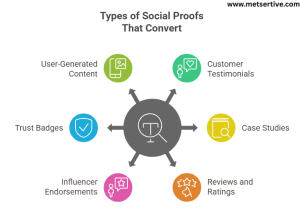
Types of social proof that convert

  1. Customer Testimonials

What it is: Short quotes from satisfied clients highlighting real results.
Funnel stage: MOFU (Middle of Funnel) – ideal for nurturing and trust-building.
Example: “We increased our demo bookings by 40% thanks to this tool.”
Visual tip: Add a headshot + name + company under each testimonial for authenticity.

If you’re wondering how to use testimonials to increase conversions, place them strategically on pricing pages or within email campaigns to reinforce decision-making

  1. Case Studies

What it is: In-depth stories showing the problem, solution, and outcome.
Funnel stage: BOFU (Bottom of Funnel) – perfect for prospects comparing options.
Example: A B2B SaaS case study demonstrating how a client cut onboarding time by 50%.
Visual tip: Use before-and-after stats in a simple graphic or timeline.

  1. Reviews and Ratings

What it is: Star ratings and user reviews on public platforms.
Funnel stage: BOFU – adds last-minute trust before purchase.
Example: “4.7 ★ average rating from 120+ customers on Trustpilot.”
Tip: Display ratings near key CTAs, like a pricing page or signup form.

  1. Influencer or Expert Endorsements

What it is: Validation from industry experts or niche influencers.
Funnel stage: TOFU/MOFU – builds authority early in the journey.
Example: “Top marketer Jane Doe calls it ‘a must-have for growing SMBs.’”
Tip: Use quotes from micro-influencers—they drive 60% more engagement than big names

  1. Trust Badges and Certifications

What it is: Industry verification marks or award badges.
Funnel stage: MOFU/BOFU – assures prospects that you’re legitimate.
Example: “Hosted on AWS. ISO 27001 compliant.”
Tip: Show them near forms and pricing tables to reduce friction.

  1. User-Generated Content (UGC)

What it is: Real photos, video demos, or social posts from customers.
Funnel stage: TOFU/BOFU – especially powerful for ecommerce and visual products.
Example: Customers’ Instagram posts tagged with your brand hashtag.
Why it works: 92% of consumers trust UGC more than branded content .
Visual tip: Create a “Shop the look” gallery using UGC on your website.

Real-World Case Studies That Got Results

Case Study 1: B2B SaaS – Testimonials Boost Email Conversions

Problem: Low conversion rates from nurture emails.
Social Proof Used: Customer testimonials added to email bodies.
Result: 23% increase in click-through rate and demo signups.
Takeaway: Even a short, relatable quote in an email can significantly improve conversions.

Case Study 2: Ecommerce – Reviews in Retargeting Ads

Problem: High abandonment cart rates.
Social Proof Used: Customer reviews featured in retargeting ads.
Result: 2.4× higher ROAS compared to generic ads .
Takeaway: Social proof in ads nudges hesitant buyers toward action—especially when tied to offers.

Case Study 3: Coaching Service – Social Shares + LinkedIn

Problem: Long sales cycles with low follow-ups.
Social Proof Used: Weekly student success stories on social media + LinkedIn recommendations.
Result: Sales cycle shortened by 60% and inbound leads increased significantly.
Takeaway: Sharing real-world success stories across platforms builds momentum—and trust.

Quick Takeaway:
Mixing and matching different types of social proof—visible at the right stages—helps guide prospects from “just browsing” to “where do I sign?” Let me know if you want visuals or templates for testimonials, case studies, or UGC galleries!

Case Study 4: Health & Wellness Clinic – Social Media Reach and Brand Trust

Problem:
A local IV hydration clinic needed a stronger online presence after in-person visits dropped significantly during the pandemic.

Social Proof Used:
They showcased customer testimonials and before/after stories through Facebook and Instagram ads, paired with an influencer shout-out from a local wellness guru. This social proof circulated widely across platforms.

Result:
Within two years, the clinic’s sales tripled, with over 1 million ad impressions and nearly 292,000 users reached in a single month. The campaign delivered an exceptional 1,039% ROI

Takeaway:
Well-executed UGC combined with credible influencer endorsement doesn’t just raise awareness—it massively drives conversions.

Case Study 5: Fitness Subscription Box (E-commerce) – UGC and Ratings Boost AOV

Problem:
A subscription-based fitness product company needed to improve credibility and increase average order value.

Social Proof Used:
They redesigned product pages to highlight star ratings, user photos, testimonials, and an Instagram “real customer” gallery.

Result:
Product page conversions jumped by 148.3% after featuring review badges and UGC prominently.

Takeaway:
Even simple visual updates that emphasize UGC and star ratings can dramatically improve purchase decisions and revenue per visitor.

Case Study 6: Legal Services – Interactive Chatbot with Trust Signals

Problem:
A small law firm struggled with low lead engagement and high website bounce rates.

Social Proof Used:
They integrated an interactive video chatbot on their homepage that featured client success stories, case summaries, and video testimonials highlighting satisfied clients .

Result:
Their user engagement rates soared—more visitors stayed on the site, engaged with the chatbot, and more leads converted into consultations.

Takeaway:
Combining real-time interaction with trust-building content establishes credibility instantly—ideal for professional services.

Where to Use Social Proof in Your Lead Nurturing Funnel

Here’s where to sprinkle social proof so it packs maximum punch in your funnel:


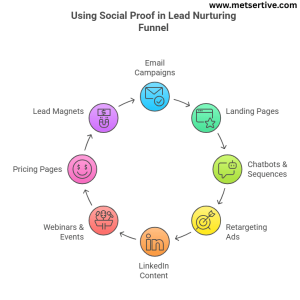
Whee to use social proof in lead nurturing funnel

  1. Email Campaigns

  • Where: Place testimonial banners or mini-case snippets mid-email or near CTAs.
  • Why it works: A quick perspective like “Our demo-to-conversion time improved by 30% thanks to this” adds real-world credibility.
  • Tip: Try A/B testing subject lines or email copy using your reviews—emails with quotes often get 20–30% higher CTR.
  1. Landing Pages (Pricing or Demo)

  • Where: Right next to ‘Get Started’ or ‘Book a Demo’ buttons—customer testimonials, star ratings, or trust logos.
  • Why it works: Prospects see proof just when they’re about to act—and trust seals the deal.
  1. Chatbots & Automated Sequences

  • Where: In conversation flows: “Client X saw results in 7 days.”
  • Why it works: As prospects chat, real stories reinforce trust in real time—no human needed.

Social proof acts as one of the most important trust signals for lead generation, especially when embedded into chatbots or retargeting      ads.

  1. Retargeting Ads & Paid Social

  • Where: Feature image of a happy customer, review quote, or before/after screenshot.
  • Why it works: Adding social proof in an ad makes it pop compared to generic brand messages.
  • Tip: Use dynamic ads showing different reviews tailored to products a visitor browsed.
  1. LinkedIn Content & DMs

  • Where: Include success stories in posts or one-to-one LinkedIn messages—like “XYZ achieved a 40% faster pipeline using this method.”
  • Why it works: Social proof shines bright in a professional network and feels less salesy.
  1. Webinars and Live Events

Where: During registration pages, in-event slides, and follow-up emails after webinars or live workshops.

Why it works: People are more likely to sign up or engage during live sessions when they see others have benefited. Including a testimonial like “This workshop helped us double our qualified leads” reduces skepticism and increases attendance and post-event conversions.

Tips:

  • Add 1–2 testimonials on the registration page near the CTA button.
  • Use a customer quote on your opening slide for credibility.
  • Post-event, include a mini case study in your thank-you email with the replay link.
  1. Pricing and Comparison Pages

Where: On your pricing page or “compare plans” page, next to feature tables or CTA buttons.

Why it works: Leads on pricing pages are evaluating purchase decisions. Seeing a relatable testimonial or result here builds trust at the decision point, easing concerns about cost and ROI.

Tips:

  • Use trust badges or short quotes like “Paid for itself in 2 months.”
  • Place testimonials from customers who chose a higher-tier plan to nudge up-sells.
  • A/B test testimonial placement to find the highest-impact spots.
  1. Lead Magnets and Download Pages

Where: On opt-in forms for guides, checklists, or free tools, and on the thank-you/download confirmation page.

Why it works: Social proof here reassures leads that the resource is valuable and worth exchanging their email for, reducing friction in list building.

Tips:

  • Use quotes like “This checklist saved us 10 hours in setup time” near download CTAs.
  • Add a mini case study on the thank-you page encouraging the next step, like booking a demo.
  • Combine social proof with urgency, e.g., “Join 5,000+ marketers who’ve used this to boost conversions.”

Adding genuine testimonials and case studies across your funnel helps you build trust with potential customers—especially when they’re still weighing their options.

How to Collect and Use Social Proof the Right Way

  1. Ask Post-Purchase or Post-Onboarding

Scenario: A SaaS company sends new customers a short email two weeks after activation:

“How’s it going? Mind sharing one thing you love so far?”

Insight: Within a month, they collect dozens of fresh quotes. One email quote—“It cut our customer follow‑up time in half”—gets featured in nurture emails and boosts demo bookings.

  1. Use Video Testimonials When Possible

Scenario: A marketing agency scheduled 15‑minute Zoom interviews with happy clients.

Example: These were edited into 45-second clips: “Thanks to them, we doubled our engagement.”

Insight: These clips were mashed into landing pages, email campaigns, and social stories—resulting in a 28% increase in conversion rate.

  1. Turn Survey Feedback into Quote Graphics

Scenario: After an e‑commerce workshop, participants are asked:

“What was your biggest win from the session?”
Responses like “We hit our first 4-figure week!” were turned into branded image cards.

Insight: Shared on LinkedIn, these visuals lifted post engagement by 5× and drove subscribers to sign up for the next session.

  1. Use the Right Tools

Scenario: A software startup implemented:

  • Endorsal to collect text + video testimonials
  • VideoAsk to prompt two-question video responses
  • Hotjar to capture heatmaps that added to qualitative feedback

Insight: They embedded these assets in onboarding sequences and saw a 15% drop in trial abandonment and a 12% bump in plan upgrades.

  1. Get Permissions & Stay Compliant

Scenario: A B2B consultant firm sends a gentle follow-up form asking:

“Can we share your success story? We’ll send over a draft before posting!”
Many clients happily agree, and it ensures GDPR compliance.

Insight: This transparency builds trust—not just with customers, but also with their legal teams—while keeping the firm protected and credible.

These real-world examples show how and where to get and use social proof smartly—so your collateral and campaigns stay authentic, compliant, and irresistibly persuasive. One of the most compelling ways to market your solution is by marketing with real customer stories that speak directly to your target audience’s pain points.

Common Mistakes to Avoid

Even the best social proof can misfire if used badly. Here’s what to skip to keep your systems sharp and effective:

  1. Using Outdated or Irrelevant Testimonials

What usually happens: You pop a 5-year-old quote under your latest email—hits like a ghost.
Why it hurts: People want to see recent relevancy, especially in fast-moving industries.
Fix: Refresh testimonials every 6–12 months or remove them if they no longer speak to what you offer now.

  1. Placing Proof in the Wrong Funnel Stage

What usually happens: You include a long case study in awareness emails.
Why it hurts: Early-stage leads aren’t ready for heavy details—they just need a reason to keep reading.
Fix:

  • Top of funnel? Use a quick stats snippet or influencer endorsement.
  • Bottom of funnel? Drop in full case studies near CTAs.
  1. Overusing Superlatives Without Specificity

What usually happens: Your site claims “best product ever”—but why?
Why it hurts: Clichés feel salesy and untrustworthy.
Fix:

  • Swap “best in the market” for “boosted our email opens by 32%”.
  • Use specific numbers, contexts, and even a story line.
  1. Ignoring Visual Formatting (Walls of Text = No Go)

What usually happens: You paste twenty testimonials back-to-back with no images or design.
Why it hurts: People scroll past blocks of text—they don’t read them.

Fix:

  • Break quotes into cards or quote bubbles
  • Use customer headshots or avatars
  • Keep each testimonial short—2–3 sentences max
  1. Using Proof Without Context

What happens: You drop a great testimonial… but it’s unclear what service or result it relates to.

Why it hurts: Prospects are left guessing: “Is this about the product I’m considering? How does it help me?”

Fix: Always include context: who the customer is, what they used, and what changed.

Example: Instead of just “Great results,” go for: “In just 3 weeks, our onboarding process was cut in half using [Tool Name].”

  1. Forgetting to Localize or Personalize

  • What happens: You show U.S.-based testimonials to your global audience or enterprise case studies to startups.

Why it hurts: Audiences tune out when they don’t see themselves in the message.

Fix: Segment proof by region, industry, or company size—and serve the right one at the right time.

Example: A lead from Australia sees proof from a fellow Aussie SME. That relatability increases trust tenfold.

  1.  Hiding Social Proof Below the Fold

What happens: Your best testimonials are buried at the bottom of your site or email.

Why it hurts: People may never scroll far enough to see them.

Fix: Bring your strongest proof higher—above the fold, near your CTA, or even in subject lines.

Example: Move a top quote from your case study footer into the email header or landing page hero for instant credibility.

Conclusion

Social proof isn’t optional—it’s essential.
When used correctly, it builds trust, adds authority, and shortens your sales cycle. The right testimonial at the right time makes someone say, “Hey, I can see myself doing that too.”

When used wisely, social proof becomes a cornerstone of B2B lead nurturing best practices, helping you build authority, reduce friction, and guide leads down the funnel. The right type of social proof, presented at the right stage, not only converts but helps you convert leads into loyal customers who champion your brand.

Want to go deeper? Check out our flagship “Nurturing Lead” guide and explore other helpful reads in the series, like:


The Ultimate Guide to Multi Channel Lead Nurturing

In today’s digital world, one touchpoint is rarely enough to win a customer. That’s why multi‑channel lead nurturing—engaging prospects across email, SMS, social media, retargeting ads, and live chat—has become essential for growing businesses.

Why does it matter for SMEs? Because it extends your reach, boosts engagement, and shortens the sales cycle. In fact, companies using 4 or more digital channels outperform single (or dual) channel users by a whopping 300% in conversions. That’s not theoretical—it’s real impact. In this guide, we’ll walk you through how to run an omnichannel lead nurturing campaign for SMEs, so you can reach prospects across email, SMS, retargeting ads, and more

This guide will unpack:

  • Why multi‑channel beats single‑channel nurturing
  • A breakdown of each core channel with proven tactics
  • How to integrate them seamlessly
  • Tech tools that tie it all together
  • And how to track performance like an analytics pro

Why Multi‑Channel Trumps Single‑Channel

Multi-channel lead nurturing is a key part of customer lifecycle marketing, ensuring you’re engaging leads not just once but at every critical stage of their buying journey

  1. Single Channels Create Gaps

Let’s face it—your audience doesn’t live in just one place. Sticking to a single channel (like email) often means missing people who simply don’t check their inboxes as often.

Example: A SaaS company sent out a free trial expiration reminder only via email—and saw minimal conversions. When they followed up with a LinkedIn DM and a retargeting ad, demo bookings jumped by 40% in just one week. One message, delivered differently, made all the difference.

  1. Avoid Message Fatigue

Hammering the same inbox over and over again doesn’t build trust—it builds friction. But spreading your outreach across multiple channels lets you stay visible without being repetitive.

Example: A small marketing agency switched from sending five email reminders about a webinar to using a mix of email, SMS, and Facebook reminders. Webinar attendance increased by 26%, and fewer people unsubscribed from their list.

Tip: Think of this like a conversation. You wouldn’t shout the same thing into someone’s ear 5 times. But if you gently mention it across different touchpoints, it feels natural.

  1. More Touchpoints = More Trust

People rarely convert after just one interaction. Multi-channel nurturing gives you more opportunities to build credibility through helpful, timely messages on the platforms your leads already use.

Example: A fitness brand used a mix of Instagram Reels, email drip series, and SMS tips to nurture leads who downloaded their free workout guide. Those exposed to all three channels were 2.3x more likely to buy a subscription than those who only got emails.

  1. Cater to Audience Preferences

Some people love LinkedIn messages. Others scroll Instagram between meetings. Multi-channel nurturing lets you respect user behavior and meet them where they’re most active.

Example: A B2B HR software company noticed Gen Z prospects were ghosting emails but responding quickly to Instagram Stories and live chat widgets. They adjusted their nurturing strategy accordingly—and reactivated 20% of “cold” leads.

  1. Better Lead Qualification

When a lead interacts across multiple touchpoints, they’re telling you something: they’re interested. Tracking this multi-channel behavior helps you identify and prioritize high-intent leads.

Example: An eCommerce tool tracked a user who opened an email, visited the pricing page via a Google ad, then chatted with support via live chat. That multi-channel engagement triggered a sales team handoff—and the lead converted within 48 hours.

Tip: Use scoring tools to assign higher value to leads engaging on more than one channel—they’re closer to buying than someone who just clicked once.

Core Channels Explained

A multi-channel strategy means meeting your audience wherever they are—email, SMS, social media, ads, or chat—and making each channel work together seamlessly.

1. Email

Still the backbone of Java nurturing.

  • Why it works: Ideal for drip sequences, longer content, drip nurturing, and education.
  • Example: Send a series explaining product features or signing up leads with educational content over 7 days.
  • Tip: Always include a clear CTA like “Start your free trial” or “Book a demo.”

Each channel plays a unique role at different lead nurturing funnel stages—email for education, retargeting for re-engagement, and chat for instant qualification.”

2. SMS

Fast, direct, and urgent.

  • Why it works: With a 98% open rate and 90% read within 3 minutes, SMS can quickly recapture attention
  • Example: “Forgot something? Your cart is waiting—here’s 10% off if you check out in the next hour.”
  • Tip: Send SMS reminders 30 minutes after cart abandonment, but cap frequency under two texts per week.

3. Social Media

Your thought leadership spotlight.

  • Why it works: Great for visibility, community building, and informal outreach.
  • Example: After a webinar, run an Instagram Stories poll about business challenges.
  • Tip: Promote key emails or offers through regular social media shares or posts.

4. Retargeting Ads

Visual reminders that stick.

  • Why it works: Ad retargeting flies with low-cost clicks—often 10x more effective than display noise
  • Example: Show a testimonial video ad to users who abandoned cart—but keep it light so it doesn’t feel creepy.
  • Tip: Allocate 10‑40% of ad spend to retargeting for better ROI

5. Chatbots & Live Chat

Real-time help, in the moment.

  • Why it works: People love instant answers. Chat shaves downtime and improves lead qualification.
  • Example: If someone visits your pricing page twice, trigger a chatbot: “Need help picking a plan?”
  • Tip: Combine a bot with human handoffs for warm leads—never leave them hanging.

How to Connect Channels Seamlessly

The real magic lies in coordinating channels, not just adding them.

 1. Use a Central CRM Hub

Platforms like HubSpot or ActiveCampaign let you orchestrate email, SMS, chat, and ads from one dashboard.

2. Trigger Smart, Not Spammy

Set up behavior-based sequences. For example:

  1. Lead opens email → then chatbot follows up
  2. If chatbot visits but doesn’t convert → send SMS 1 day later

3. Sequence Logic That Works

Create flows like:
Email → SMS Reminder → LinkedIn InMail
But avoid blasting all channels at once.

4. Avoid Channel Overlap Fatigue

  • Don’t stress leads with an email, SMS, and ad on the same day.
  • Use tone to match channel: casual in chat, professional in email.

Smart flows use behavior‑based triggers for email and SMS, like sending a cart‑recovery text when someone leaves items in their basket.”

Quick Integration Tips:

  • Email & SMS: Use both for critical reminders (trial expiration, cart recovery).
  • Ads: Target retargeting ads only after email failure.
  • Chat: Automate responses but let reps take over on complex questions.

By harnessing each channel for its strengths—and guiding communication through smart triggers—you build a nurturing engine that feels human, timely, and effective.

How to Segment Leads Effectively Across Multiple Channels

Different people prefer different ways of hearing from you. Smart segmentation ensures your messages hit the right inbox—or screen—at the right time with the right tone.

how to Segment Leads Across Channels

  1. Map Personas to Channels

Some leads respond best to one channel over another.

  • Example: Busy executives might ignore emails but pay attention to LinkedIn InMail, while younger buyers may reply through chat on your website.
  • Tip: Tag contacts with channel preference and track where they engage most.

     2. Segment by Data

Break your audience into thoughtful groups for smarter targeting:

  • Demographic: Job title, company size
  • Behavioral triggers: What they downloaded, pages viewed
  • Past interactions: Webinar attendance, demo requests

Example: Leads who clicked case studies but didn’t book a call get a special email + social ad.

  1. Use Content Readiness Markers

Gauge where people are in the funnel—who’s warming up, close to buying, or just browsing.

  • Light engagement: Opened emails or downloaded a freebie
  • Medium engagement: Watched webinars or interacted on chat
  • Heavy engagement: Asked for demo, visited pricing often

Tip: Tailor channel use to readiness:

  • Light -> Email drip
  • Medium -> Add SMS reminders or chatbot messages
  • Heavy -> Trigger a sales call or invite to join a paid webinar

     4️. Dynamic Preference Tags

What to do: Let your audience choose their preferred communication channel.

Scenario: After signing up, ask leads “How do you prefer to hear from us?” with options like Email, SMS, or LinkedIn DM.

Tip: Store this as a contact tag so future messages align with their preference—no one feels ignored or overwhelmed.

    5️. Engagement-Based Retargeting Groups

What to do: Create groups based on specific website behaviors.

Example: Leads who clicked on a pricing page belong to the “Pricing Interest” segment. These people get targeted LinkedIn InMails or retargeting ads with pricing comparisons or case studies.

Tip: Regularly update segments so new visitors get added automatically and obsolete ones don’t linger.

     6️. Recency and Frequency Filters

What to do: Segment by how recently and often someone engages with your content.

Scenario: A lead opened your email twice this week but only clicked once last quarter. Mark them as “Recently Active” and send them more timely or action-oriented messages.

Tip: Use your platform’s date-based filters to automatically segment them after defined thresholds (e.g., 3 opens in 7 days).

     7️. Predictive Behavioral Scoring

Going beyond demographics, behavioral segmentation helps you tailor messages based on actions like content viewed, emails opened, or links clicked.

What to do: Use your CRM’s built-in predictive scoring to surface high-intent leads across channels.

Example: A lead with a high intent score triggers a special multi-channel flow: a proactive SMS invite for a demo, an email detailing key benefits, and a LinkedIn follow-up from your sales team.

Tip: Combine predictive behavior scoring with manual rules (like lead source or job title) to avoid false positives.

Use lead qualification scoring to determine which channel is most effective for each segment—whether they’re hot leads ready for a demo or cold ones needing nurturing.

Tools & Tech Stack Recommendations

Here are the essential tools that enable true multi-channel nurturing—without breaking your budget or needing a tech team.

  1. CRM with Omnichannel Capabilities

Centralize communication:

  • HubSpot: Email, SMS add-on, chat, ads, CRM
  • ActiveCampaign: Powerful email, CRM, and behavior tracking
  • Sendinblue: Email, SMS, and chat in one platform

Tip: Choose a CRM that lets you view every lead’s touchpoints across channels.

     2. SMS Providers

Add quick hits of urgency or reminders:

  • Twilio: Developer-focused, highly customizable
  • SimpleTexting: User-friendly with pre-made templates

Tip: Stick to messaging frequency limits—no more than two texts per week.

     3. Paid Ads Platforms

Boost visibility with retargeting:

  • Google & Facebook/Instagram: Use dynamic ads for item reminders
  • LinkedIn Ads: Great for B2B offer dropoffs

Tip: Create a retargeting audience based on email or chat engagement—match channel signal to ad.

   4. Chat Tools

Capture leads and qualify instantly:

  • Drift: AI + live chat with account-based messaging options
  • Intercom: Great for SaaS support and conversational marketing

Tip: Program bots to ask quick qualifying questions before human handover.

   5. Integration Tools

Connect platforms seamlessly:

  • Zapier or Integromat: Automate actions (e.g., “If a lead books a demo in Calendly, send congrats SMS”)
  • Tip: Start simple—like adding leads to your email sequence when they fill a form—and build from there.

To tie everything together, you’ll need to invest in the best tools for multi‑channel marketing automation, like HubSpot or ActiveCampaign.

Platforms like ActiveCampaign and HubSpot aren’t just CRM solutions—they’re powerful marketing automation tools that allow you to build responsive, behavior-based campaigns.

Multi-Channel Lead Nurturing Campaign Examples

  1. Cart Abandonment Flow

Workflow:

  1. Email: “Looks like you left something behind…”
  2. 30-min later, SMS: “Use code SAVE10 to complete your purchase!”
  3. Next day, Retargeting Banner: Show product with offer reminder

KPIs to Track:

  • Email opens & CTR
  • SMS click-through rate
  • Banner ad impressions & purchase conversions

Example: A DTC brand used this combo and recovered 15% of abandoned carts—2× better than email-only reminders.

  1. SaaS Onboarding Sequence

Workflow:

  1. Email: “Welcome! Here’s how to get started in 5 min”
  2. 2 days later, LinkedIn InMail: Invite to connect and ask if they’d like a walkthrough
  3. Upon Visit to Feature Page, Chatbot Message: “Need help with this feature?”

KPIs to Track:

  • Email open and click rates
  • Replies to LinkedIn DM
  • Chatbot conversation starts
  • Feature activation and trial-to-paid conversions

Tip: This combo boosted their trial-to-paid rate by 27%.

  1. Re-Engagement Campaign

Workflow:

  1. Retargeting Ads: Show your latest product or offer
  2. Email Invite: Shared content or poll: “We miss you—what would help?”
  3. 2 hours after email, SMS: “Response didn’t go through? Quick check-in reply works too!”

KPIs to Track:

  • Ad click-throughs
  • Email open and reply rates
  • SMS responses or reactivations
  • Engagement uplift (opens, site visits, etc.)

Example: A small retailer reactivated 18% of dormant users with this flow—and without discounting.

  1. Webinar Reminder & Follow-Up

Workflow:

  • Email: “Join us tomorrow at 2 PM—don’t miss this session!”
  • SMS (1 hour before): “Our webinar starts in 1 hour—here’s your access link.”
  • LinkedIn Message (post-webinar): “Thanks for attending! Here’s the recording and slides.”

KPIs to Track:

  • Email opens and confirmations
  • SMS click-throughs to join link
  • LinkedIn message replies and follow-up engagement
  • Webinar attendance rate and post-event actions

Example: A B2B software provider achieved 30% higher webinar attendance using SMS reminders compared to email alone.

  1. Trial-to-Paid Conversion Sequence (SaaS)

Workflow:

  • Day 1: Welcome email with login and “Start here” video.
  • Day 3: In-app chatbot “How’s the trial going? Need help?”
  • Day 5: SMS “Your trial ends soon—get 20% off if you upgrade today!”
  • Day 7: Retargeting ad showing product features and pricing.

KPIs to Track:

  • Email and chatbot engagement rates
  • SMS click and conversion rates
  • Ad impressions and CTR
  • Trial-to-paid conversion percentage

Tip: Offering a time-sensitive discount via SMS often drives a spike in upgrades—short windows create urgency.

  1. New Feature Launch Outreach

Workflow:

  • Email: Announcement + “See it in action” video.
  • Social Post: Teaser demo with caption: “Watch how it transforms your workflow!”
  • Retargeting Ad: Retarget web visitors with a case study or tutorial.
  • Chatbot: “Want a deep-dive walkthrough? I can connect you to a specialist.”

KPIs to Track:

  • Email click-throughs to video
  • Social shares and post-engagement
  • Ad conversions to feature landing page
  • Chatbot conversations scheduled for demos

Example: A marketing tool’s retargeting campaign featuring their new dashboard resulted in a 50% increase in demo requests.

  1. Annual Plan Renewal Nudge

Workflow:

  • Email (30 days pre-renewal): “Your annual plan is set to renew—renew now and save!”
  • SMS (15 days pre-renewal): Reminder with direct payment link.
  • Email (7 days pre-renewal): Highlight added bonus or discount if renewed now.
  • Chatbot: Offer live chat to talk through plan benefits or upgrades.

KPIs to Track:

  • Renewal click-through and signup rates
  • SMS response and completion rates
  • Chatbot engagement and support tickets
  • Retention percentage vs prior year

Tip: Offer loyalty discounts via SMS—a quick personalization that often seals the deal on renewals.

Common Multi-Channel Pitfalls

Even the best automation can trip up—here’s what to watch for:


Common Pitfalls in Multi-channel lead nurturing

❌ Over-Messaging Without Coordination

Bombarding across channels feels spammy.

  • Tip: Use channel triggers, not duplicates. If you message via SMS, skip email the same day.

❌ Channel Cannibalization

Your own messages shouldn’t compete.

  • Tip: Stagger content. Social previews should amplify—not repeat—email content.

❌ Unconnected Reporting / Attribution

If tools don’t talk, you don’t know what works.

  • Tip: Tag everything with UTM codes and track in one dashboard or CRM.

❌ Missing Personalization Per Channel

Same message in chat, email, and LinkedIn can feel robotic.

  • Tip: Adapt tone and detail—quick update in SMS, helpful video link in email, story highlight on social.

Ignoring Channel-Specific Best Practices

Every platform has its own etiquette. What works on email may flop on LinkedIn.

  • Scenario: A SaaS company reused long-form email copy as a Facebook ad caption—result: poor engagement and wasted ad spend.
  • Tip: Tailor content format—SMS should be crisp, LinkedIn messages more personal, and emails value-packed.

❌ Delayed Follow-Ups That Miss the Moment

Timing is everything in nurturing. Waiting too long between touches can kill momentum.

  • Example: A B2B firm sent a demo replay email 5 days after the event—by then, most leads had lost interest.
  • Tip: Use automation to send reminders, thank-yous, or bonus content within 24 hours of key interactions.

❌ Failing to Test and Optimize

Set-it-and-forget-it doesn’t work with multi-channel flows. Without A/B testing, you risk guessing what works.

  • Tip: Test subject lines on email, image creatives in retargeting ads, or CTAs in SMS. Small tweaks can boost performance 2× or more.

Measurement & ROI

Tracking your multi-channel efforts—and proving their ROI—is critical. Here’s how to measure success across your campaigns: We’ll also show you how to measure ROI from multi‑channel marketing campaigns by tracking revenue per contact across your email, SMS, ad, and chat efforts.

  1. Attribution Models

Choose the right attribution model to credit where conversions are coming from:

  • First-touch: Credit the first channel (good for awareness campaigns)
  • Last-touch: Credit the channel that closed the deal
  • Multi-touch: Spread credit across multiple interactions—ideal for multi-channel flows

Example: A lead opens an email, views retargeted ads, and converts after an SMS reminder. All three contributed—consider using a multi-touch model.

   2. Metrics Across Channels

Here’s what to track for a complete performance picture:

  • Email: Open rate, CTR, reply/forward rates
  • Retargeting ads: Impressions, CTR, conversion rate (Cart recovered, trial started)
  • Chatbot/live chat: Messages started, questions answered, conversions from chat
  • SMS: Open and reply rates

Example: Your retargeting ads could get a strong CTR of 0.7%—10× more than display banners signaling strong resonance.

3. Uplift Tracking

Compare the performance of multi-channel vs single-channel campaigns:

  • Revenue per contact for multi-channel flows: total revenue / number of contacts
  • Single-channel revenue/cost ratio as baseline

Scenario: If you spend $2 in ad + email tools per lead and earn $50 on average, your ROI is 25–1. That’s hard to beat with just email alone.

Make sure to track campaign performance metrics like email CTR, ad impressions, chat replies, and SMS open rates to fully assess your impact.

Conclusion

Multi-channel lead nurturing gives SMEs an edge with richer connection, better engagement, and shorter sales cycles. Start smart:

  1. Pick 2–3 channels—email plus SMS and/or retargeting is a powerful combo
  2. Roll it out in stages; segment carefully and test triggers
  3. Monitor performance and refine based on opens, CTRs, ad clicks, chat replies, and revenue

Want to take it further? Check out our in-depth guides on Nurturing Lead and Drip Email Campaign Examples That Actually Convert.”


Drip Email Campaign Examples That Actually Convert

Let’s be honest—no one wants another newsletter in their inbox.

But a well-timed, relevant, and thoughtfully crafted email? That still gets opened, clicked, and remembered.

That’s exactly what email drip campaigns do. They’re not just automated sequences—they’re relationship builders. Whether you’re guiding a new subscriber, warming up a cold lead, or nudging a ready-to-buy prospect, a smart drip campaign meets them right where they are in the journey.

In fact, automated emails generate 320% more revenue than non-automated emails, according to Campaign Monitor.

So if you’re here looking for real-world examples that don’t just “nurture” but actually convert, you’re in the right place. But before we dive into those, let’s make sure you know what makes a drip campaign effective in the first place. A well-structured automated email sequence is the backbone of any effective lead nurturing strategy, especially when powered by smart email marketing automation tools

What Makes a Drip Campaign Effective?

Not all drip campaigns are created equal. Some nurture leads quietly in the background and steadily drive conversions. Others? They become inbox clutter—ignored, deleted, or worse, unsubscribed.

Here are the five key elements that turn a good drip campaign into a great one:

1️ It Starts with Smart Segmentation

You wouldn’t talk to a first-time visitor the same way you’d talk to a loyal customer—and your emails shouldn’t either.

Segmentation means grouping leads based on attributes like:

  • Stage in the funnel (e.g., awareness vs. decision)
  • Behavior (e.g., downloaded a guide, visited a pricing page)
  • Demographics (e.g., industry, company size)

Example: A SaaS company might send a beginner’s onboarding series to trial users, and a feature-benefits series to pricing page visitors.

Tip: Use your CRM or tools like HubSpot or ActiveCampaign to create behavior-based segments automatically.

2️ Each Email Has One Clear Purpose

Every email in a drip sequence should have one goal—not five.

It might be:

  • Encouraging a sign-up
  • Educating with a how-to guide
  • Pushing a CTA for a free trial

If you’re trying to sell, educate, and collect survey data in one email, it’s going to confuse your lead and dilute impact.

Pro Tip: Ask, “What’s the one thing I want the reader to do after this email?” Then build around that.

3️ The Timing Matches the Buyer’s Journey

Send too early, and you’ll scare them off. Send too late, and someone else might win the sale.

Drip campaigns work best when aligned with your average sales cycle and user behavior.

Example:
If your average B2B customer takes 30 days to convert, your drip might space 4–6 emails across that period—starting with awareness, then value-building, and finally, a CTA to speak to sales.

4️ They’re Designed to Educate, Not Just Sell

Effective drip campaigns build trust, not pressure. If every email is a pitch, your unsubscribe rate will spike.

✅ Mix up your content:

  • Share success stories
  • Explain key features
  • Offer educational resources
  • Ask for feedback or offer free tools

Tip: Use a 3:1 rule: Three value-packed or educational emails for every one promotional email.

5️ They’re Built on Real Behavior

The most effective drips don’t just guess—they respond.

Triggered emails or behavior-based automation let you send the right message when a lead does something meaningful, like:

  • Abandoning a cart
  • Clicking a pricing page
  • Downloading a case study

These signals show intent—and your emails should react accordingly.

Example:
If someone watches 80% of your product demo video, send them an invite to a one-on-one session 24 hours later.

Key Takeaway:
An effective email drip campaign is about timing, targeting, and trust. When all three align, your emails stop feeling like marketing—and start feeling like help.

 Top Performing Drip Email Campaign Types (with Real-World Examples)

Here’s where theory meets real-world strategy. Below are six drip campaign types that consistently convert when done right. Each one is tailored to a different audience and goal, making them easy to adapt to your own funnel.


Drip Email Campaign types

 1. Welcome Series for New Leads

What it is:
An introductory email sequence triggered when someone joins your list for the first time.

Who it’s for:
New subscribers, leads from gated content, or sign-ups via your website.

Why it works:
It sets the tone, builds immediate trust, and educates your lead on your brand—while interest is high.

Suggested Email Flow:
Email 1: Warm welcome and intro to your brand’s mission
Email 2: Showcase success stories or testimonials (social proof)
Email 3: Deliver a lead magnet, tool, or an invite to book a call

KPI to Watch:
Open rate, click-through rate (CTR)

2. Lead Magnet Follow-Up

What it is:
A targeted sequence that kicks in after someone downloads a resource like an eBook, guide, or checklist.

Who it’s for:
Top-of-funnel leads who have shown early interest but aren’t ready to buy.

Why it works:
It builds momentum off a recent interaction and keeps your brand top-of-mind.

Suggested Email Flow:
Email 1: Thank you + link to resource
Email 2: Related content to deepen value
Email 3: Soft CTA (e.g., register for a webinar or request a free audit)

KPI to Watch:
Engagement rate, webinar signups, resource clicks

3. Abandoned Cart Recovery (for eCommerce)

What it is:
A nudge campaign for users who added items to their cart but didn’t check out.

Who it’s for:
eCommerce businesses targeting cart abandoners.

Why it works:
Cart abandoners are high-intent users—you just need to overcome friction (price, trust, timing).

Suggested Email Flow:
Email 1: Reminder with a visual of what they left behind
Email 2: Highlight product benefits or FAQs
Email 3: Offer limited-time discount + share a customer testimonial

KPI to Watch:
Recovered revenue, conversion rate, cart return rate

4. Onboarding Drip for SaaS or Services

What it is:
A product education sequence designed to help users activate and see value quickly.

Who it’s for:
New users, trial sign-ups, or recently onboarded clients.

Why it works:
Reduces churn and accelerates time-to-value—a key factor in SaaS success.

Suggested Email Flow:
Email 1: Welcome + Quick Start video or checklist
Email 2: Feature spotlight or use-case walkthrough
Email 3: Case study or testimonial
Email 4: Offer an upgrade or book a strategy call

KPI to Watch:
Feature adoption rate, activation rate, free-to-paid conversion

This is one of the best drip email campaign examples for SaaS, especially if your product has a longer learning curve and requires active onboarding.

5. Re-Engagement Campaign

What it is:
A last attempt to reconnect with inactive leads before pruning your list.

Who it’s for:
Subscribers or users who haven’t engaged in 30–90 days.

Why it works:
Sometimes, timing or priorities change. A nudge might bring them back before you lose them for good.

Suggested Email Flow:
Email 1: “We miss you” message with a reason to check back in
Email 2: New blog, offer, or industry insight
Email 3: Feedback survey or “Are you still interested?” CTA

KPI to Watch:
Open rate, reactivation rate, unsubscribe rate

6. Upsell/Upgrade Campaign

What it is:
A post-purchase or post-activation sequence to promote higher-tier offerings or complementary services.

Who it’s for:
Engaged customers or free plan users showing strong usage patterns.

Why it works:
These users already trust your brand—this drip just nudges them to deepen that relationship.

Suggested Email Flow:
Email 1: Celebrate a milestone or usage goal
Email 2: Share additional features or benefits of the upgraded plan
Email 3: Offer a time-sensitive upgrade deal

KPI to Watch:
Revenue per user, upsell rate, product usage

How to Automate These Campaigns (Tools to Use)

Manually sending emails based on behavior? That’s not scalable—and it’s why automation exists.

Whether you’re a solo founder or part of a lean marketing team, these Drip Email tools let you create smart drip campaigns that respond in real time, based on what your leads actually do.

 Top Email Drip Tools for Automation

  • Mailchimp – Great for small businesses looking for user-friendly email flows and templates.
  • ActiveCampaign – Excellent for behavior-based automation and CRM functionality under one roof.
  • HubSpot – Ideal for B2B businesses needing marketing, sales, and CRM all integrated.
  • ConvertKit – Popular with creators and coaches for its visual automation and tagging.

CRM Integrations Make Everything Smarter

The real power of email drip campaigns comes when they’re connected to your CRM.

When your CRM knows:

  • What your lead downloaded
  • Which page they visited
  • Whether they opened that email…

…your email platform can act on that information.

Tip: Tools like HubSpot and ActiveCampaign offer native CRM integrations, while Mailchimp can integrate with platforms like Salesforce or Zoho via Zapier.

Behavior-Based Triggers: The Secret Sauce

Here’s how drip automation can feel human (without requiring manual effort):

  • If user downloads a guide but doesn’t click the next email → send a case study.
  • If user visits pricing page twice in a week → send a CTA for a 1:1 demo.
  • If user abandons a cart → send discount email after 24 hours.

You’re not just sending emails—you’re responding to intent.

If you’re wondering how to automate email drip campaigns for small businesses, platforms like Mailchimp and ConvertKit offer simple trigger-based flows that don’t require coding.

Metrics That Matter

Let’s be honest: If you’re not tracking your results, you’re just guessing.

Here are the metrics that actually show whether your drip campaigns are converting or just cluttering inboxes.

  1. Open Rates

  • Measures how many people are opening your emails.
  • Strong subject lines and sender names impact this most.
  • Good benchmark: 30%–40% for well-segmented lists.

Test emojis, personalization, and timing to improve opens.

  1. Click-Through Rates (CTR)

  • Tells you how many recipients are engaging with your email content.
  • A strong CTA, clean layout, and focused messaging make all the difference.
  • Healthy CTR: 5%–10% for well-targeted campaigns.
  1. Conversion Goals

  • These are the true outcomes you care about:
    • Signing up for a webinar
    • Downloading a resource
    • Booking a consultation
    • Making a purchase

Set one clear CTA per email, and measure based on that goal.

  1. Lead Score Changes

  • If you’re using lead scoring, track how scores evolve after a drip campaign.
  • Higher score = more engagement = closer to conversion.
  • Great for aligning with your sales team on follow-up timing.

Use your CRM to assign points for every action: opens, clicks, replies, downloads.

 To gauge the success of your trigger-based email marketing flows, monitor not just open rates, but also micro-conversions like clicks to tutorials or feature adoption.

 Common Mistakes to Avoid

Even the best automation tools and email copy won’t save a campaign if the foundation is shaky. These common mistakes can tank your drip performance before it even starts:

Drip Email Campaign mistakes to avoid

❌ 1. Sending Too Many Emails Too Soon

You’re excited. You want to follow up fast. But if you bombard new leads with emails every day, they’ll hit unsubscribe faster than you can say “nurture.”

Tip: Start slow—especially with cold leads. One email every 2–3 days often performs better than daily blasts.

❌ 2. Skipping Segmentation

If you send the same message to a brand-new lead and a repeat customer, you’re guaranteed to lose one of them. Maybe both.

Tip: Even simple segments—like “new subscriber,” “past buyer,” or “visited pricing page”—can dramatically improve relevance and results.

❌ 3. Using Weak CTAs

“Click here” is vague. “Learn more” is tired. A good CTA should give users a reason to act now.

Example:
Instead of “See our demo,” try “See how [company like theirs] doubled leads in 30 days.”

❌ 4. Not Optimizing Subject Lines

Your subject line is your first impression. If it doesn’t grab attention, the rest doesn’t matter.

Tip: Test subject lines with A/B splits. Keep it short, specific, and curiosity-driven. Use emojis or personalization—just not both every time.

5. Using One-Size-Fits-All Email Content

What works for a B2B SaaS lead won’t resonate with a retail customer. Generic content misses the mark because it assumes all leads have the same pain points and goals.

Scenario: Sending a product demo invite to someone who’s only read a blog post once.

Tip: Customize your email tone and messaging based on the lead’s stage in the funnel and prior behavior.

❌ 6. Neglecting Mobile Optimization

Over 50% of emails are opened on mobile—but if your formatting breaks, or CTAs are hard to click, you lose the lead.

Example: A beautifully designed desktop email turns into a cluttered wall of text on Mobile.

Tip: Use responsive templates, test across devices, and keep subject lines under 40 characters for mobile clarity.

❌ 7. Forgetting to A/B Test Key Elements

If you’re not testing your subject lines, CTAs, or email timing, you’re just guessing.

Example: Your open rate stays flat because the subject line sounds like spam—but you don’t know because you never tested alternatives.

Tip: Start with one variable per test—subject line, CTA button color, or send time—and monitor performance for 2–3 campaigns.

❌ 8. Ignoring the Email Lifecycle

Drip campaigns shouldn’t run forever. If you’re still emailing a disengaged lead 6 months later with the same pitch, it’s time to hit pause.

Scenario: A lead who never clicked past your welcome email is still receiving weekly content they don’t care about.

Tip: Set up sunset policies: if a lead hasn’t engaged in X days, move them to a re-engagement or exit sequence.

Conclusion

A great email drip campaign doesn’t just fill inboxes—it builds trust, educates with purpose, and gently leads prospects toward a clear decision.

Whether you’re onboarding a new user, reigniting a cold lead, or encouraging an upgrade, the key is timing, relevance, and personalization.

Once you build your first sequence, use email sequence templates to scale, and connect them to your CRM for full marketing funnel automation and drip campaign performance tracking.

Want to turn these ideas into a real strategy?

👉 Start with our core framework: Nurturing Lead to Close More Deals With Less Effort


What Is Lead Scoring and How to Use It Effectively

Let’s face it—no matter how many leads your business attracts, not all of them are ready to buy. Some are curious window shoppers, some are doing early research, and a few are hot and ready to make a decision. So, how do you know who to follow up with, and who to hold off on?

That’s where lead scoring comes in.

Lead scoring is a simple, powerful way to rank your leads based on how likely they are to become paying customers. It’s like having a compass that tells you which prospects are worth your time, and which ones need more nurturing.

For small and medium-sized businesses (SMEs), this is game-changing. When resources are limited, lead scoring helps you prioritize the leads that matter most, so your sales team isn’t wasting time chasing people who just aren’t ready.

And here’s the kicker: lead scoring is the missing link between lead generation and lead nurturing. It tells you who to nurture—and when. Without it, you’re guessing. With it, you’re strategic. Implementing an effective lead scoring system is crucial for small and medium businesses aiming to streamline their sales funnel optimization and enhance customer segmentation.

What Is Lead Scoring?

At its core, lead scoring is a system that assigns points to your leads based on certain criteria—like their behavior, engagement, and fit for your product or service. The higher the score, the more qualified the lead is.

Imagine this:

  • A lead visits your pricing page (+10 points)
  • They download an eBook (+5)
  • They open three emails in a row (+3)
  • They’re from your target industry (+7)

Total score = 25 points.
You can now compare that to your internal “sales-ready” threshold (say, 30 points) and decide what kind of follow-up makes sense.

🎯 Types of Lead Scoring Criteria

  1. Demographic data – e.g., job title, location, age
  2. Firmographic data – e.g., company size, industry, revenue
  3. Behavioral actions – e.g., email clicks, website visits, downloads
  4. Engagement history – e.g., webinar attendance, social media interaction

These signals help you paint a fuller picture of each lead’s potential.

🧠 Tip: Use both “explicit” and “implicit” data

  • Explicit data is what the lead tells you directly—like their company size or budget.
  • Implicit data is what you observe based on their behavior—like how many times they visited your case study page.

Both are essential for accurate scoring.

✅ Real-World Example:

Let’s say you’re selling CRM software. A lead who:

  • Works as a sales director at a 200-person company (explicit fit)
  • Attended your webinar and downloaded your ROI calculator (implicit behavior)

…is much more likely to convert than someone who just visited your homepage once.

That’s the power of scoring—it filters out the noise and keeps your pipeline focused.

By leveraging behavioral analytics, companies can assign scores to leads, distinguishing between marketing qualified leads (MQL) and sales qualified leads (SQL).

Why Lead Scoring Matters for SMEs

If you’re running a small or medium business, you know the struggle: not all leads are created equal, but they all demand your attention.

So how do you decide who gets a follow-up call today—and who’s better off in a long-term nurture sequence?

That’s where lead scoring earns its keep.

1. It Helps You Focus on High-Potential Leads

You probably don’t have a 20-person sales team. That means your time—and your team’s time—is precious. Lead scoring shows you who’s hot, who’s warm, and who’s just browsing.

Example:
A lead that watched your demo video, opened three emails, and requested pricing info should get your immediate attention. One that visited your homepage once? Maybe not just yet.

2. It Aligns Sales and Marketing (Finally)

Sales says, “We need better leads.”
Marketing says, “We gave you 200 this week.”

Sound familiar?

With a shared lead scoring model, everyone speaks the same language. Sales knows which leads are truly qualified. Marketing knows what it takes to move a lead from cold to warm.

✔️ Tip: Sit both teams down and define what a “sales-ready” lead actually looks like.

3. It Increases Conversion Rates

When you prioritize the right leads and engage them at the right time, you close more deals—without burning out your team or budget.

According to a study by MarketingSherpa, companies that use lead scoring see a 77% increase in lead generation ROI.

Now that’s a stat worth paying attention to.

Common Lead Scoring Models (and Which One You Should Use)

Lead scoring isn’t one-size-fits-all. In fact, there are several ways to do it—and the right model depends on your business goals, tools, and buyer journey.

Let’s break them down:

1. The Point-Based Model (Most Common)

This is the classic approach.
You assign points based on specific actions or attributes.

  • +10 for visiting your pricing page
  • +5 for opening an email
  • +15 for booking a demo
  • -10 for unsubscribing from your newsletter

You set a threshold (say, 50 points), and once a lead hits it, they’re passed to sales.

Tip: Use your CRM or marketing automation platform to auto-score leads. Tools like HubSpot, Zoho, and ActiveCampaign make this easy.

2. Fit + Interest Model

This model blends:

  • Fit = how well a lead matches your ideal customer (job title, industry, company size)
  • Interest = how engaged they are (website visits, downloads, webinar signups)

It helps you separate:

  • Good fit + high interest = hot lead
  • Good fit + low interest = nurture more
  • Bad fit + high interest = may not be worth chasing

3. Predictive Lead Scoring (Advanced)

Predictive Lead Scoring uses machine learning and AI to analyze patterns in your data and predict which leads are most likely to convert. It’s powerful—but often overkill for SMEs just starting out.

✅ Best for: companies with large lead volumes and data teams.
❌ Not ideal if you’re new to lead scoring or don’t have a CRM packed with historical data.

4. Demographic-Based Lead Scoring

Not every lead fits your ideal customer profile—and that’s okay. But the ones who do should score higher.

This model focuses purely on the attributes of the lead or company—things like industry, job title, location, or company size. It works well for businesses that sell to specific niches (e.g., SaaS companies targeting HR managers in tech firms).

✔️ Example:

  • +10 for job title = “Marketing Director”
  • +8 for company size = 50–200 employees
  • +5 for location = North America
  • -5 for job title = “Student” or “Intern”

Tip: Use this model when your product is highly tailored to specific roles, industries, or regions.

 5. Negative Scoring Model

Scoring shouldn’t just reward good signals—it should also detect when a lead is cooling off.

The negative scoring model subtracts points for behaviors that suggest disinterest or poor fit. It’s especially helpful for keeping your pipeline clean and preventing “false positives” (leads that seem active but aren’t serious buyers).

✔️ Example:

  • -10 for email bounce
  • -5 for visiting careers page (job seekers, not buyers)
  • -7 for no engagement in 30 days
  • -10 for unsubscribing from email list

Tip: Combine this with your existing scoring system to balance out the hype and bring more accuracy to lead readiness.

6. Time-Decay Lead Scoring Model

Interest fades. If your scoring system doesn’t account for time, you’re treating yesterday’s news like a breaking story.

Time-decay scoring gradually reduces a lead’s score if they haven’t engaged in a while. This model helps you focus only on active, high-intent leads and avoid wasting sales resources.

✔️ Example:

  • -5 after 14 days of inactivity
  • -10 after 30 days
  • -15 after 45+ days without engagement

Tip: Automate decay logic in your CRM so leads naturally drop in priority unless they re-engage.

How to Build a Simple Lead Scoring System

You don’t need fancy AI or a data science team to get started with lead scoring. In fact, many high-converting businesses begin with a basic, spreadsheet-based system.

Lead Scoring System Cycle

Here’s a simple, step-by-step framework to get you rolling:

🔹 Step 1: Define Your Ideal Customer Profile (ICP)

Start by identifying what a “perfect-fit” customer looks like for your business.

✔️ Example Criteria:

  • Industry: SaaS or service-based
  • Job Title: Marketing Manager or CEO
  • Company Size: 10–100 employees
  • Region: North America or EU

Tip: Interview your top customers or analyze your CRM to find patterns.

🔹 Step 2: Identify High-Intent Behaviors

What actions tell you someone is truly interested? These are the “conversion clues” you’ll score.

✔️ Examples of High-Intent Behavior:

  • Downloading a lead magnet (+5)
  • Visiting your pricing page (+10)
  • Signing up for a webinar (+7)
  • Returning to your website 3+ times in a week (+8)

Tip: Start with 5–7 behaviors and refine as you gather data.

🔹 Step 3: Assign Point Values

Now assign point values to each behavior and attribute.

Action

Points

Opened an email
+2
Clicked a CTA in an email
+3
Downloaded a guide
+5
Attended a webinar
+7
Visited pricing page
+10
Filled out contact form
+15

Tip: You can also assign negative points for low engagement (e.g., -5 for unsubscribing).

🔹 Step 4: Determine a Sales-Readiness Score

Set a score threshold that tells you when a lead is “ready for sales.” For many SMEs, this might be 30–50 points.

✔️ Example: Once a lead hits 40 points, they’re sent to a rep for a discovery call.

Tip: Adjust the threshold based on your average sales cycle and conversion rates.

🔹 Step 5: Use a CRM or Spreadsheet to Track

If you’re just starting out, a Google Sheet will do the trick. But to scale, use CRM platforms like HubSpot, Zoho, or ActiveCampaign to automate tracking and scoring.

Pro Tip: Set up email alerts or Slack notifications when leads cross your sales-readiness threshold.

🔹 Step 6: Test Your Model with Historical Data

Before going live, validate your scoring system against past leads.

✔️ Example: Look at leads who converted last quarter. Do their behaviors match your current scoring values? If top customers consistently scored lower than your “sales-ready” threshold, it may need adjusting.

Tip: This helps fine-tune point weights and ensures your model reflects real buyer behavior.

🔹 Step 7: Set Up Alerts and Automations

Scoring is most powerful when it’s automated and actionable.

✔️ Use your CRM or marketing platform to:

  • Send alerts to your sales team when a lead crosses the readiness threshold
  • Trigger tailored email sequences based on score brackets
  • Notify marketing if a lead cools off and drops below a threshold

Tip: Automations help move leads through your funnel faster—and more efficiently.

🔹 Step 8: Review and Optimize Monthly

Lead scoring isn’t “set it and forget it.” Your business—and buyer behavior—evolves.

✔️ Schedule a monthly or quarterly review to:

  • Analyze conversion rates by score range
  • Adjust point values based on new insights
  • Add new behaviors as your marketing channels grow (e.g., webinar replays, chatbot engagement)

Tip: Collaborate with both sales and marketing in this review to keep alignment sharp.

Utilizing CRM software like HubSpot or Zoho can simplify the process of setting up a predictive lead scoring model tailored to your business needs.

Tools and CRMs for Lead Scoring

Choosing the right CRM can simplify lead scoring and make it easier to scale. Here are four platforms that work well for SMEs and mid-size teams:

1. HubSpot

✅ Built-in lead scoring
✅ Drag-and-drop automation workflows
✅ Easy to integrate with email and sales pipelines

Why it’s great: HubSpot’s free CRM is user-friendly and powerful enough for growing teams. It also lets you create scoring rules based on both behavior and contact properties.

2. Zoho CRM

✅ Custom scoring rules
✅ Strong contact management features
✅ Affordable for small businesses

Why it’s great: Zoho lets you automate scoring based on specific actions like website visits or email opens—ideal for SMEs looking for customization on a budget.

3. Salesforce Pardot

✅ Advanced lead scoring and grading
✅ AI-powered insights
✅ Deep integration with Salesforce Sales Cloud

Why it’s great: Pardot is best suited for B2B companies with complex sales cycles. If you’re already using Salesforce, it’s a natural extension.

4. ActiveCampaign

✅ Easy-to-use automation builder
✅ Behavioral-based scoring
✅ Integrated email marketing & CRM

Why it’s great: ActiveCampaign is great for marketing-first teams who want email + scoring + nurturing all in one dashboard.

🧩 Tip: Look for CRM Integration

Selecting the right CRM tools for lead scoring is essential; platforms like Salesforce Pardot offer robust features for tracking and evaluating lead interactions.

Make sure your chosen tool integrates smoothly with your website forms, email platform, and sales pipeline. This ensures lead scoring happens in real-time—not manually.

Real-World Examples

Let’s bring all this theory to life. Here are few examples of how lead scoring works in practice—and how it helps businesses focus where it matters most.

Scenario 1: A B2B SaaS Company Using Webinar Engagement

Webinar attendance isn’t just a sign of interest—it’s a strong buying signal.

A B2B SaaS company hosts monthly product webinars. They assign lead scores like this:

  • +10 for registering
  • +15 for attending live
  • +5 for asking a question
  • +20 for booking a demo afterward

One attendee, Jane, signs up, attends, asks two detailed questions, and books a call—earning 50 points in total. Their CRM (HubSpot) automatically flags her as “sales-ready,” and a rep follows up within hours.

Takeaway:
Engagement-based scoring can help you identify high-intent leads faster and close warmer deals.

Scenario 2: E-commerce Store Prioritizing Cart Abandoners

Not all window shoppers are worth chasing—but some are almost at checkout.

An e-commerce brand selling eco-friendly skincare uses lead scoring to track site behavior:

  • +5 for viewing 3+ product pages
  • +10 for adding items to the cart
  • +15 for abandoning the cart
  • +10 for clicking on a retargeting email

When a lead reaches 40 points, they automatically receive a personalized SMS:
“Hey! You left something behind. Here’s 10% off your first order—just for you.”

Result: A 17% recovery rate on abandoned carts and a 20% lift in email open rates from warm leads.

Scenario 3: An Online Course Business Qualifying Signups

Not every email subscriber is ready to enroll—but some are already halfway there.

An online course creator tracks behaviors that indicate genuine learning intent:

  • +5 for signing up for a free course
  • +10 for watching 75% of a video lesson
  • +7 for joining a live Q&A session
  • +10 for visiting the checkout page

A lead who completes two free lessons and joins the live webinar gets flagged at 32 points, triggering a limited-time discount email sequence.

Tip: Educational businesses can use video completion and content depth as powerful engagement signals.

Scenario 4: A Healthcare SaaS Provider Targeting Medical Practices

Healthcare buyers are cautious—scoring helps spot the ones ready to move.

A B2B healthcare platform assigns points based on both role relevance and compliance needs:

  • +8 for job title “Operations Director” or “Practice Manager”
  • +10 for downloading a HIPAA compliance checklist
  • +12 for attending a product webinar
  • +5 for revisiting the pricing page within a week

Once a lead crosses 35 points, they’re routed to a sales specialist who offers a tailored compliance walkthrough.

Tip: Niche industries should focus on role-specific content and pain-point behaviors.

Scenario 5: A B2B Services Agency Targeting Mid-Market Clients

The right company size and the right engagement combo equals a hot lead.

A digital marketing agency uses fit + behavior scoring:

  • +10 for company size over 50 employees
  • +8 for downloading their case study
  • +6 for scheduling a free consultation
  • +5 for visiting the blog 3+ times in a week

A lead from a 75-person company books a call and reviews two service pages, reaching 29 points—just above the sales-readiness line. A custom proposal is sent within 48 hours.

Tip: For agencies, blend firmographic filters (company size, industry) with engagement signals for precision targeting.

Mistakes to Avoid

Even the best systems can go off track if you’re not careful. Here are four common lead scoring mistakes—and how to avoid them.


Lead Scoring Mistakes to Avoid

Mistake 1: Overcomplicating the Scoring Model

Trying to score every possible detail usually leads to confusion—not clarity.

When your model has 50+ scoring rules, it becomes harder to manage and trust. Focus on 5–10 core actions that best predict buying behavior.

✔️ Tip: Start simple. You can always refine your model later based on performance data.

Mistake 2: Not Aligning with the Sales Team

If marketing thinks a lead is hot, but sales disagrees—you have a misfire.

Lead scoring should be a shared framework between sales and marketing. Define what “sales-ready” means together and revisit the criteria often.

✔️ Tip: Use feedback from sales calls to improve your scoring logic (e.g., “Leads from webinars close faster”).

Mistake 3: Failing to Update the Model Regularly

What worked last quarter may not reflect your current buyer behavior.

If your content or strategy changes, so should your scoring rules. Leads that convert today may follow different paths than six months ago.

✔️ Tip: Review scoring rules quarterly and adjust based on funnel conversion trends.

Mistake 4: Ignoring Lead Decay

A lead who clicked your email three months ago isn’t “hot” anymore.

Without lead decay (subtracting points over time), your system may keep old leads looking artificially active.

✔️ Example: Subtract 5 points if a lead hasn’t visited your site or opened an email in 30 days.

Mistake 5: Using Only Marketing Data

Relying solely on website or email behavior gives you half the picture.

If your scoring model ignores sales input or offline conversations, you’re missing critical signals. For instance, a verbal confirmation during a discovery call may indicate a higher readiness than a click ever could.

✔️ Tip: Combine marketing data with sales insights to create a well-rounded scoring system.

Mistake 6: Not Testing and Validating the Model

If you’re not testing your scores against actual conversions, you’re guessing.

Lead scoring should evolve through data. What you think signals purchase intent might not reflect what’s happening in your funnel.

✔️ Tip: Review top converting leads each month—do their scores align with your expectations?

Mistake 7: Treating All Leads the Same Post-Scoring

Scoring is just the start—what you do with that score matters even more.

Some businesses score leads but still send all of them the same content or offers. That defeats the purpose.

✔️ Tip: Create different nurture paths for hot, warm, and cold leads—each with tailored messages.

Mistake 8: Setting the Sales Threshold Too High (or Low)

If your threshold is off, you’ll either miss out or overload sales with poor fits.

Some teams set unrealistic thresholds that most leads never hit, while others flood sales reps with weak leads.

✔️ Tip: Revisit the scoring threshold monthly. Track which score ranges actually convert into paying customers.

Neglecting to define clear lead qualification criteria can result in misaligned sales efforts and missed opportunities.

Conclusion

Lead scoring isn’t just for big brands with massive CRMs—it’s one of the most effective, low-cost ways for SMEs to qualify leads, prioritize follow-ups, and boost close rates without wasting time or effort.

When done right, lead scoring helps you:
✅ Focus on the right leads
✅ Align sales and marketing
✅ Build scalable, automated nurturing funnels
✅ Improve your ROI from every campaign

Understanding various lead scoring models and techniques empowers businesses to prioritize leads effectively, ultimately improving sales conversions

Now that you know who to prioritize, here’s how to nurture leads effectively


Nurturing Lead to Close More Deals With Less Effort

In a world flooded with ads, emails, and “free” offers, getting someone’s attention is tough. But keeping it—and turning that interest into revenue? That’s where nurturing leads becomes the secret sauce for success.

If you’re a small or medium-sized business owner, chances are you’re working with limited time, budget, and resources. That’s why a smart, streamlined lead nurturing strategy isn’t just nice to have—it’s a must.

Let’s walk through what lead nurturing really means today, why it matters more than ever, and how to do it right (without needing a team of 10 marketers).

What Is Lead Nurturing and Why Does It Matter?

Lead nurturing is all about building trust. Instead of pushing a sale right away, you’re guiding potential customers through their journey—answering questions, solving problems, and giving them every reason to choose you when they’re ready.

And here’s the kicker:
Nurtured leads make 47% larger purchases and convert 50% more often than non-nurtured leads (Salesmate).

So if you’re not nurturing your leads, you’re leaving serious money on the table.

The Core Building Blocks of a Nurturing Strategy

Before you dive into email campaigns or content calendars, make sure you’ve got a solid foundation. Here’s what that looks like:

1.Understand Your Ideal Buyer

Start with buyer personas—detailed profiles of your target audience based on real data and behavior. The more specific, the better.

Pro tip: Use surveys, CRM insights, and past sales data to find out:

  • What challenges your leads face
  • Where they hang out online
  • How they prefer to communicate

2. Know Your Sales Cycle

For some, it’s a week. For others, it’s months. Either way, you need to know how long it typically takes for someone to go from “just browsing” to “take my money.” This helps you time your messages and content perfectly.

Modern Lead Nurturing is not a one-size-fits-all journey—integrating the right timing with the right message transforms casual interest into high-converting engagement.

3. Build a Segmented Lead Database

Why it matters:
Grouping leads by attributes like industry, behavior, stage in the sales funnel, or engagement level enables you to send more personalized and relevant messaging.

How to do it:
Use your CRM integration to automatically assign leads to segments based on actions (e.g., downloading a guide or visiting your pricing page).

CRM Integration helps you deliver more relevant messaging and ensures your Sales Funnel stays optimized for conversion.

✔️ Pro Tip: Start with three basic segments—cold, warm, and hot leads—then refine based on engagement or persona type.

4. Create Multi-Channel Touchpoints

Why it matters:
Your leads don’t live in one place—they check email, scroll social, watch videos, and maybe even read texts. A good nurturing strategy meets them across platforms.

How to do it:
Design campaigns that integrate email drip campaigns, social media posts, SMS messages, and retargeting ads—each aligned with the buyer’s journey.

✔️ Pro Tip: Use tools like Mailchimp + Facebook Ads Manager for unified multi-channel outreach.

5. Establish a Content Delivery Timeline

Why it matters:
Even the best content won’t perform if it’s sent at the wrong time. You need a cadence that builds trust without overwhelming your leads.

How to do it:
Create a nurturing calendar that schedules touches based on activity and time gaps. Use marketing automation tools to set sequences for different stages.

✔️ Pro Tip: Trigger a new sequence if a lead hasn’t engaged in 30 days—offer fresh content or a special incentive.

By combining Email Marketing, behavioral data, and  Marketing Automation, you can build nurturing workflows that feel personal—even at scale.

Powerful Lead Nurturing Strategies That Actually Work


Lead Nurturing Strategies

  1. Personalized Email Campaigns

No more one-size-fits-all emails. Use segmentation and behavior data to tailor your emails to what each lead cares about most.

✔️ Try this: Use automation to send different follow-ups based on what a lead downloads or clicks.

  1. Content That Guides, Not Sells

Blog posts, whitepaper, case studies, guides, webinars and videos—these contents build authority and gently lead prospects to a decision.

✔️ Try this: Map your content to the buyer’s journey:

  • Awareness: Blogs, explainer videos
  • Consideration: Case studies, webinars
  • Decision: Free trials, testimonials
  1. Engage on Social Where They Are

Don’t just post—listen. Join conversations, answer questions, and stay relevant.

✔️ Try this: Use tools like Hootsuite or Sprout Social to monitor social media mentions and jump in with helpful info.

  1. Follow-Up Calls That Add Value

Calls don’t have to be cold. If a lead downloaded something or asked a question—call them!

✔️ Try this: Call with a specific reason like “I saw you checked out our case study. Want to dive into how we could help your team?”

  1. Smart Retargeting Ads

Remind visitors of what they left behind. Show them testimonials or free trials based on past behavior.

Retargeting leads based on their behavior and pairing it with tailored messaging is a powerful way to support your broader Inbound Marketing and Content Marketing strategy.

✔️ Try this: Retarget leads who visited your pricing page with a special offer.

  1. Prioritize with Lead Scoring

Not every lead is ready to buy. Use CRM and automation tools to assign scores based on actions like email opens, website visits, and content downloads.

✔️ Try this: Assign scores based on actions (opens, clicks, downloads) and set up alerts for high scorers.

  1. Run Educational Webinars

Position yourself as the expert. Webinars are a great way to educate and build trust. Hosting webinars and live Q&A sessions provides leads with in-depth knowledge about your products or industry while building trust and authority. These events also allow direct interaction with potential customers.

✔️ Try this: End each session with a low-pressure CTA like “Want help applying this to your business?”

  1. SMS Marketing (Yes, Really!)

People check their texts more than email. Use it wisely. Email isn’t the only channel for nurturing leads—SMS marketing allows for quick, direct, and personal communication. With high open rates, SMS can be a powerful tool for sending reminders, special offers, and follow-ups

✔️ Try this: Send a short, personalized message after a missed follow-up: “Hi Jamie, still interested in that free demo?”

  1. Use Customer Proof Like a Boss

People trust people. Show off those glowing reviews and case studies.

✔️ Try this: Add a “Real Results” or “Customer Stories” section to your site and include case studies in nurturing emails.

  1. Exclusive Offers and Discounts to Move the Needle

Providing special incentives for leads who have been engaging with your brand can push them toward making a purchase. Exclusive discounts, free trials, or early access to new features create urgency.

✔️ Try this: Segment leads based on engagement and offer tailored discounts (e.g., “As a valued subscriber, here’s 10% off your first purchase!“). Use countdown timers in emails to increase urgency.

These tactics, especially when fueled by Lead Generation and personalized nurture tracks, help push high-potential leads across the finish line.

Measure What Matters: Lead Nurturing Metrics to Track

To ensure your lead nurturing strategies are effective, it’s crucial to track and analyze key performance indicators (KPIs).

1. Conversion Rates

Monitor the percentage of nurtured leads that convert into customers. An increase indicates the effectiveness of your nurturing efforts.

2. Engagement Metrics

Assess open rates, click-through rates, and content engagement levels to gauge how well your audience is responding to your nurturing tactics.

3. Sales Cycle Length

A shorter sales cycle often results from effective lead nurturing, as prospects receive the information they need to make decisions faster.

4. Customer Lifetime Value (CLV)

Nurtured leads tend to become loyal customers. Tracking Customer Lifetime Value helps you understand the long-term value of your nurturing strategies.

Tracking and optimizing Lead Nurturing performance helps align your content, campaigns, and Customer Journey for predictable revenue growth.

Common Challenges in Lead Nurturing and How to Fix It

Even with the best intentions, lead nurturing can hit roadblocks. Here’s how to recognize them and tackle each one head-on—with practical examples and tools you can actually use.

Common mistakes in Lead Nurturing

1: No Clear Strategy

What’s happening:
Without a structured plan, your messages might be inconsistent or misaligned with where the lead is in the sales funnel. This leads to confusion and lost opportunities.

How to fix it:

  • Map out the buyer’s journey: Awareness → Consideration → Decision.
  • Create a simple workflow that outlines what content or action happens at each stage.

Example:
Use a tool like HubSpot to visualize your funnel. If a lead downloads a guide (awareness), follow up with a case study (consideration), then offer a free consultation (decision).

Pro Tip: Integrate this with your CRM for a seamless experience (CRM integration).

2: Overusing Automation

What’s happening:
Yes, marketing automation is powerful—but overdoing it makes your communication feel robotic and impersonal.

How to fix it:

  • Use automated email drip campaigns, but personalize subject lines, content, and even timing.
  • Mix automation with real human interactions—especially for warm or high-value leads.

Example:
If a lead completes a webinar, don’t just send a templated follow-up. Add a personal note like, “Hey Sarah, I saw you attended our session on growing B2B pipelines. Curious if you’d like a 1:1 strategy call?”

Remember: the right balance between Email Drip Campaigns and human connection can keep your nurturing efforts feeling genuine and results-driven.

3: Sales and Marketing Aren’t Synced

What’s happening:
Misalignment leads to missed follow-ups, redundant communication, or even pitching the wrong solution to the wrong lead.

How to fix it:

  • Create a Service Level Agreement (SLA) that defines when a lead becomes “sales-ready.”
  • Sync both teams on a shared CRM to track lead stages, notes, and activity logs.

Example:
If marketing scores a lead as hot (based on lead scoring), sales should get an automated alert for immediate follow-up with a tailored pitch.

4: Content Overload

What’s happening:
Your leads are overwhelmed with content—and if it’s not relevant, they tune out.

How to fix it:

  • Focus on value-driven, stage-specific content. Don’t flood inboxes with every new blog post.
  • Use behavioral triggers (like clicks or downloads) to guide what you send next.

Example:
Instead of a general newsletter, send a targeted email: “You downloaded our eBook on lead generation—here’s a quick video that shows how it works in action.”

5: Leads Drop Off Over Time

What’s happening:
Sometimes leads just go cold. Life gets busy. Interest fades. But that doesn’t mean they’re gone forever.

How to fix it:

  • Launch re-engagement campaigns using exclusive content, surveys, or offers.
  • Use analytics to pinpoint where drop-off is happening.

Example:
Send a message like, “Still thinking about streamlining your funnel? Here’s a 20% discount just for you—expires in 3 days!”

Pro Tip: A/B test subject lines and offers to see what reactivates leads fastest.

6: Not Using Data to Personalize the Journey

What’s happening:
Many businesses send the same message to all leads, regardless of where they are in the sales funnel or what actions they’ve taken. This results in disengagement and lost trust.

How to fix it:

  • Tap into CRM data and analytics tools to personalize every touchpoint—emails, follow-ups, offers.
  • Use lead behavior (pages visited, content consumed) to tailor next steps.

Example:
If a lead has opened your emails but hasn’t clicked through, send a follow-up message with a different format—like a short video or infographic.

✔️ Tip: Combine CRM integration with tools like Hotjar or HubSpot’s tracking to create dynamic, behavior-based workflows.

Using behavioral insights from your CRM Integration and #Analytics tools lets you create dynamic nurturing flows tailored to each lead’s journey.

7: Weak or Generic Calls to Action (CTAs)

What’s happening:
Your emails or landing pages might be missing a clear next step—or worse, have CTAs that feel boring or irrelevant.

How to fix it:

  • Make CTAs ultra-specific and contextual. Every CTA should help the lead move one step closer to purchase.
  • Use action-driven phrases tied to value (“Get Your Free Funnel Audit” vs. “Learn More”).

Example:
In a lead scoring system, when a lead hits a certain threshold, trigger an email with the CTA: “Based on your recent interest, here’s your custom quote ready to review.”

✔️ Tip: A/B test CTAs in your email drip campaigns to optimize click-through rates.

Strong CTAs tied to user behavior within your Sales Funnel can dramatically improve engagement and lead velocity.

8: Ignoring Mobile Optimization

What’s happening:
A huge chunk of your audience is viewing emails and landing pages on mobile—but if the design is clunky or slow, they bounce.

How to fix it:

  • Ensure all your emails, landing pages, and lead magnets are fully responsive and optimized for mobile.
  • Compress images, shorten copy, and make CTAs easily tappable.

Example:
If you’re running an SMS campaign or email drip sequence, link to a mobile-optimized landing page with a one-click sign-up form or calendar integration.

✔️ Tip: Use tools like Google’s Mobile-Friendly Test or Mailchimp’s mobile preview to catch issues before launch.

Tech Tools That Supercharge Lead Nurturing

Using the right tools doesn’t just save time—it helps you deliver the right message to the right person at exactly the right moment. Here’s a breakdown of the best tech tools to power your lead nurturing engine:

  1. Customer Relationship Management (CRM) Integration

CRMs like HubSpot, Zoho, or Salesforce help you organize and track every interaction with your leads. They serve as the central brain of your lead nurturing efforts.

Actionable Tip:
Set up automated alerts for your sales team when a lead hits a specific lead scoring threshold.

Example:
When a lead downloads a pricing sheet and watches a demo, your CRM notifies a sales rep to follow up within 24 hours.

      2. Marketing Automation Platforms

These tools (like ActiveCampaign or Mailchimp) automate repetitive tasks such as email sends, behavior tracking, and campaign management, helping you scale your outreach.

Actionable Tip:
Use behavioral triggers to personalize your outreach—for example, send a case study if a lead viewed your services page twice in a week.

Example:
A new sign-up triggers a welcome sequence that includes three emails over five days, tailored to the user’s interests.

    3. Analytics and Tracking Tools

Tools like Google Analytics, Hotjar, or Crazy Egg show you how leads interact with your site—where they drop off, what they click, and what keeps them engaged.

Actionable Tip:
Track which blog posts or landing pages generate the most conversions and use them in your email drip campaigns.

Example:
You find that your “Free Tools” page gets the most visits. You now include it in all awareness-stage nurturing emails.

     4. AI-Powered Chatbots and Conversational Tools

Tools like Drift, ManyChat, and Intercom use AI to answer questions, qualify leads, and even book meetings—24/7, without human intervention.

Actionable Tip:
Script your chatbot to ask qualifying questions and route hot leads directly to a live rep when needed.

Example:
A chatbot asks, “What’s your biggest marketing challenge?” and based on the answer, offers a downloadable guide or books a strategy call.

   5. Interactive Content Platforms

Platforms like Outgrow, Typeform, or SurveyMonkey let you create calculators, quizzes, and surveys that collect data and drive engagement.

Actionable Tip:
Use interactive lead magnets to both capture and qualify leads based on their responses.

Combining Interactive Content with Lead Scoring and segmentation helps you not only capture more leads—but qualify and nurture them smarter.

 Final Word: Keep It Personal, Keep It Consistent

Lead nurturing isn’t about sending more emails. It’s about building relationships at scale with genuine value, smart timing, and tailored messages. For SMEs, this isn’t just effective—it’s essential.

So take a step today. Audit your current funnel, segment your list, or just send one personal check-in to a warm lead. Every small effort counts.

Effective Lead Nurturing isn’t just about communication—it’s about delivering value at every stage of the Customer Journey. With the right mix of Marketing Automation, Content Marketing, and CRM Integration, you can turn passive leads into loyal customers.

📞 Need help building a lead nurturing system that actually converts? Reach out—we’ll walk you through

Unique Selling Proposition That Helps You Stand Out and Win More Customers

In today’s saturated market, standing out isn’t just beneficial—it’s essential. Whether you’re a startup or an established enterprise, your ability to differentiate can make or break your success. This is where your Unique Selling Proposition (USP) comes into play.

A well-crafted USP articulates what sets your business apart, compelling potential customers to choose you over competitors. It’s not just a catchy slogan; it’s the core of your marketing strategy, influencing everything from branding to customer engagement.

Meaning of Unique Selling Proposition

At its core, a Unique Selling Proposition is a clear statement that describes the unique benefit of your product or service, how it solves your customers’ needs, and what distinguishes it from the competition.

Unlike a general value proposition, which outlines the overall value you provide, a USP zeroes in on the specific, unique value that only your business offers. It’s the answer to the customer’s question: “Why should I choose you?”

Why Your Business Needs a Strong USP

In a marketplace flooded with similar offerings, a compelling USP is your beacon. Here’s why it’s indispensable:

  • Differentiation: It sets you apart in a crowded market.
  • Clarity: Provides a clear message about what you offer.
  • Customer Attraction: Draws in your ideal customers by addressing their specific needs.
  • Marketing Focus: Guides your marketing efforts, ensuring consistency and effectiveness.

Without a strong USP, your marketing messages may become diluted, making it harder to connect with your target audience.

Unique Value Proposition vs USP

While often used interchangeably, your value proposition and Unique Selling Proposition (USP) serve different purposes in your brand messaging.

  • A value proposition is the broad promise of value you deliver to your customers. It encompasses the benefits, outcomes, and overall experience someone can expect from doing business with you.
  • A USP, on the other hand, is more focused—it defines the specific, unique, and competitive advantage that sets you apart in the market.

Think of your value proposition as the full meal, while your USP is the star dish that keeps people coming back.

Tip:
Use your value proposition to communicate your overall brand promise, and your USP to sharpen your messaging when competing directly with others in your space.

Example:
Let’s say you run a financial planning app:

  • Value Proposition: “Helping individuals take control of their finances with simple, data-driven insights.”
  • USP: “The only budgeting app that tracks spending, automates saving, and optimizes tax refunds in one dashboard.”

Unique Selling Proposition Example

Understanding how leading brands utilize USPs can provide valuable insights:

  • Domino’s Pizza: “You get fresh, hot pizza delivered to your door in 30 minutes or less—or it’s free.” This promise emphasized speed and reliability, setting Domino’s apart in the fast-food industry.
  • FedEx: “When it absolutely, positively has to be there overnight.” FedEx built its reputation on guaranteed overnight delivery, appealing to customers’ need for reliability.
  • M&M’s: “Melts in your mouth, not in your hand.” Highlighting a unique product feature, this USP addressed a common consumer concern, differentiating M&M’s from other chocolates.

These examples showcase how a clear and specific USP can resonate with customers and drive brand loyalty.

How to Discover Your Unique Selling Proposition

Identifying your USP involves both introspection and market analysis. Here’s a comprehensive 10-step guide to help you uncover what truly sets your business apart:

How to discover your Unique Selling Proposition

  1. Understand Your Audience

    Research your target market deeply—demographics, behaviors, needs, pain points, and aspirations. The better you understand them, the more tailored and effective your USP will be.

Tip: Create buyer personas that include demographics, goals, challenges, and motivations.
Example: A skincare brand targeting eco-conscious Gen Z might build a USP around sustainability, like “All-natural skincare made for the planet and your glow.”

  1. Analyze Competitors

    Study your direct and indirect competitors. What are they doing well? More importantly, where are they falling short? Spotting gaps can help you position your offer as the smarter choice.

Tip: Use tools like SEMrush or SimilarWeb to evaluate competitors’ traffic sources, ad copy, and top-performing content.
Example: If all your competitors offer 3-day shipping, offering same-day delivery could be your edge.

  1. Identify Your Strengths

    Make a list of your business’s strengths. What do you consistently do better than anyone else? This might be innovation, speed, quality, service, or price.

Tip: Think about what customers praise you for most—speed, creativity, innovation, service, etc.
Example: A small digital marketing agency may discover clients love their agility and personalized service. USP: “Big agency results with boutique-level attention.”

  1. Gather Customer Feedback

    Ask current and past customers what they like most about your product or service. Use surveys, testimonials, or social media comments to identify common themes.

Tip: Use feedback tools like Google Forms or Typeform to gather testimonials, NPS scores, or insights via post-project surveys.
Example: If customers say they love how easy it was to communicate with you, emphasize “Clear, human-first communication that keeps your projects stress-free.”

  1. Evaluate Your Brand Personality

    Consider the tone, values, and personality of your brand. Are you approachable, authoritative, quirky, or luxurious? Align your USP with how your audience perceives your brand.

Tip: Define your tone—are you bold and edgy, warm and supportive, or high-end and luxurious?
Example: Dollar Shave Club’s humorous, laid-back tone became a part of their USP: “A great shave for a few bucks a month—no gimmicks.”

  1. Pinpoint Emotional Drivers

    Customers don’t just buy products—they buy feelings. Identify the emotions your product or service evokes: security, excitement, convenience, pride, etc. Infuse your USP with emotional resonance.

Tip: Ask: How do you want your customers to feel after using your product or service? Confident? Secure? Excited?
Example: Apple doesn’t sell just phones; it sells innovation and status. Your USP might target a feeling like “Confidence through data-driven digital marketing.”

  1. Map Out the Customer Journey

    Understand the full experience a customer goes through—customer journey from discovering your brand to post-purchase. A unique aspect of your journey (like exceptional onboarding or support) could be your USP.

Tip: List out every touchpoint—from the first ad click to after-sales support—and look for “wow” moments.
Example: If your onboarding process is ultra-smooth, your USP could be: “Launch campaigns in 5 days or less—with zero headaches.”

       8.Leverage Case Studies and Success Stories

Analyze past successes. What did you do in a standout client project that led to extraordinary results? These success stories can surface unique capabilities to emphasize in your USP.

Tip: Review past client projects where you exceeded expectations and identify what made them successful.
Example: If your strategy helped a client 10x their ROI in 3 months, your USP could be: “Real results. Like 10x ROI in 90 days. Let’s make it happen.”

       9. Assess Industry Trends and Pain Points

Stay up to date with market shifts and new customer demands. Being ahead of trends can allow you to develop a USP that speaks to current and future customer needs.

Tip: Read industry blogs, Reddit threads, and product reviews to spot emerging gaps or frustrations.
Example: If customers are overwhelmed by marketing platforms, your USP could be: “One dashboard. One team. Everything managed.”

     10.Test and Validate

Draft a few different USP options and test them in your marketing materials—email campaigns, ads, or website banners. Track engagement and conversion metrics to see which one resonates most.

Tip: Use A/B testing in ads or landing pages to see which USP resonates. Tools like Google Optimize or Unbounce are great for this.
Example: Test two variations: “ROI-focused marketing” vs. “Hands-free campaign management.” Go with the one that gets better engagement.

Crafting a Compelling USP: Step-by-Step Guide (With Tips & Examples)

A compelling Unique Selling Proposition doesn’t just communicate what you do—it tells your audience why they should choose you over everyone else. Here’s a refined 10-step framework to help you craft a standout USP:

1. Define Your Target Audience

Start by clearly identifying who your ideal customer is. The more specific your audience, the more personal and effective your USP will be.

Tip: Use demographic, geographic, and psychographic data to create buyer personas.
Example: Instead of “business owners,” narrow it to “wellness coaches looking to grow their client base online.”

2. Highlight Unique Benefits

Determine what your business offers that competitors don’t. Focus on benefits—not features—that make your offer stand out.

Tip: Avoid comparisons like “better than” and instead emphasize what’s different.
Example: “We provide 1-on-1 strategy sessions with every project—no generic templates here.”

3. Articulate the Value

Show your audience what they’ll gain by working with you. Whether it’s saving time, increasing revenue, or boosting efficiency, your USP should make the value crystal clear.

Tip: Tie your benefit to a specific customer pain point or goal.
Example: “Triple your leads in 60 days without increasing your ad budget.”

4. Keep It Concise and Memorable

Your USP should be short, sharp, and easy to recall. If someone can’t remember your USP, they probably won’t remember your brand.

Tip: Aim for a one-liner that could fit in a social media bio or ad headline.
Example: “Clean teeth in 30 seconds, anytime, anywhere.”

5. Make It Customer-Centric

Frame your USP around what your customer needs, wants, or struggles with. The focus should be on solving their pain points—not just showcasing your business strengths.

Tip: Position the benefit as a direct solution to a problem they face daily.
Example (Product): Instead of saying “We make high-performance headphones,” say “Block out chaos with noise-canceling headphones designed for focus and clarity.”

6. Use Specific Language, Not Jargon

Avoid buzzwords that sound impressive but lack clarity. The more specific your language, the more trust and understanding you build.

Tip: Translate complex terms into simple, result-oriented language your customers instantly understand.
Example (Finance): Replace “integrated wealth optimization solutions” with “Grow your savings 3x faster with tailored investment portfolios.”

7. Reflect Your Brand Voice

Your USP should match your brand personality—whether you’re sleek and premium, fun and quirky, or authoritative and technical.

Tip: Ensure the tone of your USP reflects the tone used across your product packaging, customer service, and social media.
Example (Consumer Brand): For a sustainable cleaning brand with a playful voice: “Tough on mess. Gentle on the planet. Loved by clean freaks everywhere.”

8. Build in Proof or Credibility

People trust brands that can back up their claims. Adding numbers, credentials, or recognitions makes your USP more credible.

Tip: Use client stats, testimonials, awards, or certifications to reinforce your promise.
Example (Tech Startup): “Trusted by over 10,000 businesses to protect their data—ISO-certified and GDPR compliant.”

9. Stress the Transformation

Great USPs don’t just talk about what your product is—they show what your customer becomes after using it.

Tip: Highlight the “before and after” journey to make your solution feel more powerful.
Example (Health & Wellness Service): “Go from burned out to balanced in 30 days—with a personal wellness coach by your side.”

10. Test and Refine Regularly

Markets change, and so should your USP. Test variations to see what resonates most with your audience and improves conversions.

Tip: Use surveys, A/B testing tools, or customer interviews to refine your messaging.
Example (Ecommerce Brand): Test whether “Designed for comfort” or “Stay cozy all day with cloud-soft fabrics” leads to more sales on your product pages.

By applying these 10 steps, your USP will not only be powerful and persuasive—it’ll be something your audience remembers and responds to.

Where and How to Use Your USP in Marketing

Your Unique Selling Proposition isn’t just a slogan—it’s a positioning tool that should be visible across your entire marketing ecosystem. The more places you reinforce it, the more memorable and compelling your brand becomes.

Here are 7 essential places to integrate your USP:

1. Website (Homepage and Landing Pages)

Your homepage is often the first impression visitors get, so your USP should be front and center—ideally in your Above the Fold /hero section or as a key value statement.

Tip: Use your USP in the headline or subheading of your landing pages to quickly communicate value.

2. Social Media Bios and Posts

Platforms like Instagram, LinkedIn, and Twitter offer limited space—making them perfect for concise, punchy USPs that hook your audience.

Tip: Include your USP in your bio and use it as a recurring theme in post captions and visuals.

3. Paid Advertising Campaigns

Your USP should be the backbone of your ad copy, especially in Facebook, Google, and LinkedIn ads where grabbing attention fast is critical.

Tip: Test variations of your USP in headline A/B testing to see which performs best.

4. Email Marketing

Reinforce your USP in email headers, welcome emails, and footers to remind subscribers why they chose you in the first place.

Tip: Use it as a tagline beneath your logo in email templates or as part of your email signature.

5. Sales Pages and Proposals

Sales collateral and pricing pages are high-conversion zones. Embedding your USP here reassures potential clients of your value.

Tip: Add a short USP near pricing tiers or package comparisons to position yourself as the best choice.

6. Business Cards and Print Materials

Offline branding still matters—especially at networking events, conferences, or local meetups. Use your USP to make your brand stick.

Tip: Place your USP on the back of your business card or at the top of flyers and brochures.

7. Video and Podcast Intros

In audio-visual content, your USP should be part of the hook. It establishes credibility and sets context for your audience.

Tip: Start every podcast episode or YouTube video with a 5-10 second USP pitch to instantly tell viewers who you are and why they should care.

By using your USP consistently in these seven areas, you create a unified brand message that builds trust, boosts conversions, and makes your business unforgettable.

Common USP Mistakes to Avoid

Crafting a Unique Selling Proposition is a powerful step—but getting it wrong can confuse your audience or weaken your brand. Here are 7 common mistakes to watch out for:

Common USP mistakes to avoid

1. Being Too Vague or Generic

Saying things like “high quality” or “great customer service” doesn’t distinguish you. These are expected, not exceptional.

Fix: Use specific language and outcomes that prove your value.
Better: “Results-driven SEO that lands you on page one in 90 days.”

2. Focusing on Features Instead of Benefits

Features describe what your product does; benefits describe what the customer gets. Your USP should emphasize outcomes.

Fix: Ask yourself, “So what?” for every feature until you reach the benefit.
Example: Feature: “Automated reports.” → Benefit: “Save 5 hours a week with hands-free analytics.”

3. Copying the Competition

If your USP sounds just like your competitors’, you’re not giving customers a reason to choose you.

Fix: Conduct competitor audits and look for gaps you can fill.
Avoid: “We’re the #1 digital agency.”
Try: “We scale boutique brands using tailored data-driven funnels.”

4. Failing to Keep It Updated

As your services evolve or your audience shifts, your USP must evolve too. A stale USP can mislead or undersell your brand.

Fix: Review and refresh your USP every 6–12 months, or after a major shift in your business.
Example: Adjust your USP if you expand from local to national service offerings.

5. Making It Too Long or Complicated

A USP should be clear and quick to understand—ideally one sentence. If people can’t repeat it, they won’t remember it.

Fix: Trim any fluff and focus on the strongest value hook.
Tip: Say it out loud—if it doesn’t sound natural, rewrite it.

6. Ignoring Emotional Triggers

People buy based on emotion and justify with logic. A USP that only appeals to logic misses the chance to connect deeply.

Fix: Tie your USP to an emotional outcome—confidence, ease, pride, freedom.
Example: “Never feel overwhelmed by your marketing again.”

7. Not Using It Consistently Across Platforms

Your USP won’t work if it’s hidden or only shown in one place. Consistency breeds familiarity—and trust.

Fix: Incorporate your USP into your website, ads, email footers, social bios, and more.
Tip: Create a brand message guide to ensure your team uses the USP consistently.

Avoiding these pitfalls will help ensure your USP is not only impactful but also a key driver of trust, conversion, and long-term brand recognition.

How a Digital Marketing Agency Can Help Develop Your USP

Partnering with a digital marketing agency can enhance your USP development by:

  • Conducting Market Research:

Agencies can provide insights into market trends and customer behavior.

  • Effective brand messaging:

It is the consistent use of language, tone, and key ideas that communicate your company’s values, benefits, and personality across all touchpoints..

  • Ensuring Consistency:

Agencies ensure your USP is consistently applied across all marketing channels.

  • Optimizing for SEO:

Integrating your USP into your website’s SEO strategy can improve visibility and attract the right audience.

By leveraging their expertise, a digital marketing agency can help you craft a USP that not only differentiates your brand but also drives growth.

Key Takeaways:

  • A USP clearly articulates what makes your business unique and why customers should choose you.
  • It’s essential for differentiation, clarity, and effective marketing.
  • Crafting a USP involves understanding your audience, analyzing competitors, and highlighting your unique strengths.
  • Consistent application across all marketing channels reinforces your brand identity.
  • Avoid common mistakes like vagueness and overpromising.
  • A digital marketing agency can provide valuable assistance in developing and promoting your USP.

Final Thoughts: Stand Out or Be Overlooked

In a competitive landscape, a strong Unique Selling Proposition isn’t just a marketing tool—it’s a necessity. It defines your brand, guides your marketing strategy, and connects you with your ideal customers.

If you’re ready to develop a compelling USP that sets your business apart, consider partnering with a digital marketing agency. Their expertise can help you articulate your unique value and communicate it effectively to your target audience.

Marketing Attribution for Businesses That Want Real Results

Marketing attribution is the key to unlocking which marketing efforts actually drive results. By analyzing how each touchpoint influences a customer’s journey, businesses—especially small and medium-sized ones—can make smarter decisions, optimize their budgets, and improve ROI. This guide breaks down the top attribution models, how to choose the right one for your business, and actionable strategies to implement attribution effectively in today’s multi-channel world.

What is Marketing Attribution?

Marketing attribution is the process of assigning credit to various marketing touchpoints that influence a customer’s decision to convert. By understanding which interactions contribute most to conversions, businesses can allocate resources more effectively and enhance their marketing strategies.​

Why is Marketing Attribution Important?

Implementing marketing attribution offers several benefits:

  • Enhanced Personalization: By identifying which channels and messages resonate with customers, marketers can tailor content to individual preferences.​
  • Improved ROI: Understanding the effectiveness of each marketing channel allows for better budget allocation, maximizing return on investment.​
  • Product Development Insights: Analyzing customer interactions can reveal preferences and needs, guiding product improvements.​
  • Alignment Between Sales and Marketing: Attribution provides a common framework for both teams to assess performance and strategize collaboratively.​

Types of Marketing Attribution Models

Single-Touch Attribution Models

  • First-Touch Attribution: Assigns all credit to the first interaction. Useful for understanding initial customer engagement but may overlook subsequent influences.​
  • Last-Touch Attribution: Credits the final interaction before conversion. Highlights the closing touchpoint but ignores earlier engagements.​

Multi-Touch Attribution Models

  • Linear Attribution: Distributes credit equally across all touchpoints. Provides a balanced view but may not reflect the varying impact of each interaction.​
  • Time Decay Attribution: Gives more credit to touchpoints closer to the conversion time. Emphasizes recent interactions but may undervalue initial engagements.​
  • U-Shaped Attribution: Allocates significant credit to the first and last interactions, with the remainder distributed among the middle touchpoints. Highlights the importance of initial awareness and final conversion steps.​
  • W-Shaped Attribution: Assigns credit to the first touch, lead creation, and opportunity creation points, acknowledging key milestones in the sales funnel.​
  • Full-Path Attribution: Extends the W-Shaped model by including post-opportunity interactions, offering a comprehensive view of the customer journey.​

Data-Driven Attribution Models

Data-Driven Attribution Models utilize machine learning algorithms to analyze historical data and assign credit based on the actual impact of each touchpoint. These models adapt to unique customer journeys and can provide more accurate insights. ​

How to Choose the Right Attribution Model for Your Business

Choosing the best marketing attribution model for your business isn’t a one-size-fits-all decision. It depends on your goals, customer journey complexity, available tools, and more. Here’s a step-by-step guide to help you choose wisely:

Choosing the right attribution model

1. Understand Your Sales Cycle

Shorter sales cycles (like those in eCommerce) may benefit from last-touch models, which emphasize the final trigger to conversion. Businesses with longer cycles (like B2B services) often need multi-touch or W-shaped models to fully understand all influential interactions.

2. Identify Your Primary Marketing Goals

If your goal is to attract new leads, a first-touch model will tell you which channels create awareness. For businesses focused on closing sales, last-touch or time-decay models are more helpful. Brands aiming for a balanced view of their funnel may benefit most from position-based or linear models.

3. Consider the Complexity of Your Customer Journey

If customers engage through a variety of touchpoints—email, ads, organic search, webinars—a multi-touch model gives a clearer picture of their journey. If interactions are few and simple, single-touch models may suffice.

4. Evaluate the Resources and Tools You Have

More advanced models like data-driven attribution require access to clean, integrated data across platforms. Tools like Google Analytics 4, HubSpot, or Adobe Analytics can support these needs. For lean teams, starting with simpler models (like first or last-touch) might be more practical.

5. Test and Adapt

Don’t settle on a model without testing it first. Try different attribution models on the same historical campaign data and see which insights feel most aligned with reality. Continue to iterate and refine based on results.

6. Analyze Historical Performance

Apply multiple models (e.g., linear, time-decay, last-touch) to past campaigns and analyze which ones better correlate with your actual ROI or lead quality. This historical lens provides context for your decision.

7. Factor in Cross-Device and Cross-Platform Behavior

Choose attribution models or tools that can track user behavior across devices and platforms, such as GA4 or Facebook’s Advanced Attribution. Otherwise, you risk undervaluing crucial touchpoints.

8. Align Attribution Insights with Budget Planning

Use model data to directly inform budget shifts. For example, if your attribution data shows that webinars convert higher than Facebook ads, you may shift budget allocation accordingly for better ROI.

9. Collaborate Across Teams

Bring in insights from sales, product, and customer service teams to inform model selection. For example, sales might notice that certain leads from SEO convert better—this could influence your model weighting.

10. Monitor Trends and Update Regularly

Digital behavior evolves fast. Reassess your attribution strategy quarterly to ensure it reflects changing customer preferences, platform updates, or channel shifts. Stay current by monitoring tools like GA4, LinkedIn Analytics, and HubSpot’s CRM insights.

Implementing Marketing Attribution in Your Business

Here’s a detailed step-by-step guide to actually put marketing attribution into action, with real examples and tools you can use:

Implementing Marketing Attribution

1. Define Clear Objectives

Before implementing any attribution model, identify exactly what you want to achieve.
For example:

  • If your goal is lead generation, prioritize models that credit top-of-funnel interactions (like first-touch).
  • If you care most about sales conversions, use models like time-decay or last-touch that focus on bottom-of-funnel performance.

💬 Tip: Set specific KPIs upfront like “increase attributed revenue by 15% in 6 months.”

2. Audit Existing Data

Evaluate the data you’re currently collecting across marketing channels.
Questions to ask:

  • Are all touchpoints being tracked?
  • Are there gaps (e.g., offline events, direct visits)?
  • Are UTM parameters consistently applied?

🔧 Tools like Google Tag Manager and Segment can help you tag events properly and consolidate data into clean, usable sets.

3. Select Appropriate Tools

Choose platforms that not only track customer journeys but also support the attribution models you need.
Examples:

  • Google Analytics 4 (GA4): Great for small businesses starting with basic multi-touch attribution.
  • HubSpot: Offers marketing attribution reports built into their CRM, ideal for inbound marketing teams.
  • Adobe Analytics: Robust for large businesses needing custom models and AI-powered attribution.
  • HockeyStack: Perfect for SaaS and SMEs — user-friendly dashboards that connect marketing spend to revenue easily.

💬 Pro Tip: Use free trials to test platforms before committing long-term.

4. Integrate Data Sources

Ensure all your customer touchpoints are connected.
For example:

  • Link your CRM (like Salesforce or Pipedrive) with your marketing tools.
  • Sync Facebook Ads Manager, Google Ads, email platforms like Mailchimp, and your website analytics.

🔗 Integration tools like Zapier or native API connectors make syncing systems much easier.

5. Customize Attribution Models

Start with built-in models but adjust weighting if necessary based on your buyer journey.
Example:

  • In GA4, you can choose data-driven attribution (recommended) or customize touchpoint credit manually.
  • In HubSpot, you can set custom attribution rules for different campaign types.

🛠 Some industries — like real estate or B2B tech — benefit from custom models like W-shaped attribution over standard models.

6. Train Your Team

It’s crucial that your marketing and sales teams understand the attribution logic you’re using.
Example:

  • Conduct workshops showing them how to read attribution reports in GA4 or HubSpot.
  • Create internal playbooks explaining which metrics they should focus on (e.g., assisted conversions vs direct conversions).

🎯 Well-trained teams make better data-driven decisions faster.

7. Monitor and Adjust

Attribution is not “set it and forget it.” Customer behavior and platforms change frequently.
Example:

  • Review attribution reports quarterly.
  • If you see that organic search is increasingly influencing late-stage conversions, you might shift budget from PPC to SEO.

📊 Use GA4’s Explorations and Funnel Analysis reports to find shifting user behavior trends.

8. Ensure Cross-Functional Collaboration

Marketing, sales, finance, and customer success teams all have valuable insights about what influences a sale.
Example:

  • Sales reps can report real-world feedback like “customers often mention seeing our webinars” — a key offline touchpoint to track.

🤝 Set monthly alignment meetings to review marketing attribution insights across teams.

9. Address Privacy and Compliance

Privacy regulations like GDPR and CCPA impact data collection for attribution.
Example:

  • Use consent management platforms like OneTrust or Cookiebot to ensure data tracking respects user privacy.
  • Focus on first-party data collection wherever possible.

🔒 Being privacy-first protects your brand and ensures you still have robust attribution data in a cookieless future.

10. Leverage Insights for Optimization

Use attribution reports to make better marketing decisions consistently.
Example:

  • If you find webinars are second-touch champions for lead nurturing, increase your webinar marketing spend.
  • If TikTok ads are only driving top-funnel but not converting, tweak your messaging or reconsider spend.

📈 Tie every marketing decision back to attribution insights to maximize ROI.

📝 Final Note:

Each step now includes examples, tools, or tips to make the advice real, specific, and immediately actionable — exactly how high-quality blog content should be!

Challenges in Marketing Attribution and How to Overcome Them

While marketing attribution can unlock powerful insights, it’s not without its hurdles. Here’s a look at the most common challenges — and how you can overcome them effectively:

1. Data Silos

Challenge:
Data is often scattered across different platforms — CRM, social media ads, email marketing, offline events — making it hard to stitch together a full customer journey.

How to Overcome:

  • Use data integration tools like Segment, Zapier, or HubSpot Operations Hub to automatically unify data from multiple sources into a single platform.
  • Build a centralized customer data platform (CDP) where all touchpoints feed into one analytics view.

💬 Example: Connect Salesforce, Google Ads, and Facebook Ads into Google Analytics 4 (GA4) via APIs for cross-channel reporting.

2. Cross-Device and Cross-Platform Tracking

Challenge:
Customers move between smartphones, laptops, tablets, and offline interactions. Tracking their full journey across devices is difficult.

How to Overcome:

  • Implement User-ID tracking in GA4, where a unique user ID ties all interactions together across devices.
  • Use tools like Branch.io for deep linking and attribution across apps and web platforms.
  • Encourage users to log in or use identifiable actions across devices to connect sessions.

💬 Example: When a customer logs into your app and then later visits your website, GA4 can link these interactions for better attribution.

3. Offline Interaction Measurement

Challenge:
Offline events like trade shows, retail visits, or phone consultations aren’t automatically tracked like digital actions.

How to Overcome:

  • Use campaign-specific codes (e.g., QR codes, event-specific UTM links) to track offline engagement.
  • Capture offline touchpoints in your CRM manually or via integrations with tools like CallRail (for call tracking) or Salesforce Campaigns.

💬 Example: Assign QR codes on printed brochures at events that link to unique landing pages — track attribution to the event directly.

4. Model Complexity and Confusion

Challenge:
Many attribution models (linear, time-decay, W-shaped) can overwhelm teams. Picking the wrong model can distort insights.

How to Overcome:

  • Start with simple models (first-touch, last-touch) and gradually move to multi-touch or data-driven models as your data quality improves.
  • Use guided attribution setup wizards inside tools like HubSpot or Wicked Reports to simplify selection based on your sales cycle.

💬 Example: In HubSpot, marketers can view visual model comparisons side-by-side before choosing one.

5. Privacy Regulations and Data Loss

Challenge:
With GDPR, CCPA, and cookie restrictions, gathering and storing attribution data must be handled carefully and legally.

How to Overcome:

  • Implement Consent Management Platforms (CMPs) like OneTrust or Cookiebot to obtain user consent legally.
  • Focus heavily on collecting first-party data through gated content, newsletter signups, and customer accounts.

💬 Example: Offer valuable gated eBooks or webinars to encourage customers to willingly share first-party data.

6. Internal Bias and Attribution Manipulation

Challenge:
Teams may tweak models to make their own marketing channels look more successful, risking credibility.

How to Overcome:

  • Set up governance protocols around how attribution models are chosen and modified.
  • Assign neutral oversight to a Revenue Operations (RevOps) team or data analyst group rather than to individual departments.
  • Establish a common “source of truth” tool like Looker Studio (formerly Google Data Studio) where reports are transparent and standardized.

💬 Example: Schedule quarterly cross-functional meetings to review attribution insights collaboratively and avoid channel favoritism.

7. Lack of Real-Time Insights

Challenge:
Attribution models often rely on batch processing, meaning you get delayed results that can’t inform quick decisions.

How to Overcome:

  • Use real-time analytics dashboards via GA4 Real-Time Reports, Funnel.io, or HockeyStack.
  • Set up automated alerts for major attribution shifts (e.g., when a new channel starts outperforming others).

💬 Example: If TikTok ad conversions spike suddenly, real-time dashboards alert your marketing team to scale that channel fast.

 Summary Tip:

The best way to future-proof your marketing attribution strategy is to combine solid tools, cross-team collaboration, and a privacy-first mindset while staying agile enough to adapt as customer behaviors evolve.

7 Essential Questions to Ask Before Implementing Any Attribution Model

Before you dive into setting up a marketing attribution system, make sure you have clarity by answering these critical questions:

1. What specific goals am I trying to achieve with attribution?

  • Example: Am I trying to optimize ad spend, improve lead quality, or justify marketing budgets to stakeholders?

2. Do I have reliable and unified data across all key channels?

  • Example: Are my CRM, website analytics, ad platforms, and email tools properly integrated?

3. How complex is my typical customer journey?

  • Example: Do my customers convert after a few touches (simple) or across multiple touchpoints and devices (complex)?

4. Which attribution models align best with my business goals and sales cycle?

  • Example: Should I start with first-touch for brand awareness or time-decay for closing deals?

5. What tools or platforms will I use to implement and track attribution?

  • Example: Will I use Google Analytics 4, HubSpot, Adobe Analytics, HockeyStack, or a combination?

6. Am I prepared to address privacy regulations and tracking limitations?

  • Example: Have I implemented consent management tools like OneTrust or Cookiebot to comply with GDPR/CCPA?

7. How will I validate and refine my attribution model over time?

  • Example: Will I set a quarterly review schedule to adapt based on shifting customer behavior and marketing performance?

Quick Tip:

Print this checklist and run through it with your marketing and sales teams before making any attribution setup decisions — it will save you time, money, and major headaches down the road.

Conclusion

Marketing attribution is a vital tool for understanding and optimizing the customer journey. By selecting the appropriate models and addressing implementation challenges, businesses can gain valuable insights, improve marketing effectiveness, and drive growth.

Target Marketing Strategies That Attract the Right Customers and Grow Your Business

Imagine trying to sell winter coats in the middle of summer to people living in the tropics. Sounds pointless, right? That’s exactly what happens when businesses market their products to the wrong audience. Instead of casting a wide net and hoping for the best, smart businesses use target marketing strategies to attract the right customers—people who actually want and need their products.

By understanding your ideal customer and tailoring your marketing efforts to them, you can increase conversions, reduce wasted ad spend, and build a loyal customer base. In this article, we’ll break down actionable target marketing strategies that will help your business grow, backed by expert insights and data.

What Is Target Marketing?

Target marketing is the process of identifying, understanding, and reaching a specific group of consumers who are most likely to buy your products or services. Instead of marketing to everyone, you focus on a defined audience segment based on factors like:

  • Demographics (age, gender, income, education)
  • Psychographics (values, interests, lifestyles)
  • Geographics (location-based targeting)
  • Behavioral Data (purchasing habits, product preferences)

According to HubSpot, businesses that implement targeted marketing campaigns experience up to 20% higher revenue growth than those using generic marketing approaches

 Why Target Marketing Strategies Work

The success of target marketing strategies lies in their ability to deliver personalized and relevant messages to potential customers. Research by McKinsey & Company shows that businesses using personalized marketing see 5 to 8 times the ROI on their marketing spend

Here’s why it works:

Increases Conversion Rates: Customers engage more when they feel understood.
Reduces Wasted Ad Spend: Your marketing budget is spent on high-potential leads.
Builds Customer Loyalty: Personalized interactions create stronger customer relationships.

How to Define Your Target Audience

To create an effective target marketing strategy, you need to define your ideal customer clearly. Here’s how:

Defining your target audience

Step 1: Analyze Your Current Customers

Look at your existing customers—who are they? What problems do they have? Use tools like Google Analytics and Facebook Insights to gather data on demographics and behavior.

Step 2: Conduct Market Research

Use surveys, interviews, and competitor analysis to understand market demand. Tools like SEMrush and Ahrefs can help identify trends in your industry.

Step 3: Create Buyer Personas

A buyer persona is a fictional representation of your ideal customer. Include:

  • Age, gender, location
  • Interests and buying habits
  • Pain points and goals

For example, if you’re a digital marketing agency, your buyer persona could be:

“Sarah, a 35-year-old small business owner, struggling with online advertising but eager to grow her brand using digital marketing services.”

Step 4: Identify Customer Pain Points

Understanding the biggest challenges your audience faces helps you craft marketing messages that offer solutions. Read customer reviews, participate in online forums, or use tools like AnswerThePublic to identify common concerns in your industry.

Step 5: Analyze Competitor Audiences

Look at your competitors’ customers. Who follows them on social media? Who engages with their content? Tools like SimilarWeb and BuzzSumo can help you analyze audience demographics and engagement trends.

Step 6: Use Social Media Insights

Platforms like Facebook, Instagram, and LinkedIn provide audience insights that show follower demographics, interests, and behaviors. This data helps you refine your target marketing strategy to reach the right people.

Step 7: Segment Your Audience

Not all customers are the same. Divide them into smaller segments based on:

  • Age group
  • Buying behavior
  • Location
  • Level of engagement (new visitors vs. repeat customers)

According to Epsilon, 80% of consumers are more likely to purchase from brands that offer personalized experiences (source: Epsilon).

Step 8: Test and Optimize Your Targeting

Run A/B tests on different audience segments and track performance. For example, you can:

  • Test different messaging for different age groups.
  • Compare engagement rates between email and social media campaigns.
  • Adjust targeting settings based on ad performance metrics.

Continuous testing ensures your target marketing strategies are always improving.

Effective Target Marketing Strategies

Now that you’ve defined your audience, let’s explore the best target marketing strategies to reach them.

Target Marketing Strategies

   1. Segmentation and Personalization

👉 Example: An e-commerce store selling fitness gear can target:

  • Beginners (offering easy workout plans)
  • Professional Athletes (highlighting high-performance gear)
  • Home Fitness Enthusiasts (promoting space-saving equipment)

   2. Content Marketing for Targeted Outreach

strong content marketing strategy includes:

  • Blog Posts & SEO
  • Video Marketing
  • Email Campaigns

     3. Social Media Advertising with Precise Targeting

Use Facebook’s Lookalike Audiences to find people similar to your best customers.

     4. Retargeting Campaigns to Re-engage Potential Buyers

According to AdRoll, retargeted visitors are 70% more likely to convert.

     5. Influencer & Affiliate Marketing

92% of consumers trust influencers more than brand ads.

     6.Search Engine Optimization (SEO) for Organic Reach

Optimizing your website with relevant keywords can increase organic traffic.
Example: A digital marketing agency can target “Best SEO services for small businesses.”

     7.Local Marketing Strategies

If your business serves a specific location, use:

  • Google My Business optimization
  • Local SEO and directory listings
  • Community engagement and sponsorships
  1. Interactive Marketing (Quizzes, Polls, and Chatbots)

Engagement-based strategies help businesses capture leads and improve conversions.
Example: A skincare brand could offer a “Find Your Perfect Routine” quiz to generate leads.

 Measuring and Optimizing Your Target Marketing Efforts

To ensure your target marketing strategies are working, track these key metrics:

📊 Conversion Rate – Are your efforts leading to sales?
📈 Customer Acquisition Cost (CAC) – How much does it cost to gain a customer?
🎯 Return on Ad Spend (ROAS) – Are your ads generating revenue?

How to Optimize Target Marketing Strategies

1️⃣ A/B Testing – Experiment with different headlines, ad copies, and CTAs to see which performs best.
Example: If an e-commerce store runs two versions of a Facebook ad with different images, they can analyze which one leads to more clicks.

2️⃣ Refine Audience Targeting – If your ad engagement is low, adjust your targeting criteria based on demographics and interests.
Example: A fashion brand targeting “women 25-35 interested in sustainable fashion” can narrow it down further based on buying behavior.

3️⃣ Improve Website User Experience (UX) – A slow or confusing website can lead to high bounce rates. Optimize page speed, simplify navigation, and ensure mobile-friendliness.
Example: If a landing page takes too long to load, users may leave before converting.

4️⃣ Optimize Content for SEO – Refresh old blog posts with new data, update keywords, and enhance readability to improve rankings.
Example: A marketing agency can update a 2023 blog post on “SEO trends” with 2025 insights.

5️⃣ Analyze Customer Feedback – Use surveys and reviews to understand pain points and adjust your messaging accordingly.
Example: If multiple customers say a product is “too expensive,” consider offering a limited-time discount or payment plans.

Final Thoughts: Take Action Today!

Target marketing isn’t about selling to everyone—it’s about selling to the right people. By understanding your audience, using personalized marketing strategies, and leveraging digital tools, you can increase conversions, maximize ad spend, and grow your business faster.

Ready to implement powerful target marketing strategies? Contact us today for expert digital marketing services!