Posts

CRM Integration Best Practices for Lead Management

If you’ve ever felt like leads are slipping through the cracks, your CRM might not be working as hard as it could. A customer relationship management system should do more than store contacts; it should actively help you track, nurture, and convert leads at every stage of your funnel.”

The truth? It’s not about just having a CRM; it’s about connecting it to everything else you do.

That’s what CRM integration in lead management is all about:
1. Capturing every lead, wherever they come from.
2. Tracking their journey without manual spreadsheets.
3. Nudging them with the right message, at the right time, automatically.

Selecting the best CRM for small business lead management can be the difference between chaotic follow-ups and a predictable sales pipeline. A well-integrated CRM turns chaos into clarity—helping you respond faster, nurture smarter, and convert more leads without working 12-hour days.

Stat to consider:
Companies with strong sales and marketing alignment, powered by CRM integration, achieve 20% higher sales win rates.

In this guide, we’ll walk through:
1. Why CRM integration matters for lead management
2. Best practices that work for SMEs
3. Tools and real-world examples
4. Common mistakes to avoid

Let’s turn your CRM into your growth engine.

Why CRM Integration Matters in Lead Management

Imagine this:
A potential customer downloads your lead magnet, checks your pricing page, and even chats with your bot. But because your systems aren’t talking to each other, this hot lead sits untouched for days.

That’s lost revenue.

The Challenge Without Integration:

  • Leads are scattered across forms, chat, email, and social.
  • Manual updates cause delays and errors.
  • Follow-ups are inconsistent.
  • You don’t know which leads are warm vs. cold.

The Benefits of CRM Integration:

1. Centralized Lead Data
Every form fill, chat conversation, and email click is logged automatically in one place, giving you a 360° view of your lead’s journey.

2. Better Segmentation and Scoring
Integration allows you to segment leads by behavior (visited pricing page, downloaded guide) and score them automatically for sales readiness.

3. Automated Nurturing Workflows
Leads can trigger tailored email sequences or retargeting ads without you lifting a finger.

4. Sales and Marketing Alignment
Your sales team knows exactly when to step in, thanks to clear lead stages and triggers.

5. Lead tracking software
Using lead tracking software within your CRM helps you visualize each prospect’s journey, ensuring no high-potential lead slips through the cracks.

Example:

A B2B SaaS company integrates HubSpot CRM with its website forms and email marketing. When someone downloads a whitepaper:
1. They’re added to HubSpot with tags for the specific topic.
2. They automatically enter a 4-email nurturing sequence tailored to that topic.
3. If they visit the pricing page twice, their lead score increases, triggering a notification for the sales team to follow up.

Result? Faster, more relevant follow-ups and higher conversion rates.

 Tip:

Before you start adding integrations, map your customer journey first:

  • Where do your leads come from (ads, social, referrals)?
  • What actions show interest (downloads, webinar sign-ups)?
  • When should sales step in?

Once you know your journey, you can integrate your CRM at each touchpoint to streamline your lead management system.

 Core CRM Integration Points for Effective Lead Management

Your CRM is only as powerful as the data it collects—and that starts with integrating the right touchpoints in your lead journey. Lead capture automation ensures every website form or ad lead goes straight into your CRM, ready for nurturing.

Here are key integration points you shouldn’t skip:

 1. Website Forms

Where it fits: Top of funnel (lead capture).
Instead of leads sitting in your inbox or a Google Sheet, CRM integration captures every form fill automatically.

Example: Using HubSpot or Zoho CRM, when a lead downloads your free guide, it is instantly logged, tagged (e.g., “Lead Magnet: SEO Guide”), and enters a nurture workflow.

Tip: Always include source tagging (e.g., FB Ads, Organic, Referral) for tracking which channels drive the best leads.

  2. Email Marketing Platforms

Where it fits: Nurturing & engagement tracking.
Sync your CRM with Mailchimp, ConvertKit, or ActiveCampaign to track opens, clicks, and bounces for behavior-based lead scoring.

Example: If a lead clicks on your “Pricing” email twice, your CRM can auto-flag them as warm and notify your sales team.

Tip: Use email behavior (opens, clicks) to trigger workflows like “send case study” or “invite to webinar.”

 3. Live Chat & Chatbots

Where it fits: Qualification & real-time capture.
Connect chat tools like Drift or Intercom to your CRM so chats automatically create or update lead records.

Example: A visitor asks about your pricing in chat → CRM updates lead with “Pricing Interest” tag → triggers a follow-up email or a sales call.

Tip: Use chatbots for FAQs while capturing emails to funnel into your CRM seamlessly.

 4. Social Media Lead Forms

Where it fits: TOFU lead capture via ads (LinkedIn, Facebook).
Integrate your CRM to auto-import leads from social forms with no manual export hassle.

Example: A Facebook Lead Ad for a free webinar feeds directly into your CRM, adds the “Webinar Sign-up” tag, and triggers a confirmation + reminder sequence.

Tip: Test lead form questions carefully to qualify leads without overwhelming them.

 5. Calendars & Scheduling Tools

Where it fits: BOFU (sales-readiness, consult booking).
Integrate scheduling tools like Calendly or SavvyCal to automatically push booked calls into your CRM with lead source, time, and notes.

Example: When a lead books a demo, the CRM tags them “Demo Booked” and moves them to your sales pipeline.

Tip: Set up automatic email confirmations and reminders from your CRM for booked calls to reduce no-shows.

By aligning these touchpoints, your CRM becomes a living, breathing map of your lead’s journey, allowing you to act at the right moment without scrambling.

Best Practices for CRM Integration in Lead Management

Integrating your CRM is more than toggling a switch—it’s about using it effectively to nurture and convert leads consistently. Integrated CRM helps manage customer lifecycle management, guiding leads from first touch to post-purchase retention.
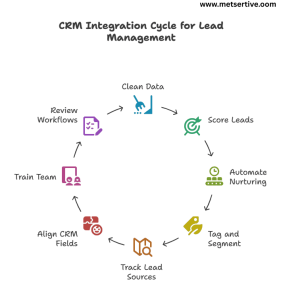
CRM integration in lead management best practices.

Here are best practices to follow:

1. Keep Your Data Clean and Organized

Messy data = confused teams + wasted opportunities.

Example: If “John Smith” enters your CRM three times with slightly different emails, your sales team might call him twice—or not at all.

Tip: Use your CRM’s deduplication tools and schedule a monthly cleanup to merge duplicate records.

 2. Use Lead Scoring to Prioritize High-Intent Leads

Not all leads are equal. CRM integrations allow you to assign lead scores based on:

  • Pages visited (Pricing Page = +10)
  • Email opens and clicks (+5)
  • Demo booked (+20)

Example: A lead with a score above 50 triggers a notification for your sales team to follow up immediately.

Tip: Start simple, and refine your scoring based on which leads actually convert.

 3. Automate Nurturing Workflows

Your CRM should trigger nurturing sequences based on lead behavior, so your team doesn’t manually send every email.

Example: Downloading a guide triggers a 5-part educational email series automatically.

Tip: Map workflows with clear goals (educate → engage → convert) and use CRM analytics to measure performance.

You can automate lead nurturing with CRM workflows, sending timely content and alerts based on user actions without manual intervention

 4. Tag and Segment Based on Behavior

Use tags to group leads by interest, stage, or source, allowing for personalized follow-ups.

Example: Tag leads as “Webinar Attendee,” “Pricing Interest,” or “SEO Lead Magnet” for targeted nurturing.

Tip: Personalization can increase open rates by 26% (Campaign Monitor).

 5. Use Lead Source Tracking Consistently

Knowing where your leads come from helps you double down on what works and stop wasting budget on what doesn’t.

Example: If 60% of your qualified leads come from LinkedIn while only 5% come from a Google Ads campaign, you can confidently reallocate your spend and efforts.

Tip: Use UTM parameters on your links and map them into your CRM’s lead source fields automatically using tools like HubSpot or Zapier.

 6. Align CRM Fields with Your Sales Process

Your CRM should mirror how your team actually sells, not just generic pipeline stages. True CRM integration fosters marketing and sales alignment, ensuring that your nurturing campaigns and sales follow-ups work together seamlessly.

Example: If your process includes a “Demo Scheduled” stage before “Proposal Sent,” ensure your CRM stages reflect this to avoid confusion and missed follow-ups.

Tip: Involve your sales team in defining these fields to ensure they match reality, not just theory.

 7. Train Your Team on CRM Usage Regularly

Even the best CRM integration fails if your team doesn’t know how to use it effectively.

Example: A team might forget to log calls or update deal stages, leaving your pipeline data unreliable for forecasting and nurturing.

Tip: Host short monthly training sessions or “CRM clean-up sprints” to reinforce habits, share workflow hacks, and answer questions live.

 8. Review and Refine Workflows Regularly

Your CRM isn’t “set it and forget it.”
Check what’s working:

  • Are your nurturing sequences getting replies?
  • Are leads converting after certain touchpoints?

Example: If your webinar leads aren’t converting, tweak your post-webinar sequence to include a case study and a limited-time offer.

Tip: Review workflows quarterly to align with updated offerings and audience behaviors.

Following these best practices ensures your CRM integration is not just a tech checkbox but a strategic growth engine for your lead nurturing funnel.

Recommended Tools for CRM Integration

Your CRM is the hub, but its true power comes from what it connects to. When choosing tools, prioritize those that support CRM workflow automation to reduce manual work and increase consistency in your lead management.”Here’s your SME-friendly toolkit to integrate seamlessly:

1. CRM Platforms

HubSpot
All-in-one CRM with built-in email, chat, and ad integrations, plus lead scoring and workflow automation.
Tip: Use HubSpot’s visual workflow builder to see your nurturing flows at a glance.

Zoho CRM
Budget-friendly CRM with solid integrations and customization.
Tip: Great for SMEs needing lead scoring and workflow automation without enterprise pricing.

Salesforce
Powerful and customizable, best for scaling teams with complex pipelines.
Tip: Use Salesforce’s AppExchange to add integrations for social media, chat, and ad platforms.

2. Integration Tools

Zapier & Make (Integromat)
Connect your CRM to 5,000+ apps without coding.

Example: New Calendly booking → Create/Update lead in CRM → Trigger confirmation email.

Tip: Start with key Zaps (form submissions, lead ads, calendar bookings) and expand as needed.

3. Email Marketing Tools

Mailchimp, ActiveCampaign, ConvertKit
Sync email campaigns with CRM to track opens, clicks, and automate lead scoring. Linking email drip campaigns CRM can ensure timely follow-ups that align with lead behavior.”

Example: Lead clicks your pricing email twice → CRM tags “High Interest” → Notifies sales.

Learning how to integrate CRM with email marketing tools like Mailchimp or ActiveCampaign can supercharge your nurturing efforts

4. Live Chat & Chatbot Tools

Intercom, Drift, Tidio
Capture chats directly into your CRM while qualifying leads in real time.

Scenario: A website visitor asks about pricing, enters their email in chat → CRM auto-tags “Pricing Interest” → Starts follow-up sequence.

5. Scheduling Tools

Calendly, SavvyCal
Integrate directly to create/update CRM records when leads book demos or consultations.

Example: A lead books a call → CRM tags as “Demo Booked” and moves to BOFU nurturing stage.

6. Paid Ads Platforms

Facebook, LinkedIn, Google Ads
Integrate lead form submissions directly into your CRM, automatically tagging source and campaign for tracking ROI.

 Tip:

Before investing in tools, map your lead journey. Choose integrations that eliminate manual entry and align with your lead management strategy.

Real-World Case Studies

See how SMEs actually use CRM integration to supercharge their lead management and nurturing:

Case Study 1: Coaching Business Automating Consult Bookings

Problem:

A business coach manually tracked leads from webinar signups to consult calls, missing follow-ups.

CRM Integration:

Used HubSpot + Calendly to auto-create leads and tag them as “Webinar Attendee” when they booked calls.

Result:

1. 40% increase in consult call bookings.
2. Faster response times, leading to more paid clients.

Takeaway: Automate your booking pipeline to move leads seamlessly from interest to action.

Case Study 2: E-commerce Brand Personalizing Outreach

Problem:

An online store struggled to convert high-value shoppers who abandoned carts.

CRM Integration:

Integrated Shopify with ActiveCampaign to tag high-value cart abandoners and trigger a personalized email + SMS series.

Result:

1. 28% cart recovery rate.
2. Increased AOV (Average Order Value) due to targeted upsells.

Takeaway: Use CRM tags and workflows to prioritize warm leads for personalized re-engagement.

 Case Study 3: B2B SaaS Improving Demo Conversions

Problem:

A SaaS company wasted time on low-quality demo leads.

CRM Integration:

Linked LinkedIn Lead Gen Forms to Salesforce, adding auto-lead scoring (based on job title, company size, engagement).

Result:

1. 3x higher conversion rate from demo to paid plan.
2. Sales team focused only on high-intent leads.

One SaaS client implemented a lead scoring system within their CRM, helping the sales team focus on high-intent leads and improving conversion rates.

Takeaway: Integrate lead forms with CRM and use lead scoring to prioritize high-potential prospects.

Case Study 4: Digital Marketing Agency Streamlining Follow-Ups

Problem:

Follow-ups were delayed after discovery calls, leading to lost opportunities.

CRM Integration:

Connected Calendly + Zoho CRM, auto-tagging leads post-call and triggering a 3-email follow-up sequence with case studies and testimonials.

Result:

1.Reduced follow-up delay from 3 days to instant.
2. Improved close rates by 25%.

Takeaway: Automate post-call nurturing to keep leads warm and engaged.

Case Study 5: Online Course Creator Maximizing Lead Magnet Downloads

Problem:

Thousands downloaded free guides, but few converted to course buyers.

CRM Integration:

Used Mailchimp with HubSpot to tag leads based on the guide topic and send a tailored email drip series, followed by webinar invites.

Result:

  1. 19% increase in webinar attendance.
  2. 15% boost in course enrollments.

Takeaway: Align your lead magnets with CRM tagging and follow-up drips for targeted nurturing.

Key Lesson:

These SMEs didn’t add tools for the sake of it. They:

  • Mapped their customer journey.
  • Integrated touchpoints with their CRM.
  • Used automation for timely, personalized nurturing.

You can do the same to transform your lead management into a conversion engine.

Common CRM Integration Mistakes to Avoid

CRM integration can transform your lead management, but many SMEs fall into avoidable traps that drain resources and hurt conversions.
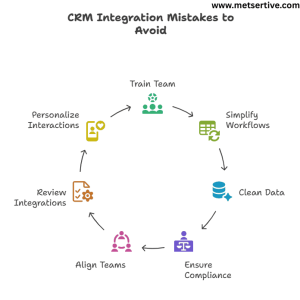
CRM Integration mistakes to avoid

Here are 7 mistakes to avoid (with examples and fixes):

1. Not Training Your Team on CRM Usage

What happens:
Your CRM captures and organizes leads, but if your sales and marketing teams don’t know how to use it, follow-ups get delayed or missed.

Example: Leads tagged “High Intent” are ignored because the sales team only checks emails.

Fix: Run a simple CRM training workshop and document SOPs (Standard Operating Procedures) for your team.

2. Overcomplicating Workflows Without Testing

What happens:
Complex automations may break, sending leads the wrong emails or dropping them from workflows.

Example: A new lead receives a demo invite before the welcome email.

Fix: Start with simple, clear workflows. Test them internally before scaling.

3. Failing to Clean and Deduplicate Data Regularly

What happens:
Duplicate or outdated lead data confuses your tracking and messes up reporting.

Example: The same lead receives multiple emails for the same webinar.

Fix: Use your CRM’s deduplication and cleanup tools monthly to maintain a clean database.

4. Ignoring GDPR and Data Compliance

What happens:
Collecting leads without proper consent can lead to legal issues and lost trust.

Fix: Add consent checkboxes on forms, clear opt-in messaging, and easy unsubscribe options in emails.

5. Not Aligning Sales and Marketing Teams

What happens:
Leads may be marked as “sales-ready” by marketing but aren’t contacted promptly, or sales doesn’t know which nurturing emails leads have received. Ignoring CRM integration for sales teams often leads to missed opportunities, as the team may not know which leads are ready for outreach.

Fix: Hold monthly alignment meetings. Define when a lead becomes sales-ready and log activity in your CRM for visibility.

6. Setting and Forgetting Your Integrations

What happens:
Your workflows and triggers might stop working due to updates, API issues, or tool changes.

Example: Your webinar tool updates its API, breaking the integration that tags attendees in your CRM.

Fix: Schedule a quarterly audit of your CRM integrations and test workflows regularly.

7. Missing Personalization Opportunities

What happens:
You send the same generic follow-up to every lead, regardless of their behavior, interests, or funnel stage.

Example: A lead who downloaded an advanced SEO guide gets a beginner’s “What is SEO?” email.

Fix: Use your CRM’s tagging and segmentation to send relevant, stage-appropriate content.

Key takeaway:
CRM integration should make your lead management clean, clear, and actionable, not messy and confusing. Avoid these mistakes to keep your system running like a well-oiled machine.

Conclusion: 

If you want your leads to convert consistently, your CRM can’t live in a silo.

When your CRM is fully integrated:

  • You capture leads from every channel without leaks.
  • You respond faster and nurture leads automatically.
  • You personalize follow-ups without manual chaos.
  • You track what’s working and what’s not—so you can improve.

In a world where leads expect speed, relevance, and trust, CRM integration isn’t a tech upgrade. It’s your competitive edge. CRM integration is a core strategy for sales funnel optimization, shortening sales cycles while maintaining personalization.

Remember:
You don’t need a complicated system to start. Even integrating your forms, email marketing, and calendar with your CRM can significantly shorten your sales cycle and boost conversions.

Next Step: Put Your CRM to Work

You now know how to capture, track, and nurture leads seamlessly.
The next move? Build your Lead Nurturing Funnel around this integrated CRM system so you can:

  1. Personalize your messaging
  2. Send the right content at the right time
  3. Turn more leads into customers without chasing every single one manually

Explore our actionable guide: How to Create a Lead Nurturing Funnel That Converts

What Is Lead Scoring and How to Use It Effectively

Let’s face it—no matter how many leads your business attracts, not all of them are ready to buy. Some are curious window shoppers, some are doing early research, and a few are hot and ready to make a decision. So, how do you know who to follow up with, and who to hold off on?

That’s where lead scoring comes in.

Lead scoring is a simple, powerful way to rank your leads based on how likely they are to become paying customers. It’s like having a compass that tells you which prospects are worth your time, and which ones need more nurturing.

For small and medium-sized businesses (SMEs), this is game-changing. When resources are limited, lead scoring helps you prioritize the leads that matter most, so your sales team isn’t wasting time chasing people who just aren’t ready.

And here’s the kicker: lead scoring is the missing link between lead generation and lead nurturing. It tells you who to nurture—and when. Without it, you’re guessing. With it, you’re strategic. Implementing an effective lead scoring system is crucial for small and medium businesses aiming to streamline their sales funnel optimization and enhance customer segmentation.

What Is Lead Scoring?

At its core, lead scoring is a system that assigns points to your leads based on certain criteria—like their behavior, engagement, and fit for your product or service. The higher the score, the more qualified the lead is.

Imagine this:

  • A lead visits your pricing page (+10 points)
  • They download an eBook (+5)
  • They open three emails in a row (+3)
  • They’re from your target industry (+7)

Total score = 25 points.
You can now compare that to your internal “sales-ready” threshold (say, 30 points) and decide what kind of follow-up makes sense.

🎯 Types of Lead Scoring Criteria

  1. Demographic data – e.g., job title, location, age
  2. Firmographic data – e.g., company size, industry, revenue
  3. Behavioral actions – e.g., email clicks, website visits, downloads
  4. Engagement history – e.g., webinar attendance, social media interaction

These signals help you paint a fuller picture of each lead’s potential.

🧠 Tip: Use both “explicit” and “implicit” data

  • Explicit data is what the lead tells you directly—like their company size or budget.
  • Implicit data is what you observe based on their behavior—like how many times they visited your case study page.

Both are essential for accurate scoring.

✅ Real-World Example:

Let’s say you’re selling CRM software. A lead who:

  • Works as a sales director at a 200-person company (explicit fit)
  • Attended your webinar and downloaded your ROI calculator (implicit behavior)

…is much more likely to convert than someone who just visited your homepage once.

That’s the power of scoring—it filters out the noise and keeps your pipeline focused.

By leveraging behavioral analytics, companies can assign scores to leads, distinguishing between marketing qualified leads (MQL) and sales qualified leads (SQL).

Why Lead Scoring Matters for SMEs

If you’re running a small or medium business, you know the struggle: not all leads are created equal, but they all demand your attention.

So how do you decide who gets a follow-up call today—and who’s better off in a long-term nurture sequence?

That’s where lead scoring earns its keep.

1. It Helps You Focus on High-Potential Leads

You probably don’t have a 20-person sales team. That means your time—and your team’s time—is precious. Lead scoring shows you who’s hot, who’s warm, and who’s just browsing.

Example:
A lead that watched your demo video, opened three emails, and requested pricing info should get your immediate attention. One that visited your homepage once? Maybe not just yet.

2. It Aligns Sales and Marketing (Finally)

Sales says, “We need better leads.”
Marketing says, “We gave you 200 this week.”

Sound familiar?

With a shared lead scoring model, everyone speaks the same language. Sales knows which leads are truly qualified. Marketing knows what it takes to move a lead from cold to warm.

✔️ Tip: Sit both teams down and define what a “sales-ready” lead actually looks like.

3. It Increases Conversion Rates

When you prioritize the right leads and engage them at the right time, you close more deals—without burning out your team or budget.

According to a study by MarketingSherpa, companies that use lead scoring see a 77% increase in lead generation ROI.

Now that’s a stat worth paying attention to.

Common Lead Scoring Models (and Which One You Should Use)

Lead scoring isn’t one-size-fits-all. In fact, there are several ways to do it—and the right model depends on your business goals, tools, and buyer journey.

Let’s break them down:

1. The Point-Based Model (Most Common)

This is the classic approach.
You assign points based on specific actions or attributes.

  • +10 for visiting your pricing page
  • +5 for opening an email
  • +15 for booking a demo
  • -10 for unsubscribing from your newsletter

You set a threshold (say, 50 points), and once a lead hits it, they’re passed to sales.

Tip: Use your CRM or marketing automation platform to auto-score leads. Tools like HubSpot, Zoho, and ActiveCampaign make this easy.

2. Fit + Interest Model

This model blends:

  • Fit = how well a lead matches your ideal customer (job title, industry, company size)
  • Interest = how engaged they are (website visits, downloads, webinar signups)

It helps you separate:

  • Good fit + high interest = hot lead
  • Good fit + low interest = nurture more
  • Bad fit + high interest = may not be worth chasing

3. Predictive Lead Scoring (Advanced)

Predictive Lead Scoring uses machine learning and AI to analyze patterns in your data and predict which leads are most likely to convert. It’s powerful—but often overkill for SMEs just starting out.

✅ Best for: companies with large lead volumes and data teams.
❌ Not ideal if you’re new to lead scoring or don’t have a CRM packed with historical data.

4. Demographic-Based Lead Scoring

Not every lead fits your ideal customer profile—and that’s okay. But the ones who do should score higher.

This model focuses purely on the attributes of the lead or company—things like industry, job title, location, or company size. It works well for businesses that sell to specific niches (e.g., SaaS companies targeting HR managers in tech firms).

✔️ Example:

  • +10 for job title = “Marketing Director”
  • +8 for company size = 50–200 employees
  • +5 for location = North America
  • -5 for job title = “Student” or “Intern”

Tip: Use this model when your product is highly tailored to specific roles, industries, or regions.

 5. Negative Scoring Model

Scoring shouldn’t just reward good signals—it should also detect when a lead is cooling off.

The negative scoring model subtracts points for behaviors that suggest disinterest or poor fit. It’s especially helpful for keeping your pipeline clean and preventing “false positives” (leads that seem active but aren’t serious buyers).

✔️ Example:

  • -10 for email bounce
  • -5 for visiting careers page (job seekers, not buyers)
  • -7 for no engagement in 30 days
  • -10 for unsubscribing from email list

Tip: Combine this with your existing scoring system to balance out the hype and bring more accuracy to lead readiness.

6. Time-Decay Lead Scoring Model

Interest fades. If your scoring system doesn’t account for time, you’re treating yesterday’s news like a breaking story.

Time-decay scoring gradually reduces a lead’s score if they haven’t engaged in a while. This model helps you focus only on active, high-intent leads and avoid wasting sales resources.

✔️ Example:

  • -5 after 14 days of inactivity
  • -10 after 30 days
  • -15 after 45+ days without engagement

Tip: Automate decay logic in your CRM so leads naturally drop in priority unless they re-engage.

How to Build a Simple Lead Scoring System

You don’t need fancy AI or a data science team to get started with lead scoring. In fact, many high-converting businesses begin with a basic, spreadsheet-based system.

Lead Scoring System Cycle

Here’s a simple, step-by-step framework to get you rolling:

🔹 Step 1: Define Your Ideal Customer Profile (ICP)

Start by identifying what a “perfect-fit” customer looks like for your business.

✔️ Example Criteria:

  • Industry: SaaS or service-based
  • Job Title: Marketing Manager or CEO
  • Company Size: 10–100 employees
  • Region: North America or EU

Tip: Interview your top customers or analyze your CRM to find patterns.

🔹 Step 2: Identify High-Intent Behaviors

What actions tell you someone is truly interested? These are the “conversion clues” you’ll score.

✔️ Examples of High-Intent Behavior:

  • Downloading a lead magnet (+5)
  • Visiting your pricing page (+10)
  • Signing up for a webinar (+7)
  • Returning to your website 3+ times in a week (+8)

Tip: Start with 5–7 behaviors and refine as you gather data.

🔹 Step 3: Assign Point Values

Now assign point values to each behavior and attribute.

Action

Points

Opened an email
+2
Clicked a CTA in an email
+3
Downloaded a guide
+5
Attended a webinar
+7
Visited pricing page
+10
Filled out contact form
+15

Tip: You can also assign negative points for low engagement (e.g., -5 for unsubscribing).

🔹 Step 4: Determine a Sales-Readiness Score

Set a score threshold that tells you when a lead is “ready for sales.” For many SMEs, this might be 30–50 points.

✔️ Example: Once a lead hits 40 points, they’re sent to a rep for a discovery call.

Tip: Adjust the threshold based on your average sales cycle and conversion rates.

🔹 Step 5: Use a CRM or Spreadsheet to Track

If you’re just starting out, a Google Sheet will do the trick. But to scale, use CRM platforms like HubSpot, Zoho, or ActiveCampaign to automate tracking and scoring.

Pro Tip: Set up email alerts or Slack notifications when leads cross your sales-readiness threshold.

🔹 Step 6: Test Your Model with Historical Data

Before going live, validate your scoring system against past leads.

✔️ Example: Look at leads who converted last quarter. Do their behaviors match your current scoring values? If top customers consistently scored lower than your “sales-ready” threshold, it may need adjusting.

Tip: This helps fine-tune point weights and ensures your model reflects real buyer behavior.

🔹 Step 7: Set Up Alerts and Automations

Scoring is most powerful when it’s automated and actionable.

✔️ Use your CRM or marketing platform to:

  • Send alerts to your sales team when a lead crosses the readiness threshold
  • Trigger tailored email sequences based on score brackets
  • Notify marketing if a lead cools off and drops below a threshold

Tip: Automations help move leads through your funnel faster—and more efficiently.

🔹 Step 8: Review and Optimize Monthly

Lead scoring isn’t “set it and forget it.” Your business—and buyer behavior—evolves.

✔️ Schedule a monthly or quarterly review to:

  • Analyze conversion rates by score range
  • Adjust point values based on new insights
  • Add new behaviors as your marketing channels grow (e.g., webinar replays, chatbot engagement)

Tip: Collaborate with both sales and marketing in this review to keep alignment sharp.

Utilizing CRM software like HubSpot or Zoho can simplify the process of setting up a predictive lead scoring model tailored to your business needs.

Tools and CRMs for Lead Scoring

Choosing the right CRM can simplify lead scoring and make it easier to scale. Here are four platforms that work well for SMEs and mid-size teams:

1. HubSpot

✅ Built-in lead scoring
✅ Drag-and-drop automation workflows
✅ Easy to integrate with email and sales pipelines

Why it’s great: HubSpot’s free CRM is user-friendly and powerful enough for growing teams. It also lets you create scoring rules based on both behavior and contact properties.

2. Zoho CRM

✅ Custom scoring rules
✅ Strong contact management features
✅ Affordable for small businesses

Why it’s great: Zoho lets you automate scoring based on specific actions like website visits or email opens—ideal for SMEs looking for customization on a budget.

3. Salesforce Pardot

✅ Advanced lead scoring and grading
✅ AI-powered insights
✅ Deep integration with Salesforce Sales Cloud

Why it’s great: Pardot is best suited for B2B companies with complex sales cycles. If you’re already using Salesforce, it’s a natural extension.

4. ActiveCampaign

✅ Easy-to-use automation builder
✅ Behavioral-based scoring
✅ Integrated email marketing & CRM

Why it’s great: ActiveCampaign is great for marketing-first teams who want email + scoring + nurturing all in one dashboard.

🧩 Tip: Look for CRM Integration

Selecting the right CRM tools for lead scoring is essential; platforms like Salesforce Pardot offer robust features for tracking and evaluating lead interactions.

Make sure your chosen tool integrates smoothly with your website forms, email platform, and sales pipeline. This ensures lead scoring happens in real-time—not manually.

Real-World Examples

Let’s bring all this theory to life. Here are few examples of how lead scoring works in practice—and how it helps businesses focus where it matters most.

Scenario 1: A B2B SaaS Company Using Webinar Engagement

Webinar attendance isn’t just a sign of interest—it’s a strong buying signal.

A B2B SaaS company hosts monthly product webinars. They assign lead scores like this:

  • +10 for registering
  • +15 for attending live
  • +5 for asking a question
  • +20 for booking a demo afterward

One attendee, Jane, signs up, attends, asks two detailed questions, and books a call—earning 50 points in total. Their CRM (HubSpot) automatically flags her as “sales-ready,” and a rep follows up within hours.

Takeaway:
Engagement-based scoring can help you identify high-intent leads faster and close warmer deals.

Scenario 2: E-commerce Store Prioritizing Cart Abandoners

Not all window shoppers are worth chasing—but some are almost at checkout.

An e-commerce brand selling eco-friendly skincare uses lead scoring to track site behavior:

  • +5 for viewing 3+ product pages
  • +10 for adding items to the cart
  • +15 for abandoning the cart
  • +10 for clicking on a retargeting email

When a lead reaches 40 points, they automatically receive a personalized SMS:
“Hey! You left something behind. Here’s 10% off your first order—just for you.”

Result: A 17% recovery rate on abandoned carts and a 20% lift in email open rates from warm leads.

Scenario 3: An Online Course Business Qualifying Signups

Not every email subscriber is ready to enroll—but some are already halfway there.

An online course creator tracks behaviors that indicate genuine learning intent:

  • +5 for signing up for a free course
  • +10 for watching 75% of a video lesson
  • +7 for joining a live Q&A session
  • +10 for visiting the checkout page

A lead who completes two free lessons and joins the live webinar gets flagged at 32 points, triggering a limited-time discount email sequence.

Tip: Educational businesses can use video completion and content depth as powerful engagement signals.

Scenario 4: A Healthcare SaaS Provider Targeting Medical Practices

Healthcare buyers are cautious—scoring helps spot the ones ready to move.

A B2B healthcare platform assigns points based on both role relevance and compliance needs:

  • +8 for job title “Operations Director” or “Practice Manager”
  • +10 for downloading a HIPAA compliance checklist
  • +12 for attending a product webinar
  • +5 for revisiting the pricing page within a week

Once a lead crosses 35 points, they’re routed to a sales specialist who offers a tailored compliance walkthrough.

Tip: Niche industries should focus on role-specific content and pain-point behaviors.

Scenario 5: A B2B Services Agency Targeting Mid-Market Clients

The right company size and the right engagement combo equals a hot lead.

A digital marketing agency uses fit + behavior scoring:

  • +10 for company size over 50 employees
  • +8 for downloading their case study
  • +6 for scheduling a free consultation
  • +5 for visiting the blog 3+ times in a week

A lead from a 75-person company books a call and reviews two service pages, reaching 29 points—just above the sales-readiness line. A custom proposal is sent within 48 hours.

Tip: For agencies, blend firmographic filters (company size, industry) with engagement signals for precision targeting.

Mistakes to Avoid

Even the best systems can go off track if you’re not careful. Here are four common lead scoring mistakes—and how to avoid them.


Lead Scoring Mistakes to Avoid

Mistake 1: Overcomplicating the Scoring Model

Trying to score every possible detail usually leads to confusion—not clarity.

When your model has 50+ scoring rules, it becomes harder to manage and trust. Focus on 5–10 core actions that best predict buying behavior.

✔️ Tip: Start simple. You can always refine your model later based on performance data.

Mistake 2: Not Aligning with the Sales Team

If marketing thinks a lead is hot, but sales disagrees—you have a misfire.

Lead scoring should be a shared framework between sales and marketing. Define what “sales-ready” means together and revisit the criteria often.

✔️ Tip: Use feedback from sales calls to improve your scoring logic (e.g., “Leads from webinars close faster”).

Mistake 3: Failing to Update the Model Regularly

What worked last quarter may not reflect your current buyer behavior.

If your content or strategy changes, so should your scoring rules. Leads that convert today may follow different paths than six months ago.

✔️ Tip: Review scoring rules quarterly and adjust based on funnel conversion trends.

Mistake 4: Ignoring Lead Decay

A lead who clicked your email three months ago isn’t “hot” anymore.

Without lead decay (subtracting points over time), your system may keep old leads looking artificially active.

✔️ Example: Subtract 5 points if a lead hasn’t visited your site or opened an email in 30 days.

Mistake 5: Using Only Marketing Data

Relying solely on website or email behavior gives you half the picture.

If your scoring model ignores sales input or offline conversations, you’re missing critical signals. For instance, a verbal confirmation during a discovery call may indicate a higher readiness than a click ever could.

✔️ Tip: Combine marketing data with sales insights to create a well-rounded scoring system.

Mistake 6: Not Testing and Validating the Model

If you’re not testing your scores against actual conversions, you’re guessing.

Lead scoring should evolve through data. What you think signals purchase intent might not reflect what’s happening in your funnel.

✔️ Tip: Review top converting leads each month—do their scores align with your expectations?

Mistake 7: Treating All Leads the Same Post-Scoring

Scoring is just the start—what you do with that score matters even more.

Some businesses score leads but still send all of them the same content or offers. That defeats the purpose.

✔️ Tip: Create different nurture paths for hot, warm, and cold leads—each with tailored messages.

Mistake 8: Setting the Sales Threshold Too High (or Low)

If your threshold is off, you’ll either miss out or overload sales with poor fits.

Some teams set unrealistic thresholds that most leads never hit, while others flood sales reps with weak leads.

✔️ Tip: Revisit the scoring threshold monthly. Track which score ranges actually convert into paying customers.

Neglecting to define clear lead qualification criteria can result in misaligned sales efforts and missed opportunities.

Conclusion

Lead scoring isn’t just for big brands with massive CRMs—it’s one of the most effective, low-cost ways for SMEs to qualify leads, prioritize follow-ups, and boost close rates without wasting time or effort.

When done right, lead scoring helps you:
✅ Focus on the right leads
✅ Align sales and marketing
✅ Build scalable, automated nurturing funnels
✅ Improve your ROI from every campaign

Understanding various lead scoring models and techniques empowers businesses to prioritize leads effectively, ultimately improving sales conversions

Now that you know who to prioritize, here’s how to nurture leads effectively