
Why Customer Retention Starts Before the First Purchase
Most businesses assume customer retention begins after a customer makes a purchase.
They believe retention is something that happens during:
• Onboarding
• Customer support
• Account management
• Loyalty programs
• Post-purchase communication
But the reality is often very different.
Customer retention frequently starts long before the first transaction takes place.
In many cases, customers decide whether they will stay or leave before they ever become customers.
Why?
Because retention is heavily influenced by the expectations people develop before buying.
The messages they see.
The promises they hear.
The content they consume.
The conversations they have with your sales team.
All of these factors shape how customers perceive your business and what they expect after purchasing.
When expectations and reality align, customers are more likely to stay.
When expectations and reality conflict, dissatisfaction and churn often follow.
This is why many retention problems are not created after conversion.
They are created before conversion.
In this guide, you’ll discover:
• Why customer retention starts before the first purchase
• How marketing directly influences retention outcomes
• Why expectation management is one of the most overlooked retention strategies
• How businesses unintentionally create future churn before a prospect becomes a customer
Understanding this shift can completely change how you think about customer retention, customer experience, and sustainable growth.
Because retention is not simply a post-sale activity.
It is the result of everything a customer experiences before and after they buy.
What Does “Retention Starts Before the First Purchase” Actually Mean?
Let’s simplify this.
When most businesses think about retention, they think about what happens after the sale.
They focus on:
• Customer onboarding
• Follow-up communication
• Support systems
• Loyalty programs
• Customer success initiatives
Those things matter.
But retention actually begins earlier than that.
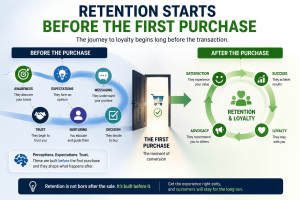
Retention starts the moment a prospect begins forming expectations about your business.
Before someone buys from you, they are already evaluating:
• Your messaging
• Your promises
• Your positioning
• Your content
• Your website
• Your sales conversations
Every interaction helps them create a mental picture of what working with your business will be like.
And that picture influences whether they stay after they buy.
The Expectations Effect
Think about it this way.
Customers don’t simply purchase products or services.
They purchase expectations.
If those expectations are met or exceeded:
- Trust grows.
- Satisfaction increases.
- Retention becomes easier.
But when expectations don’t match reality:
- Frustration appears.
- Confidence drops.
- Churn becomes more likely.
This is why retention and acquisition are more connected than most businesses realize.
Simple SaaS Example
Imagine a SaaS company running ads that promise:
“Double your productivity in just 7 days.”
The prospect signs up expecting immediate results.
But after purchasing, they discover:
• The platform requires training
• Team adoption takes time
• Results typically take 60–90 days
The software itself may be excellent.
The customer may still achieve success.
But because expectations were set incorrectly, disappointment appears long before results do.
Eventually the customer cancels.
The company sees it as a retention problem.
In reality:
The retention problem started during marketing.
Service Business Example
Consider a digital marketing agency.
During sales conversations they suggest:
“We’ll generate leads almost immediately.”
The client signs the contract expecting rapid growth.
However, the actual process involves:
• Market research
• Strategy development
• Content creation
• Campaign optimization
Results may take several months.
Again, the service may be valuable.
But expectations and reality are misaligned.
The client becomes impatient.
Trust declines.
Retention suffers.
The churn didn’t start after delivery.
It started before the client signed.
Why the Buying Decision and Retention Decision Are Connected
Many businesses separate acquisition and retention into different departments.
Marketing acquires customers.
Customer success retains customers.
Support keeps customers happy.
But customers don’t experience your business in separate departments.
They experience one continuous journey.
From the first advertisement they see…
To the first conversation…
To the purchase…
To onboarding…
To long-term engagement.
Every stage influences the next.
That’s why the buying decision and the retention decision are often connected.
A customer who enters with realistic expectations is far more likely to stay.
A customer who enters with unrealistic expectations is far more likely to leave.
The Big Insight
Retention is not something you “start” after a customer buys.
Retention is something you influence before they buy.
The strongest retention systems don’t begin with customer support.
They begin with:
• Honest messaging
• Clear positioning
• Proper qualification
• Expectation management
• Trust-building communication
Because customers who understand what to expect are usually easier to retain.
Actionable Tip
Review your current customer journey and ask:
What expectations are prospects forming before they buy?
Look at:
• Your website copy
• Landing pages
• Ads
• Sales conversations
• Lead nurturing emails
Then compare those expectations with the actual customer experience.
If there is a gap between promise and reality, that gap may be creating future churn.
And fixing it could improve retention before a customer ever makes their first purchase.
Key Takeaway
Customer retention doesn’t begin after conversion.
It begins when prospects start forming expectations about your business.
Because the experience customers expect often determines whether they stay long enough to experience the value you deliver.
The Hidden Link Between Acquisition and Retention
One of the biggest misconceptions businesses have about growth is how they think about acquisition and retention.
Most treat them as completely separate activities.
Marketing focuses on generating leads and acquiring customers.
Sales focuses on converting prospects.
Customer success focuses on retaining customers.
Support focuses on solving problems.
On paper, that structure seems logical.
But from the customer’s perspective, none of these functions are separate.
They experience one continuous journey.
And that’s where many businesses get into trouble.
The Common Business Mindset
Ask a leadership team where retention responsibility begins.
Many will say:
After the sale
Or:
Once onboarding starts
Or:
When customer success takes over
This mindset creates a dangerous blind spot.
Because it assumes retention begins only after a customer enters the business.
But customers start forming opinions much earlier.
Long before they buy.
Long before onboarding.
Long before customer success gets involved.
And those early impressions often determine whether customers stay or leave later.
Why This Thinking Is Wrong
The customer journey doesn’t reset after a purchase.
It continues.
Every interaction builds on the one before it.
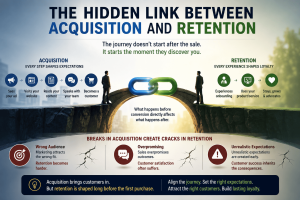
Think about the journey:
• A prospect sees your ad
• Visits your website
• Reads your content
• Speaks with your sales team
• Becomes a customer
• Experiences onboarding
• Uses your product or service
Each stage influences the next.
If unrealistic expectations are created during acquisition…
Customer success inherits the consequences.
If marketing attracts the wrong audience…
Retention becomes harder.
If sales overpromises outcomes…
Customer satisfaction often suffers.
This is why acquisition and retention are deeply connected.
What happens before conversion directly affects what happens after conversion.
A Simple SaaS Example
Imagine a SaaS company running advertisements that say:
“Get results in just 7 days.”
The message generates attention.
Signups increase.
The acquisition campaign appears successful.
But there’s one problem.
The software typically requires:
• Team setup
• User training
• Workflow adoption
• Data collection
Meaning most customers don’t see meaningful results until 60 days later.
Now imagine what happens.
The customer buys expecting immediate outcomes.
Seven days pass.
Results don’t appear.
Fourteen days pass.
Still no significant improvement.
The customer begins questioning the purchase.
Not because the software is poor.
Not because the company failed.
But because expectations and reality don’t match.
Eventually:
- Satisfaction drops
- Trust declines
- Churn increases
The business sees a retention problem.
But the root cause started during acquisition.
The Service Business Version
The same thing happens in service businesses.
Imagine a consulting firm promising:
“We’ll double your revenue quickly.”
A client signs the contract expecting rapid transformation.
However, real growth requires:
• Strategy development
• Market testing
• Process improvements
• Team execution
Results may take months.
The service itself may be excellent.
The consultant may deliver significant value.
But the client’s expectations were set incorrectly from the beginning.
Now frustration appears.
Not because the service lacks value.
Because the timeline didn’t match the promise.
Again:
Acquisition created the retention problem.
The Cost of Misalignment
When acquisition and retention are disconnected, businesses often experience:
• Higher churn
• Lower customer satisfaction
• More support issues
• Increased refund requests
• Poor reviews
• Lower lifetime value
And often they respond by trying to generate even more leads.
Which only feeds the cycle.
Because acquiring more customers into a system that creates disappointment doesn’t solve the problem.
It simply scales the problem.
The Strategic Shift
The smartest businesses understand something many competitors miss:
Retention starts influencing growth before retention officially begins.
That’s why they focus on:
• Honest positioning
• Clear messaging
• Accurate expectations
• Better customer qualification
• Realistic promises
Because attracting the right customer with the right expectations makes retention dramatically easier later.
Actionable Tip
Review your marketing and sales messaging.
Ask:
Are we attracting the right customers?
Are we setting realistic expectations?
Could a new customer reasonably expect something we cannot consistently deliver?
If the answer is yes, you may already be creating future churn without realizing it.
Fixing retention sometimes starts by fixing acquisition.
Key Takeaway
Most businesses view acquisition and retention as separate growth activities.
But customers experience them as one continuous journey.
And when expectations created before the sale don’t align with reality after the sale:
Retention suffers.
Because poor acquisition strategies often create future retention problems long before a customer decides to leave
Expectations Drive Retention
If there is one factor that quietly influences retention more than most businesses realize, it’s expectations.
Not pricing.
Not features.
Not even customer support.
Expectations.
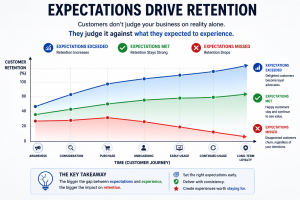
Because customers rarely judge your business based on reality alone.
They judge reality compared to what they expected to experience.
And that difference often determines whether they stay or leave.
Why Expectations Matter More Than Most Businesses Realize
Most businesses focus heavily on delivering value.
And that’s important.
But value alone doesn’t guarantee retention.
Why?
Because customer satisfaction isn’t based only on what you deliver.
It’s based on the gap between:
What customers expected
And
What customers experienced
This is where many businesses unintentionally create churn.
Not because they fail to deliver.
But because they create expectations they can’t consistently meet.
A Simple Way to Think About It
Imagine a customer rates their actual experience as:
8 out of 10.
That’s a strong experience.
Most businesses would consider that a success.
But now let’s compare two different expectation levels.
Scenario A
Customer expectation:
8 out of 10
Actual experience:
8 out of 10
Result:
The customer feels satisfied.
The promise matched the reality.
Trust remains intact.
Retention becomes more likely.
Scenario B
Customer expectation:
10 out of 10
Actual experience:
8 out of 10
The actual experience is identical.
Nothing changed.
But now the customer feels disappointed.
Why?
Because reality failed to match expectations.
The customer doesn’t evaluate the experience objectively.
They evaluate the gap.
And that gap creates dissatisfaction.
How Businesses Accidentally Create Expectation Gaps
This often happens through:
• Overpromising in marketing
• Exaggerated sales claims
• Unrealistic timelines
• Vague positioning
• Misleading case studies
• Poor qualification processes
Businesses usually do this with good intentions.
They want to attract attention.
Generate leads.
Increase conversions.
But when promises become bigger than reality, future retention becomes harder.
Real-World Example
Imagine a business software company promoting:
“Set up in minutes.”
A prospect signs up expecting a quick and effortless experience.
After purchasing, they discover:
• Data migration is required
• Team training is needed
• Internal approvals slow implementation
The software may still solve the customer’s problem.
But the setup process doesn’t match what was promised.
Now frustration begins.
Not because the product failed.
Because expectations were inaccurate.
The Hidden Relationship Between Expectations and Churn
Many businesses see churn as a customer success issue.
But often churn starts much earlier.
When expectations are inflated:
• Satisfaction decreases faster
• Trust erodes quicker
• Patience disappears sooner
• Perceived value drops
And customers become far more likely to leave.
In many cases, churn is simply disappointment in disguise.
The Smarter Retention Strategy
The goal isn’t to lower expectations.
The goal is to create accurate expectations.
The best businesses don’t promise perfection.
They promise clarity.
They help customers understand:
• What success looks like
• How long it takes
• What effort is required
• What challenges may appear
• What outcomes are realistic
This creates confidence.
And confidence strengthens retention.
Actionable Tip
Review your customer journey and identify:
Where expectations are being created.
Look at:
• Ads
• Landing pages
• Sales calls
• Discovery meetings
• Proposals
• Onboarding materials
Then ask:
Does the experience consistently match the promise?
Any gap you find today may become a retention problem tomorrow.
Key Takeaway
Retention problems often begin as expectation problems.
Because customers don’t judge your business based on reality alone.
They judge reality against what they expected.
And when expectations and experiences align:
- Trust increases.
- Satisfaction improves.
- Retention becomes much easier.
How Businesses Accidentally Create Churn Before the Sale
Most businesses assume churn starts when customers become unhappy after buying.
But often, churn begins much earlier.
In fact, many retention problems are unknowingly created during marketing and sales activities.
The customer simply doesn’t feel the consequences until after they buy.

Let’s look at some of the most common ways businesses accidentally create future churn before the sale ever happens.
1. Overpromising Results
This is one of the biggest causes of future retention problems.
To generate more leads or close more deals, businesses often make promises that sound exciting but are difficult to deliver consistently.
Examples include:
- “Get results in 7 days.”
- “Double your revenue in 30 days.”
- “Guaranteed success.”
- “Completely automated growth.”
These messages attract attention.
But they also create expectations.
And expectations become dangerous when reality cannot match them.
Scenario
A business purchases a marketing service because they were promised rapid growth.
They expect meaningful results within a week.
But in reality:
- Strategy takes time
- Testing takes time
- Optimization takes time
After a month, the customer starts feeling frustrated.
Not necessarily because the service is bad.
But because the outcome doesn’t match what they expected.
The problem wasn’t delivery.
The problem was expectation creation.
The Hidden Cost
Overpromising may improve short-term conversions.
But it often increases:
- Refund requests
- Customer dissatisfaction
- Negative reviews
- Early churn
Actionable Tip
Make your promises aspirational but realistic.
Instead of saying:
“Results in 7 days.”
Try:
“Most businesses begin seeing measurable improvements within 60–90 days, depending on their starting point.”
Realistic expectations often create better retention than exciting promises.
2. Attracting the Wrong Customers
Not every prospect is the right customer.
Yet many businesses try to appeal to everyone.
At first, this seems like a growth strategy.
More people.
More leads.
More opportunities.
But it often creates the opposite effect.
Scenario
Imagine a SaaS platform built specifically for large enterprise organizations.
The product is designed for:
- Multiple departments
- Complex workflows
- Advanced reporting
However, the marketing focuses on attracting freelancers and solo entrepreneurs.
Many sign up.
Many purchase.
But shortly afterward:
- Adoption is low
- Features feel overwhelming
- Customers struggle to find value
Result?
High churn.
Not because the product is poor.
But because the wrong customers entered the system.
The Bigger Insight
Customer retention improves when customer fit improves.
The better the fit:
- The easier adoption becomes
- The faster value is realized
- The longer customers stay
Actionable Tip
Review your messaging and ask:
“Are we attracting the customers most likely to succeed with our solution?”
The goal isn’t more customers.
The goal is better-fit customers.
3. Poor Qualification
Many sales teams are rewarded for closing deals.
As a result, conversations often focus on getting a “yes.”
But sometimes the better outcome is helping the prospect realize they are not a fit.
That may seem counterintuitive.
But it’s often better for both sides.
Scenario
A company purchases software because a salesperson convinced them it could solve a specific challenge.
After implementation they discover:
- The software isn’t designed for that use case
- Internal resources are missing
- Expectations were misunderstood
The deal closes.
But the customer struggles.
Eventually they leave.
What Really Happened?
The sale succeeded.
The qualification failed.
The Bigger Insight
Retention becomes difficult when customers buy solutions that don’t align with their needs.
A qualified customer is far more likely to become a long-term customer.
Actionable Tip
During sales conversations, spend as much time evaluating fit as you do selling.
Ask:
- Is this customer ready?
- Is this the right solution?
- Can they realistically achieve success?
Sometimes protecting retention means saying “not yet.”
4. Misaligned Messaging
This is surprisingly common.
Marketing says one thing.
Sales says another.
The product delivers something different.
And the customer is left trying to figure out what is actually true.
Scenario
Marketing promotes:
“Easy setup in minutes.”
Sales says:
“Our team will guide you through implementation.”
After purchase, the customer discovers:
Setup requires significant internal resources and training.
Now confusion begins.
Trust starts eroding.
And trust is extremely difficult to rebuild.
Why This Matters
Customers expect consistency.
When messaging changes throughout the journey, customers begin questioning credibility.
Even small inconsistencies can create doubt.
The Bigger Insight
Retention is heavily influenced by trust.
And trust is built through consistency.
The message customers hear before the sale should closely match the experience they receive afterward.
Actionable Tip
Audit your customer journey regularly.
Compare:
- Marketing messages
- Sales conversations
- Onboarding experience
- Product delivery
Ask:
“Are we telling the same story at every stage?”
Consistency reduces disappointment and strengthens retention.
The Key Takeaway
Many businesses think churn is caused by what happens after the sale.
But often, the seeds of churn are planted before the customer ever buys.
When businesses:
- Overpromise
- Attract the wrong customers
- Skip qualification
- Create inconsistent expectations
They unintentionally create future retention problems.
Because retention isn’t only about keeping customers happy after conversion.
It’s also about making sure the right customers buy for the right reasons in the first place.
Why Customer Experience Begins Before Conversion
Most businesses think customer experience starts after the purchase.
When onboarding begins.
When implementation starts.
When support gets involved.
But that’s not actually where customer experience begins.
Customer experience starts much earlier.
It begins the very first time someone interacts with your business.
Before the sale.
Before the contract.
Before the transaction.
Because every interaction shapes perception.
And perception shapes trust.
Customer Experience Starts Before Someone Becomes a Customer
Think about the journey a prospect takes before buying.
They may:
- Visit your website
- Read your content
- Watch your videos
- Attend a webinar
- Speak with your sales team
- Request a demo
- Download a resource
Every one of these interactions contributes to the customer experience.
The customer may not have purchased yet.
But they are already forming opinions.
Questions like:
- Can I trust this company?
- Do they understand my problem?
- Are they transparent?
- Will they be easy to work with?
Are being answered long before money changes hands.
Example: Two Different Experiences
Imagine two businesses selling similar services.
Business A
A prospect visits the website.
The messaging is vague.
Contact forms receive delayed responses.
Sales conversations feel rushed.
Questions are answered inconsistently.
The prospect eventually buys.
But uncertainty remains.
Business B
A prospect visits the website.
The messaging is clear.
Educational content answers key questions.
Responses are timely.
Sales conversations are consultative and transparent.
The prospect buys.
But trust already exists.
Both businesses made the sale.
But one started building the customer experience much earlier.
And that difference often influences retention later.
Trust Begins Before Conversion
One of the biggest drivers of retention is trust.
And trust rarely appears overnight.
It develops gradually.
Every helpful interaction strengthens it.
Every confusing interaction weakens it.
Scenario
Imagine a prospect researching a SaaS solution.
Over several weeks they encounter:
- Helpful educational content
- Honest expectations
- Transparent pricing
- Valuable onboarding guidance before purchase
By the time they become a customer:
Trust already exists.
Now adoption becomes easier.
Engagement improves.
Retention becomes more likely.
Because confidence was built before conversion.
Why This Matters for Retention
Customers who enter the relationship with trust and realistic expectations tend to:
- Stay longer
- Engage more
- Experience less frustration
- Give businesses more opportunities to solve problems
Meanwhile customers who enter with uncertainty often leave faster when challenges appear.
The difference is rarely the product alone.
It’s often the experience that preceded the purchase.
The Strategic Insight
Many businesses try to improve retention by focusing only on post-purchase activities:
- Better onboarding
- More support
- Additional follow-up
Those initiatives matter.
But retention improvements often start much earlier.
Because customers don’t suddenly become customers.
They transition into customer relationships.
And every interaction during that transition influences what happens next.
Actionable Tips
If you want stronger retention, improve the pre-purchase experience.
Start by evaluating:
- Is your messaging clear and realistic?
- Does your content educate rather than simply promote?
- Are sales conversations focused on fit and expectations?
- Is the buying journey easy and transparent?
- Are prospects receiving value before they purchase?
The better the experience before conversion, the easier retention becomes after conversion.
The Key Takeaway
Customer experience doesn’t begin after the sale.
It begins the moment a prospect interacts with your business.
Every piece of content.
Every conversation.
Every promise.
Every expectation.
Contributes to the relationship you’re building.
And in many cases, retention is simply the outcome of the experience customers had before they ever became customers.
Because customers are far more likely to stay when trust, clarity, and realistic expectations are established before the first purchase.
The Psychology Behind Long-Term Customer Relationships
At its core, customer retention is not just a business concept.
It’s a human behavior concept.
Because customers don’t stay simply because you sold them something.
They stay because they continue to believe the relationship is valuable.
And that belief is influenced by psychology far more than most businesses realize.
Many companies focus heavily on:
- Features
- Pricing
- Promotions
- Sales tactics
But long-term customer relationships are usually built on something deeper:
Trust.
And trust doesn’t happen automatically.
It develops over time through consistent experiences.
Why People Stay
Think about the relationships you have with brands, products, or service providers you continue using.
Why do you stay?
Usually not because of a single transaction.
You stay because:
- Expectations were met
- Trust was earned
- Value continued to be delivered
- The experience remained positive
The same psychology applies to customers.
When these factors exist consistently, customers become comfortable continuing the relationship.
When they disappear, customers begin looking elsewhere.
The Four Drivers of Long-Term Retention
1. Expectations Are Met
Customers enter every purchase with expectations.
Some are created by marketing.
Some by sales conversations.
Some by previous experiences.
Retention becomes much easier when reality aligns with those expectations.
Scenario
A SaaS company tells prospects:
“Most customers see meaningful improvements within 60–90 days.”
After implementation, the customer experiences exactly that.
Result:
- Expectations were met
- Trust increases
- Satisfaction grows
Now compare that to unrealistic promises that never materialize.
Retention becomes significantly harder.
2. Trust Is Built
Trust is one of the strongest retention drivers.
Customers stay longer when they believe:
- You are honest
- You are reliable
- You consistently act in their best interest
Trust reduces uncertainty.
And people naturally prefer staying with businesses they trust rather than starting over with unknown alternatives.
Example
A service business encounters a delay in a client project.
Instead of hiding the issue, they communicate proactively.
They explain:
- What happened
- What is being done
- What the revised timeline looks like
The client may not love the delay.
But transparency strengthens trust.
And trust often strengthens retention.
3. Value Is Consistent
Customers don’t evaluate value once.
They evaluate it continuously.
This is especially important for:
- SaaS businesses
- Membership businesses
- Subscription services
- Retainer-based service businesses
The question customers repeatedly ask themselves is:
“Is this still worth it?”
If the answer remains yes, they stay.
If the answer becomes uncertain, retention risk increases.
Scenario
A customer subscribes to a software platform.
Initially, they’re excited.
But over time:
- Product usage declines
- Communication disappears
- New value isn’t highlighted
Eventually the customer wonders:
“Why am I still paying for this?”
Retention begins declining long before cancellation occurs.
4. Outcomes Are Achieved
Customers rarely buy products.
They buy outcomes.
They buy progress.
They buy transformation.
The closer customers get to the outcome they want, the longer they tend to stay.
Example
A fitness coaching client joins to lose weight.
If they begin seeing measurable progress:
- Motivation increases
- Trust increases
- Retention improves
The same principle applies across industries.
Customers stay when they feel they are moving toward their desired result.
The Trust Equation
One of the simplest ways to understand retention psychology is through this progression:
Visibility → Credibility → Trust → Loyalty
Let’s break that down.
Visibility
Customers must see you consistently.
Through:
- Content
- Communication
- Customer support
- Product engagement
You can’t build relationships if customers rarely hear from you.
Credibility
Visibility alone isn’t enough.
Customers must also believe you know what you’re talking about.
Credibility is built through:
- Expertise
- Proof
- Consistency
- Results
Trust
When visibility and credibility accumulate over time, trust develops.
Customers begin thinking:
“This company understands my needs.”
“They consistently deliver value.”
“I can rely on them.”
Loyalty
Loyalty is the outcome.
Not the starting point.
Customers become loyal because trust was built repeatedly over time.
The Big Insight
Many businesses assume retention is mostly transactional.
They think customers stay because of:
- Discounts
- Contracts
- Pricing
- Features
Those things matter.
But they’re rarely the entire reason.
Because retention is often emotional before it becomes transactional.
People stay with businesses they trust.
Businesses that consistently deliver value.
Businesses that make them feel confident in their decision.
And that’s why retention is ultimately a relationship-building exercise—not just a revenue strategy.
Actionable Tips
To strengthen retention psychology:
- Set realistic expectations early
- Communicate consistently
- Demonstrate credibility regularly
- Focus on customer outcomes, not just product usage
- Look for trust-building opportunities at every stage of the customer journey
Because customers don’t stay simply because they bought.
They stay because they continue believing they made the right choice.
Why Lead Nurturing Plays a Major Role in Retention
Most businesses view lead nurturing through a very narrow lens.
They see it as a conversion tool.
Something designed to:
- Generate sales
- Increase conversions
- Move prospects through the funnel
And while that’s true…
It’s only part of the story.
Because effective lead nurturing does something much bigger.
It improves customer retention.
This surprises many businesses.
After all, how can something that happens before the sale influence whether customers stay after the sale?
The answer is simple.
Lead nurturing shapes expectations, understanding, trust, and customer fit.
All of which influence retention later.
Lead Nurturing Is More Than Follow-Up
When people hear the term lead nurturing, they often think:
- Email sequences
- Follow-up messages
- Retargeting ads
- Sales reminders
But great nurturing is really about education.
It’s about helping prospects understand:
- The problem
- The solution
- The process
- The expected outcomes
The more clarity prospects have before buying, the fewer surprises they encounter afterward.
And fewer surprises usually mean stronger retention.
Why Poorly Nurtured Customers Often Churn Faster
Let’s imagine two prospects.
Both eventually become customers.
But they arrive through very different journeys.
Customer A
Sees an advertisement.
Books a call.
Purchases quickly.
Little education.
Limited understanding.
Unclear expectations.
After purchase they discover:
- More work is required than expected
- Results take longer than expected
- Their role is bigger than expected
Frustration appears.
Retention becomes difficult.
Customer B
Goes through a nurturing journey.
They consume:
- Educational content
- Case studies
- Webinars
- Emails
- Helpful resources
Before purchasing they understand:
- How the solution works
- What success requires
- Realistic timelines
- Expected outcomes
After becoming a customer:
There are fewer surprises.
Trust already exists.
Retention becomes much easier.
Lead Nurturing Creates Better-Fit Customers
One of the most overlooked benefits of nurturing is qualification.
Good nurturing doesn’t just attract prospects.
It helps prospects determine whether they’re a good fit.
Scenario
A SaaS company creates educational content explaining:
- Who the platform is for
- Who it is not for
- Required resources
- Expected implementation process
Some prospects realize:
“This isn’t the right fit.”
And they don’t buy.
At first this might seem like a lost opportunity.
But it’s actually a retention win.
Because poor-fit customers often become future churn.
Lead Nurturing Builds Trust Before the Sale
Think about how trust develops.
Rarely through a single interaction.
Trust grows through repeated exposure and consistent value.
This is exactly what nurturing does.
Through content, communication, and education, prospects gradually become familiar with your business.
By the time they purchase:
- Trust already exists
- Expectations are clearer
- Confidence is higher
And customers who trust you before the sale are often more likely to stay after the sale.
The Connection Between Nurturing and Retention
This is the important shift many businesses miss.
They think:
Lead nurturing improves conversion.
But nurturing also improves:
- Customer quality
- Expectation management
- Product adoption
- Customer success
- Retention
Because retention doesn’t begin after conversion.
As we’ve discussed throughout this blog:
Retention often starts before the first purchase.
And nurturing is one of the most powerful ways to influence that process.
Actionable Tips
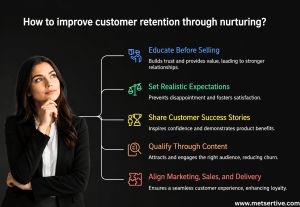
If you want nurturing to improve retention—not just conversions—focus on these areas:
1. Educate Before Selling
Help prospects understand:
- The problem
- The solution
- The process
Not just the offer.
2. Set Realistic Expectations
Avoid:
Overpromising
Focus on:
Clarity
- Transparency
- Realistic outcomes
3. Share Customer Success Stories
Use real examples that demonstrate:
- Results
- Timelines
- Challenges
- Outcomes
This helps prospects develop accurate expectations.
4. Qualify Through Content
Create content that explains:
- Who your solution is for
- Who it is not for
Better-fit customers generally retain longer.
5. Align Marketing, Sales, and Delivery
The message prospects hear before purchase should match the experience they receive afterward.
Consistency strengthens retention.
The Big Insight
Many businesses treat lead nurturing as a conversion activity.
But the smartest businesses recognize something deeper.
Lead nurturing is also a retention strategy.
Because when prospects:
- Understand the product
- Understand the process
- Understand expected outcomes
They become better customers.
And better customers tend to stay longer.
Key Takeaway
Lead nurturing doesn’t just help customers buy.
It helps the right customers buy for the right reasons.
And when that happens:
- Expectations improve
- Trust improves
- Customer success improves
- Retention improves
Which is why well-nurtured customers often become long-term customers.
The SaaS, D2C, SME, and Service Business Examples
By now, the idea should be becoming clear:
Retention does not magically begin after the sale.
It is influenced by everything that happens before the sale.
The messaging prospects see.
The expectations they develop.
The promises they hear.
The trust they build.
Let’s look at how this plays out across different business models.
SaaS Example: Retention Starts Before Signup
Many SaaS companies focus heavily on acquiring users.
They optimize:
- Landing pages
- Free trials
- Demos
- Sign-up flows
But retention often depends on something much simpler:
Whether customers understood what they were signing up for.
Scenario
A SaaS company promotes its platform as:
“Easy to implement in just one day.”
New customers sign up expecting immediate success.
But after purchase they discover:
- Setup takes several weeks
- Team involvement is required
- Data migration is needed
Result:
- Frustration
- Lower adoption
- Increased churn
Now compare that to a company that clearly explains:
- Setup requirements
- Learning curve
- Expected timelines
- Success milestones
Customers arrive with realistic expectations.
They know what success looks like.
They know what is required.
Result:
Better onboarding
- Higher adoption
- Lower churn
Key Insight
Many SaaS churn problems are not onboarding problems.
They are expectation-setting problems that started before signup.
Actionable Tip
Audit your website, demos, and sales conversations.
Ask:
“Are we creating realistic expectations before customers buy?”
D2C Example: Retention Starts Before the First Order
For D2C brands, retention often begins with product expectations.
Customers decide whether they trust your brand based on what they see before purchasing.
Scenario
An online brand uses heavily edited product images.
The product appears:
- Larger
- Higher quality
- More luxurious
than it actually is.
The customer purchases.
When the product arrives:
Reality does not match expectations.
Result:
- Returns increase
- Negative reviews increase
- Repeat purchases decline
Now compare that to a brand that uses:
- Accurate product photography
- Honest descriptions
- Clear specifications
- Transparent communication
Customers know exactly what they’re buying.
When the product arrives:
Expectation and reality align.
Result:
- Higher satisfaction
- Fewer returns
- Stronger trust
- More repeat purchases
Key Insight
Retention often starts with accurate representation.
Because disappointed customers rarely become loyal customers.
Actionable Tip
Review product pages regularly.
Ask:
“Are we helping customers make informed buying decisions—or simply trying to maximize conversions?”
Service Business Example: Retention Starts During the Sales Process
Service businesses frequently create retention problems without realizing it.
Why?
Because sales conversations often focus on winning the client instead of preparing the client.
Scenario
An agency promises:
- Fast results
- Immediate improvements
- Quick turnaround times
The client signs the contract.
But once the project begins:
- Deliverables take longer
- Results require testing
- Progress happens gradually
The client begins questioning the decision.
Not because the service is poor.
But because expectations were unrealistic.
Now compare that to a service provider that communicates:
- Realistic timelines
- Clear deliverables
- Expected responsibilities
- Potential challenges
The client understands the journey before it begins.
Result:
- Higher trust
- Better communication
- Stronger retention
Key Insight
Many service-business retention problems begin in the sales process—not in service delivery.
Actionable Tip
Review your proposals and sales presentations.
Look for places where expectations may be unintentionally inflated.
SME Example: Retention Starts During Lead Nurturing
Many SMEs focus on generating leads.
Far fewer focus on educating leads.
And that’s where future retention opportunities often get lost.
Scenario
An SME sells business consulting services.
Instead of pushing for an immediate sale, they nurture prospects through:
- Educational content
- Case studies
- Industry insights
- Success frameworks
Prospects gradually learn:
- How the process works
- What results are realistic
- What commitment is required
By the time they become customers:
They are informed.
They are qualified.
They are aligned.
Result:
1.Better customer fit
2.Higher engagement
3.Stronger retention
4.Higher Customer Lifetime Value (LTV)
Key Insight
Educational nurturing doesn’t just improve conversions.
It improves customer quality.
And better customers tend to stay longer.
The Bigger Pattern
Notice what all four examples have in common.
The retention outcome was influenced before the transaction occurred.
Not after.
Whether you’re:
- SaaS
- D2C
- SME
- Service business
The principle remains the same:
Better expectations create better retention.
Because customers stay when reality matches what they believed they were buying.
Key Takeaway
Retention isn’t owned by customer success alone.
It’s influenced by:
- Marketing
- Sales
- Positioning
- Messaging
- Lead nurturing
- Expectation setting
Which means retention begins much earlier than most businesses think.
Often before the first purchase ever happens.
The Retention Flywheel Starts Before Conversion
Most businesses think retention looks like this:
Customer Purchase
↓
Customer Experience
↓
Retention
But the reality is much bigger.
Retention is not a single stage.
It’s the result of an entire chain of events.
Let’s visualize it.
The Retention Flywheel
Marketing Messaging
↓
Expectation Setting
↓
Customer Acquisition
↓
Customer Experience
↓
Retention
↓
Customer Lifetime Value (LTV)
↓
Referrals
↓
Profitability
↓
Growth
And then the cycle starts again.
Step 1: Marketing Messaging
Everything starts here.
Your marketing creates the first impression.
It tells prospects:
- What you do
- Who you help
- What outcomes they can expect
This messaging becomes the foundation of future expectations.
If messaging creates clarity:
Retention becomes easier.
If messaging creates unrealistic expectations:
Retention becomes harder.
Step 2: Expectation Setting
This is one of the most overlooked growth activities.
Because expectations act like a lens.
Customers evaluate every future experience through that lens.
When expectations and reality align:
Trust grows.
When expectations and reality diverge:
Disappointment appears.
And disappointment is often the first step toward churn.
Step 3: Customer Acquisition
This is where most businesses focus.
Leads become customers.
Contracts get signed.
Subscriptions begin.
But acquisition is not the finish line.
It’s merely the transition point.
Step 4: Customer Experience
Now the customer begins interacting with your business.
They experience:
- Onboarding
- Product usage
- Service delivery
- Support
- Communication
This is where expectations are either validated or broken.
Step 5: Retention
If expectations were realistic and value is consistently delivered:
Customers stay.
They continue buying.
They continue engaging.
They continue trusting.
Retention becomes the natural outcome.
Step 6: Customer Lifetime Value (LTV)
When customers stay longer:
Value accumulates.
Revenue compounds.
Profitability improves.
The relationship becomes significantly more valuable than the initial transaction.
Step 7: Referrals
Satisfied customers often become advocates.
They:
- Recommend you
- Refer others
- Leave reviews
- Share experiences
Now retention begins influencing acquisition.
The flywheel starts accelerating.
Step 8: Profitability
At this stage:
- CAC becomes easier to recover
- Marketing efficiency improves
- Revenue quality improves
Because customer value continues growing.
Step 9: Growth
This is where sustainable growth emerges.
Not from constantly replacing customers.
But from maximizing customer value over time.
Growth becomes:
- More predictable
- More profitable
- More sustainable
The Big Insight
Many businesses view retention as a post-sale activity.
Something managed by:
- Customer success
- Support teams
- Account managers
But this flywheel reveals a different reality.
Retention is the outcome of the entire customer journey.
Marketing influences it.
Sales influences it.
Positioning influences it.
Expectation setting influences it.
Customer experience influences it.
By the time retention becomes visible, many of the factors affecting it have already been in motion for weeks or months.
Actionable Tip
Map your customer journey from:
First touchpoint
→ First purchase
→ First success moment
Then ask:
“Where might we be creating expectations that we can’t consistently fulfill?”
The answer often reveals hidden retention opportunities.
Key Takeaway
Retention doesn’t begin after conversion.
It begins before conversion.
Because every stage of the customer journey contributes to whether customers stay, leave, expand, refer, and generate long-term value.
And that’s why the strongest retention systems are built long before the first purchase ever happens.
Signs You’re Creating Future Churn Before Customers Buy
One of the biggest misconceptions about retention is that churn begins when customers become unhappy after the purchase.
But in many businesses, churn begins much earlier.
Sometimes months earlier.
Often during:
- Marketing campaigns
• Lead nurturing
• Sales conversations
• Product positioning
• Customer acquisition
The reality is simple:
Many businesses unknowingly create future churn before customers ever buy.
Let’s make this practical.
If several of the following signs sound familiar, your retention challenges may actually be starting before conversion.
1. Marketing Promises More Than Delivery
This is one of the most common causes of future churn.
Marketing creates expectations.
But if delivery cannot consistently match those expectations, disappointment follows.
SaaS Example
Marketing message:
“Get results in 7 days.”
Reality:
Implementation takes 15 days.
Customers feel misled.
D2C Example
Product advertisements show dramatic transformations.
Customers receive the product.
Results are far less dramatic than expected.
Returns increase.
Service Business Example
An agency promises explosive growth within weeks.
Actual results require months of testing and optimization.
Clients become frustrated.
SME Example
A business consultant promises “guaranteed growth.”
Client expectations become unrealistic.
Trust begins eroding almost immediately.
Actionable Tip
Review your marketing messages.
Ask:
“Can our delivery team consistently fulfill this promise?”
If not, adjust the promise before it becomes future churn.
2. Wrong-Fit Customers Keep Entering
Not every lead is a good customer.
Yet many businesses focus on maximizing volume instead of improving fit.
SaaS Example
Enterprise software is marketed to freelancers.
Customers purchase.
Product complexity overwhelms them.
Churn rises.
D2C Example
Premium products attract bargain shoppers through discount-heavy promotions.
Customers purchase once.
Never return.
Service Business Example
An agency specializes in long-term strategic growth.
Marketing attracts businesses seeking instant results.
Mismatch occurs.
Relationships end quickly.
SME Example
A specialized B2B solution attracts businesses outside the ideal customer profile.
Customers struggle to implement recommendations.
Retention suffers.
Actionable Tip
Stop asking:
“How do we get more customers?”
Start asking:
“How do we attract better-fit customers?”
3. Customers Frequently Misunderstand the Offer
If customers regularly say:
• “I thought this included more.”
• “I didn’t know that.”
• “This isn’t what I expected.”
You may have an expectation-setting problem.
SaaS Example
Customers assume a feature is included.
It isn’t.
Disappointment follows.
D2C Example
Customers misunderstand product specifications.
Returns increase.
Service Business Example
Clients assume ongoing support is included.
It wasn’t part of the agreement.
Trust declines.
SME Example
Customers misunderstand implementation requirements.
Adoption suffers.
Actionable Tip
Look for recurring questions from prospects and customers.
Those questions often reveal unclear messaging.
4. Expectations Are Unclear
Unclear expectations create uncertainty.
And uncertainty creates dissatisfaction.
Even when the product itself performs well.
Scenario
A customer doesn’t know:
- What success looks like
• How long results take
• What their responsibilities are
• What happens next
The experience feels confusing.
Confusion eventually becomes frustration.
Actionable Tip
Clearly communicate:
- Timeline
• Deliverables
• Expected outcomes
• Customer responsibilities
The clearer the expectations, the stronger the retention.
5. Early Churn Is Common
Early churn is often one of the clearest warning signs.
Because customers are leaving before they fully experience value.
SaaS Example
Users cancel within the first 30 days.
D2C Example
Customers buy once and disappear.
Service Business Example
Clients leave after the initial engagement.
SME Example
Customers stop engaging shortly after implementation.
Actionable Tip
Investigate what customers expected before purchasing.
Compare it with what they actually experienced.
The gap often reveals the root cause.
6. Refund Requests Are Increasing
Refund requests often reveal expectation misalignment.
Not necessarily product failure.
Example
A product works exactly as designed.
But customers expected something completely different.
Result:
Refund request.
The issue wasn’t performance.
The issue was expectation.
Actionable Tip
Review refund reasons quarterly.
Patterns often reveal retention problems long before churn data does.
7. Customers Say:
“I Thought This Would Be Different.”
This single sentence contains more retention insight than many analytics dashboards.
Because it usually means:
Reality failed to match expectations.
And expectations were often shaped before the purchase.
Actionable Tip
Collect this feedback.
Don’t ignore it.
Use it to improve:
• Marketing
• Positioning
• Sales conversations
• Onboarding
The Insight That Changes Everything
Most businesses assume retention problems begin after conversion.
But many actually begin before conversion.
Because:
• Marketing influences expectations
• Expectations influence experience
• Experience influences retention
Which means:
Many retention problems are actually acquisition problems in disguise.
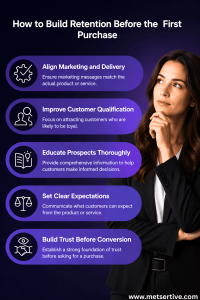
How to Build Retention Before the First Purchase
If retention starts before conversion…
Then improving retention starts before conversion too.
The goal isn’t simply to acquire customers.
The goal is to acquire customers who:
• Understand your offer
• Fit your solution
• Have realistic expectations
• Are positioned for success
Here’s how to make that happen.
-
Align Marketing and Delivery
One of the most important retention strategies is simple:
Promise only what can be delivered.
When marketing, sales, and delivery operate independently:
Problems emerge quickly.
SaaS Example
Marketing promotes simplicity.
Product onboarding feels complex.
Trust declines.
D2C Example
Advertising highlights premium quality.
Customer experience feels average.
Repeat purchases decline.
Service Business Example
Sales promises aggressive timelines.
Delivery teams struggle to meet expectations.
Client satisfaction falls.
SME Example
Marketing communicates one outcome.
Operations deliver something different.
Customers become confused.
Actionable Tip
Bring marketing, sales, and delivery teams together regularly.
Review customer promises.
Ensure everyone is communicating the same reality.
-
Improve Customer Qualification
Not every lead should become a customer.
This can feel counterintuitive.
But stronger qualification often improves retention dramatically.
SaaS Example
A company rejects customers who lack technical resources.
Result:
Better adoption.
Lower churn.
Service Business Example
An agency declines clients seeking unrealistic outcomes.
Result:
Stronger long-term relationships.
D2C Example
A premium brand focuses on ideal customers rather than discount seekers.
Result:
Higher loyalty.
SME Example
A consultant works only with businesses ready to implement recommendations.
Result:
Better customer success.
Actionable Tip
Define:
- Ideal customer profile
• Customer fit criteria
• Success requirements
Then qualify prospects against those standards.
-
Educate Prospects Thoroughly
Education improves retention.
Because educated customers make better decisions.
Help prospects understand:
What They’ll Get
Clarify:
- Features
• Benefits
• Deliverables
What They Won’t Get
This is equally important.
Transparency builds trust.
What Success Requires
Many customers underestimate their role in achieving results.
Explain:
- Time commitment
• Resources required
• Responsibilities
Actionable Tip
Create educational content that prepares prospects for success before they buy.
-
Set Clear Expectations
Retention problems often begin when expectations remain vague.
Clear expectations reduce surprises.
And fewer surprises usually lead to stronger retention.
Example
Instead of saying:
“You’ll see results quickly.”
Say:
“Most customers begin seeing measurable improvements within 60–90 days.”
One creates excitement.
The other creates trust.
Trust usually wins long-term.
Actionable Tip
Document your:
- Timelines
• Milestones
• Success metrics
• Customer responsibilities
Then communicate them repeatedly.
-
Build Trust Before Conversion
Trust is one of the strongest predictors of retention.
And trust rarely appears overnight.
It develops gradually.
Through:
- Helpful content
• Consistent communication
• Transparency
• Authenticity
• Delivering on small promises
SaaS Example
Educational webinars build credibility before signup.
D2C Example
Honest product reviews build confidence.
Service Business Example
Thought leadership content establishes expertise.
SME Example
Case studies and customer stories reduce uncertainty.
Actionable Tip
Focus on helping prospects make better decisions—not just faster decisions.
Trust formed early often lasts longer.
The Strategic Shift
Most businesses focus on:
“How do we acquire more customers?”
The smarter question is:
“How do we acquire customers who are more likely to stay?”
Because retention is rarely created by luck.
It’s created by:
- Clear expectations
• Strong qualification
• Honest communication
• Better-fit customers
• Early trust
Key Takeaway
Customer retention doesn’t begin after the first purchase.
It begins long before it.
The strongest retention systems are built through:
1.Better marketing
2.Better qualification
3.Better expectation setting
4.Better education
5.Better trust-building
Because when customers know exactly what they’re buying, what success requires, and what to expect…
They are far more likely to stay.
And that’s where sustainable growth begins.
The Big Shift: Stop Thinking of Retention as a Post-Sale Activity
Most businesses think about retention the wrong way.
They assume retention begins after the sale.
After onboarding.
After implementation.
After customer success gets involved.
After support starts interacting with the customer.
And on the surface, that seems logical.
After all, retention is often measured after someone becomes a customer.
But here’s the perspective shift that changes everything:
Retention is measured after the sale.
But it often begins before the sale.
That distinction is important.
Because by the time a customer decides to stay or leave, many of the factors influencing that decision have already been set in motion.
Why This Matters
Think about a customer who cancels after 60 days.
Most businesses investigate:
• Product issues
• Support tickets
• Onboarding problems
• Service delivery challenges
Those are all important.
But sometimes the real cause started much earlier.
The customer purchased with expectations that were never realistic.
And when reality failed to match those expectations, churn became almost inevitable.
The problem wasn’t necessarily the product.
The problem was the expectation.
The Traditional View of Retention
Many businesses see retention as the responsibility of:
• Customer support
• Customer success
• Account management
• Operations teams
In this model:
Marketing acquires customers.
Sales closes customers.
Then retention becomes someone else’s responsibility.
But customer behavior doesn’t work that way.
Customers experience your business as one continuous journey.
They don’t separate:
• Marketing
• Sales
• Onboarding
• Delivery
• Support
To them, it’s all one experience.
Which means every stage contributes to retention.
SaaS Example
A SaaS company invests heavily in customer success.
They hire onboarding specialists.
They improve support.
They launch educational resources.
Yet churn remains high.
Why?
Because marketing promised:
“Instant results.”
Customers expected success immediately.
But actual adoption requires:
• Training
• Team alignment
• Implementation
Customer success teams are now trying to recover from expectations created before signup.
The retention problem started before onboarding ever began.
D2C Example
A D2C brand launches an aggressive advertising campaign.
The ads create enormous excitement.
Customers purchase.
But the actual product experience feels ordinary compared to what was promised.
Returns increase.
Repeat purchases decline.
Customer service works hard to solve complaints.
But the root issue wasn’t customer service.
It was expectation management.
Retention challenges were created before the first order was placed.
Service Business Example
A consulting firm promises transformational outcomes during sales conversations.
The client signs.
But after engagement begins, the client discovers:
• Results take time
• Internal execution is required
• Success depends on collaboration
The client feels disappointed.
Not because the service lacks value.
But because expectations were unrealistic.
The retention issue began during the sales process.
SME Example
An SME focuses heavily on lead generation.
Marketing campaigns perform well.
Customers convert.
But engagement quickly declines after purchase.
When leadership investigates, they discover many customers:
• Didn’t fully understand the solution
• Didn’t understand implementation requirements
• Had unrealistic expectations
The acquisition process attracted customers.
But it didn’t prepare customers.
And that preparation gap eventually became a retention problem.
The Insight Most Businesses Miss
The strongest retention strategies often begin inside:
• Marketing
• Positioning
• Lead nurturing
• Sales conversations
• Expectation setting
Not inside customer support.
Not inside onboarding.
Not inside customer success.
Because by the time those teams become involved, expectations already exist.
And expectations strongly influence whether customers stay.
The Strategic Shift
Instead of asking:
“How do we improve retention after customers buy?”
Start asking:
“How do we improve retention before customers buy?”
That question changes everything.
Because it forces businesses to think about:
• Customer fit
• Messaging accuracy
• Sales alignment
• Expectation management
• Customer education
And all of those factors influence retention long before churn becomes visible.
Actionable Tip
Review your customer journey from the prospect’s perspective.
Ask:
• What expectations are we creating?
• Are those expectations realistic?
• Can we consistently deliver what we’re promising?
• Are we attracting the right customers?
The answers often reveal retention opportunities hiding inside acquisition.
Key Takeaway
Strategic businesses understand something many competitors miss:
Retention begins when expectations are formed.
And expectations are usually formed long before the first purchase.
Which means one of the most powerful retention strategies often starts in marketing—not customer support.
Conclusion
For years, businesses have viewed retention as a post-sale activity.
Something managed through:
• Follow-ups
• Loyalty programs
• Customer support
• Account management
• Customer success initiatives
And while all of those matter, they only tell part of the story.
Because retention begins much earlier than most businesses realize.
Long before:
• The first purchase
• The signed contract
• The onboarding process
• The welcome email
Retention begins when a prospect starts forming expectations about your business.
And those expectations influence everything that follows.
What We’ve Learned
Throughout this discussion, we’ve seen that retention is connected to far more than post-sale communication.
It’s influenced by:
• Marketing messaging
• Positioning
• Lead nurturing
• Sales conversations
• Customer qualification
• Expectation setting
• Trust-building
All of these factors shape how customers perceive your business before they buy.
And perception often influences retention more than businesses realize.
The Businesses That Win Retention Early
The businesses with the strongest retention often gain an advantage before customers ever become customers.
They don’t simply focus on generating more leads.
They focus on creating better-fit customers.
They:
1.Attract the right customers
2.Set realistic expectations
3.Educate prospects thoroughly
4.Build trust early
5.Deliver consistent value
As a result, customers arrive better informed, better prepared, and more likely to succeed.
And customers who succeed tend to stay.
SaaS Perspective
The best SaaS companies don’t just optimize onboarding.
They optimize expectation setting before signup.
Because informed users adopt faster and churn less.
D2C Perspective
The strongest D2C brands don’t just focus on acquiring buyers.
They focus on ensuring customers know exactly what they’re purchasing.
Because trust drives repeat purchases.
Service Business Perspective
The most successful service providers don’t simply close deals.
They qualify clients carefully and communicate honestly.
Because aligned expectations create stronger long-term relationships.
SME Perspective
Growing SMEs don’t just invest in lead generation.
They invest in customer education.
Because educated customers often become more profitable customers.
The Final Insight
Most businesses ask:
“How do we improve retention?”
But a more powerful question is:
“What expectations are we creating before customers buy?”
Because expectations influence:
• Trust
• Satisfaction
• Engagement
• Loyalty
• Churn
• Lifetime Value
And ultimately:
Profitability.
Actionable Next Steps
If you want to improve retention, start here:
- Audit your marketing promises
- Review customer expectations
- Improve customer qualification
- Align marketing, sales, and delivery
- Educate prospects more thoroughly
- Identify where expectation gaps occur
- Track early churn patterns
Often, the biggest retention opportunities are hiding before conversion.
Key Takeaway
Customer retention doesn’t start after the first purchase.
It starts the moment a prospect begins deciding whether they can trust you.
And businesses that understand this build:
- Higher retention
- Higher Customer Lifetime Value (LTV)
- Lower churn
- More predictable growth
- More profitable customer relationships
Because the first sale doesn’t start retention.
Expectations do.


