
Customer Experience Audit for Fixing Broken Touchpoints Across Channels
Customer experience audit is the fastest way to uncover where customers feel friction, confusion, or frustration—often in places businesses don’t realize are costing them conversions, retention, and trust.
Let’s get one thing straight.
Customer experience is no longer a “nice-to-have.”
It’s not a branding bonus.
And it’s definitely not just a support team problem.
Customer experience is a growth lever.
Today, customers don’t just compare prices.
They compare how easy, fast, and reassuring it feels to do business with you.
Two brands can sell the same product at the same price—
and the one with the smoother experience wins.
Where Most Businesses Get It Wrong
Here’s the uncomfortable truth:
Most businesses believe they’re delivering a great customer experience.
But very few actually audit it.
They assume:
- “Our product is good.”
- “Our support replies eventually.”
- “Our website looks fine.”
Meanwhile, revenue quietly leaks through broken touchpoints:
- A slow checkout
- Confusing pricing pages
- Cold automated emails
- Late or robotic support responses
No alarms go off.
No angry emails come in.
Customers don’t complain.
They just… leave.
That’s what makes CX problems so dangerous.
They create silent churn.
What a CX Audit Really Uncovers
A proper customer experience audit doesn’t just tell you what’s broken.
It shows you where trust is being lost without you noticing.
Specifically, it uncovers:
- Silent churn risks
Customers who stop engaging long before they cancel or disappear. - Conversion friction
Moments where customers hesitate, abandon carts, or delay decisions. - Trust-breaking moments
Inconsistent messaging, slow responses, or confusing handoffs between channels.
According to PwC, 32% of customers will walk away from a brand they love after just one bad experience.
That’s how unforgiving modern CX has become.
Why This Guide Exists
The good news?
You don’t need to:
- Rebuild your website
- Change your entire tech stack
- Hire a CX consultant immediately
A CX audit helps you:
- Identify the biggest experience gaps
- Prioritize fixes that actually impact revenue
- Improve retention and conversions step by step
Small changes at the right touchpoints compound fast.
Think of this guide as a flashlight—not a bulldozer.
It helps you see what’s leaking before you try to fix everything.
Customer Experience Explained to Boost Retention, Revenue & Loyalty
What Is a Customer Experience Audit? (Simple, Practical Definition)
Let’s simplify this—because CX jargon often overcomplicates things.
Simple Definition
A customer experience audit is a structured review of every interaction a customer has with your brand, to identify:
- Friction
- Inconsistency
- Missed opportunities
That’s it.
No buzzwords.
No complicated frameworks.
It’s about seeing your business through your customer’s eyes.
What a CX Audit Is Not
This part matters, because many businesses think they’re auditing CX—but they’re not.
A CX audit is not:
- ❌ A one-time customer survey
- ❌ Just checking your NPS score
- ❌ Limited to customer support interactions
Surveys and scores are signals, not the full picture.
Example:
A customer might give you a “7/10” on NPS.
But:
- They struggled at checkout
- Got confused after purchase
- Never came back
The score didn’t show the story.
The journey did.
What a CX Audit Actually Includes
A real CX audit looks at how customers feel and move, not just what they say.
It evaluates:
- Emotional experience
Do customers feel confident or anxious? - Speed & clarity
Are responses fast? Are next steps obvious? - Consistency across channels
Does WhatsApp say one thing while the website says another?
Tip: Customers don’t experience departments.
They experience one brand.
If marketing sounds friendly but support sounds cold, CX breaks.
When Should You Run a CX Audit?
You don’t need to wait for a crisis.
Strong signals it’s time to audit your CX:
- Falling conversions
- Rising churn or drop-offs
- Increasing support complaints
- Growth that has plateaued despite traffic
Scenario:
A SaaS company sees strong trial sign-ups—but low trial-to-paid conversions.
The product isn’t the issue.
The experience during onboarding is.
A CX audit reveals:
- Confusing setup steps
- No follow-up guidance
- Slow support replies during trial
Problem found.
Revenue saved.
Key takeaway so far:
Customer experience problems rarely scream.
They whisper—until revenue disappears.
A CX audit helps you listen before it’s too late.
Before You Start: Set Clear Goals for Your CX Audit
Before you map journeys.
Before you analyze touchpoints.
Before you open spreadsheets.
You need to answer one question:
“What are we actually trying to fix?”
Because auditing customer experience without clear goals is how businesses fall into analysis paralysis.
Why Auditing Without Goals Backfires
When there’s no clear outcome, teams:
- Audit everything
- Fix nothing
- Argue over priorities
- Drown in data
You end up with:
- 50 screenshots
- 20 observations
- 0 real improvements
A CX audit isn’t about perfection.
It’s about progress in the right direction.
Common CX Audit Goals (Pick What Matters Most)
Most CX audits usually aim to improve one (or two) of these outcomes:
- Improve conversion rate
(More visitors → buyers) - Reduce churn
(Fewer customers leaving quietly) - Shorten response time
(Especially on WhatsApp, chat, or email) - Increase repeat purchases
(Turning one-time buyers into loyal customers)
According to Bain & Company, increasing customer retention by just 5% can boost profits by 25–95%.
That’s why clarity matters.
Choose 1–2 Primary Outcomes (Not Everything at Once)
This is critical.
Trying to fix:
- Conversions
- Retention
- Support
- Mobile UX
- Personalization
- Automation
…all in one audit is a recipe for burnout.
Instead, choose one main goal and one supporting goal.
Practical Examples
SaaS
- Primary goal: Reduce trial drop-offs
- Supporting goal: Improve onboarding clarity
eCommerce
- Primary goal: Lower cart abandonment
- Supporting goal: Improve checkout trust signals
SME / Local Business
- Primary goal: Improve WhatsApp response experience
- Supporting goal: Reduce missed inquiries
Tip:
Write your audit goal as a sentence, not a keyword.
Bad: “Improve CX”
Good: “Reduce trial drop-offs by identifying friction in onboarding and support touchpoints.”
That sentence becomes your decision filter.
If a finding doesn’t support that goal?
Park it for later.
Step 1: Map Your Real Customer Journey (Not the Ideal One)
This is where most CX audits go wrong.
Businesses map the journey they wish customers followed.
Not the one they actually do.
Why Customer Journeys Are No Longer Linear
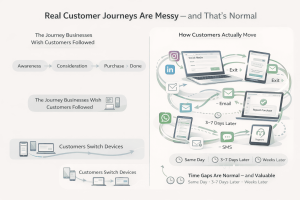
The old model looked neat:
Awareness → Consideration → Purchase → Done
Reality looks like this:
Social → Website → WhatsApp → Exit → Email → Pricing → Exit → SMS → Checkout → Support → Repeat Purchase
Messy.
Looping.
Unpredictable.
And completely normal.
Today’s customers:
- Switch devices
- Jump channels
- Pause decisions
- Re-enter weeks later
Google reports that over 90% of users switch between devices to complete a task.
Your CX must survive those switches.
Map How Customers Actually Move
Start by mapping real behavior, not assumptions.
Ask:
- Where do customers enter from?
- Where do they leave?
- Where do they come back?
Example Journey
A real-world SaaS journey might look like:
- Sees a LinkedIn post (mobile)
- Visits website (desktop)
- Clicks pricing
- Leaves
- Receives email nurture
- Books demo
- Asks question on WhatsApp
- Converts days later
That’s not chaotic.
That’s modern CX.
How to Create a Realistic Journey Map
You don’t need a fancy framework.
You need honesty.
Step 1: Identify Entry Points
- Social media posts or ads
- Blog content
- Referrals
- WhatsApp inquiries
- Google search
Step 2: Identify Exit Points
- Pricing page
- Checkout page
- Long forms
- Slow-loading pages
- No-response moments
Exits aren’t failures.
They’re signals.
Step 3: Identify Re-Entry Loops
- Email follow-ups
- Retargeting ads
- WhatsApp reminders
- Promotional SMS
- Support conversations
Many conversions happen on the second or third loop.
Include These 3 Critical Layers
Most journey maps miss this—and it costs them.
1️⃣ Devices
- Mobile vs desktop vs tablet
- Where does friction increase?
2️⃣ Channels
- Website
- SMS
- Support chat
Does the conversation continue—or restart every time?
3️⃣ Time Gaps
- Same-day actions
- 3–7 day pauses
- Weeks of silence before re-engagement
Tip:
Time gaps often hide the biggest CX opportunities.
Tools You Can Use (Simple to Advanced)
You don’t need enterprise software to start.
- Whiteboard or sticky notes
Great for team alignment - Miro / FigJam
Visual, collaborative, easy to iterate - CRM journey data
Actual behavior beats opinions
Start rough.
Refine later.
The Modern Customer Journey Is Not Linear
Key takeaway:
You can’t improve customer experience if you don’t see the journey clearly.
Map the real path.
Not the pretty one.
Step 2: List and Categorize All Customer Touchpoints
Once you’ve mapped the real customer journey, the next step is simple—but powerful:
List every place where a customer interacts with your brand.
This is where most CX problems hide in plain sight.
What Are Customer Touchpoints? (Simple Definition)
Customer touchpoints are every interaction between your business and your customer.
Not just:
- Support chats
- Sales calls
But also:
- Ads
- Emails
- Checkout pages
- Follow-up messages
- Delivery updates
- Even silence
If a customer sees, reads, clicks, or waits—that’s a touchpoint.
And customers don’t separate departments.
They experience one brand.
The 4 Core Categories of Customer Touchpoints
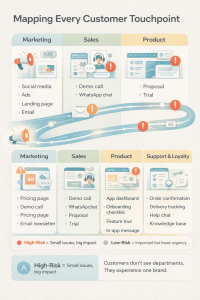
To keep things organized, group your touchpoints into these four buckets:
1️⃣ Marketing Touchpoints (First Impressions Live Here)
These shape expectations before customers ever talk to you.
Examples:
- Social media posts
- Paid ads
- Blog content
- Landing pages
- Email newsletters
Risk:
Over-promising here creates disappointment later.
2️⃣ Sales Touchpoints (Decision Moments)
These help customers decide whether to trust you.
Examples:
- Pricing pages
- Demo booking pages
- WhatsApp sales conversations
- Proposal emails
- Trial onboarding
Risk:
Confusion or slow responses kill momentum.
3️⃣ Product Experience Touchpoints (Reality Check)
This is where customers experience what they paid for.
Examples:
- App onboarding
- Feature walkthroughs
- In-product messages
- Setup emails
- Usage reminders
Risk:
A great sales experience followed by a confusing product = churn.
4️⃣ Support & Post-Purchase Touchpoints (Trust Builders)
This is where loyalty is earned—or lost.
Examples:
- Order confirmation emails
- Delivery updates
- WhatsApp support chats
- Help center articles
- Renewal reminders
Risk:
Silence after purchase creates anxiety.
High-Risk vs Low-Risk Touchpoints
Not all touchpoints carry the same weight.
High-risk touchpoints (small issues = big damage):
- First interaction
- Checkout
- Support response
- Post-purchase communication
- Renewals or cancellations
Low-risk touchpoints (important, but less critical):
- Social likes
- Blog comments
- Passive content consumption
During a CX audit, prioritize high-risk touchpoints first.
Example CX Audit Touchpoint Checklist
Here’s a simple starter list you can adapt:
- Ads (message vs landing page match)
- Landing pages (speed + clarity)
- Pricing page (transparency)
- Checkout (steps, fees, trust)
- Emails (tone, timing, relevance)
- WhatsApp messages (speed + personalization)
- Support replies (response time + empathy)
- Post-purchase updates (confirmation, tracking, onboarding)
Tip:
If it touches revenue or trust, it goes on the list.
Customer Touchpoints Where CX Is Won or Lost
Step 3: Evaluate Each Touchpoint for Friction, Clarity, and Emotion
Now comes the most important part of your CX audit:
Put yourself in the customer’s shoes—at every touchpoint.
Don’t ask, “Does this work?”
Ask, “How does this feel?”
The 5 Questions to Ask at Every Touchpoint
For each touchpoint, ask:
- Is it fast?
- Is it clear?
- Is it consistent?
- Is it human?
- Does it build confidence—or doubt?
If you hesitate on any answer, you’ve found friction.
A Practical CX Evaluation Framework
Use this simple framework to audit each interaction:
Speed
- Page load time
- Response time on WhatsApp/email
- Time to resolution
Studies show that customers expect replies within minutes on messaging channels—not hours.
Clarity
- Is the next step obvious?
- Are prices, actions, and outcomes clear?
- Are expectations set properly?
Confusion = hesitation = drop-off.
Tone
- Does it sound human or robotic?
- Is the language warm or transactional?
- Does it match your brand voice?
Customers can feel scripted responses.
Effort
- Is it easy to complete the task?
- Too many steps?
- Too many fields?
- Too many clicks?
High effort = high abandonment.
Emotion
- Does this touchpoint reassure the customer?
- Or does it create anxiety?
Emotion decides loyalty more than logic.

Real-World Examples of CX Breakdown
❌ Checkout Page with Hidden Fees
- Customer feels tricked
- Trust drops instantly
- Abandonment skyrockets
✔ Fix:
Show full pricing early. Transparency beats persuasion.
❌ Slow WhatsApp Replies
- Customer is ready to buy
- Waits hours for a response
- Buys from a competitor instead
✔ Fix:
Use auto-acknowledgments + response SLAs.
❌ Cold Post-Purchase Email
“Your order has been processed.”
✔ Fix:
Add reassurance:
“What happens next,” delivery timelines, and support access.
Tip: Score Each Touchpoint
Give each touchpoint a simple score (1–5) for:
- Speed
- Clarity
- Tone
- Effort
- Emotion
Anything scoring 3 or below becomes a priority fix.
Key takeaway:
CX isn’t improved by guesswork.
It’s improved by systematically removing friction and anxiety.
Step 4: Audit Omnichannel Consistency (Where CX Often Breaks)
Customers don’t think in channels.
They think in conversations.
If they talk to you on Instagram today and WhatsApp tomorrow, they expect:
The conversation to continue—not restart.
This is where CX often quietly breaks.
Why Omnichannel Consistency Matters
Today’s customers:
- Discover you on social media
- Research on your website
- Ask questions on WhatsApp
- Buy later from email or SMS
And they expect:
- The same tone
- The same pricing
- The same promises
When that doesn’t happen, trust erodes—even if your product is good.
According to Salesforce, 76% of customers expect consistent interactions across departments and channels—but most businesses still fail here.
Common CX Gaps That Hurt Trust
These inconsistencies don’t just confuse customers—they slow conversions.
❌ Website says one thing, WhatsApp says another
- Website: “Free shipping on all orders”
- WhatsApp: “Free shipping above ₹999 only”
Customer reaction:
“Which one is true?”
❌ Marketing tone ≠ Support tone
- Instagram: friendly, fun, conversational
- Support email: stiff, robotic, cold
Customer reaction:
“This doesn’t feel like the same brand.”
❌ Different answers from different people
- Sales says refunds are easy
- Support says refunds take 14 days and approvals
Customer reaction:
“I was misled.”
What to Audit for Omnichannel Consistency
Use this checklist across every channel:
Brand Voice
- Is the tone consistent?
- Friendly vs formal
- Helpful vs transactional
Tip:
Create a simple brand voice guide—1 page is enough.
Pricing Consistency
- Same prices everywhere?
- Same discounts?
- Same shipping and tax rules?
Hidden differences = broken trust.
Policy Clarity
- Refund policy
- Cancellation rules
- Delivery timelines
- SLA commitments
Customers shouldn’t have to “hunt” for clarity.
Real-World Example
Instagram Ad:
“Start in 5 minutes. No setup fees.”
Landing Page:
Long form. Complex setup. Pricing hidden.
Result:
High ad clicks → low conversions.
Fix:
Align ad promises with landing page reality.
Quick Self-Test
Ask yourself:
“If a customer screenshots a message from one channel and shares it on another—would it still make sense?”
If not, CX is breaking.
Key takeaway:
Consistency isn’t about perfection.
It’s about removing contradictions.
Step 5: Review Support Experience Like a Customer Would
Support isn’t a cost center.
It’s where trust is tested under pressure.
Customers usually contact support when:
- Something broke
- Something is unclear
- Something feels risky
How you respond decides:
- Retention
- Reviews
- Referrals
What to Audit in Your Support Experience
Look beyond “ticket closed.”
Focus on how it felt.
First Response Time
Speed signals respect.
Example:
- 2-minute reply = “They care”
- 2-day reply = “They don’t value me”
Studies show fast first response increases customer satisfaction by over 30%, even if resolution takes longer.
Resolution Clarity
Does the customer know:
- What happened?
- What was fixed?
- What happens next?
Vague answers create anxiety.
Tone & Empathy
This matters more than policies.
Compare:
- “As per our policy, refunds are not allowed.”
vs - “I understand how frustrating this is. Let me explain the best option available.”
Same outcome. Very different experience.
Test Your Own Support (This Is Powerful)
Don’t assume.
Experience it yourself.
Step-by-step test:
- Send a real query (email, WhatsApp, chat)
- Track response time
- Read the tone
- Check clarity
- Ask: “Would I feel reassured?”
Tip:
Test at different times—working hours, evenings, weekends.
Real Scenario Comparison
❌ Cold Experience
- Response after 48 hours
- Generic template
- No name
- No empathy
Customer thinks:
“They don’t care. I’ll leave.”
✔ Great Experience
- Response in 2 minutes
- Uses customer name
- Acknowledges frustration
- Clear next steps
Customer thinks:
“Mistakes happen. I trust them.”
Support Audit Red Flags
Watch out for:
- No auto-acknowledgment
- Long silences
- Copy-paste replies
- Passing customers between agents
- Asking for the same info repeatedly
Each one chips away at loyalty.
Key takeaway:
Customers don’t remember perfect products.
They remember how you helped when it mattered.
Step 6: Analyze Post-Purchase and Retention Touchpoints
Most businesses treat conversion as the finish line.
It’s not.
It’s the starting line for retention.
This is where CX quietly decides whether:
- Customers come back
- Customers refer others
- Or customers disappear after one purchase
Why CX Doesn’t End at Conversion
After a customer pays, emotions peak.
They feel:
- Excited
- Anxious
- Hopeful
- Curious
If you go silent at this moment, doubt creeps in.
According to PwC, 32% of customers leave a brand after just one bad experience—and many of those experiences happen after purchase.
What to Audit in Post-Purchase CX
Review these touchpoints as if you were the customer:
Order Confirmations
Ask:
- Is it instant?
- Is it clear?
- Does it confirm what they bought and what happens next?
❌ Weak CX:
“Thanks for your order.” (No details)
✔ Strong CX:
“Thanks, Sarah! Your order #4567 is confirmed. Here’s what happens next…”
Delivery Updates
Silence creates anxiety.
Customers want to know:
- Has it shipped?
- When will it arrive?
- Who do I contact if there’s an issue?
Tip:
Proactive updates reduce “Where is my order?” tickets dramatically.
Onboarding Emails (Critical for SaaS & Services)
Buying doesn’t equal understanding.
Audit:
- Do customers know how to start?
- Is there a simple “first win” guide?
❌ Example:
SaaS tool sends login credentials only.
✔ Better:
“Welcome! Here’s how to get value in your first 10 minutes.”
No onboarding = churn risk.
Follow-Ups and Check-Ins
This is where relationships form.
Examples:
- “How’s it going so far?”
- “Need help setting this up?”
- “Here’s a tip to get more value.”
These small moments create loyalty.
Signs of Weak Post-Purchase CX
Watch for these red flags:
- Long silence after payment
- Customers asking basic “what next?” questions
- High refund or cancellation rates
- Support tickets asking for clarity, not issues
Example:
A customer buys software and hears nothing for a week.
They assume it’s complicated—or not worth it.
Result:
Churn before real usage.
Quick Post-Purchase CX Checklist
Ask:
- Do we communicate immediately?
- Do we reduce anxiety?
- Do we guide next steps?
- Do we stay present after payment?
Key takeaway:
Retention is built after the sale, not before it.
Step 7: Use Data and Feedback to Validate Your CX Audit
CX audits shouldn’t rely on gut feelings.
Opinions lie.
Patterns don’t.
This step helps you validate what’s actually broken—using data.
Quantitative Data: What Customers Do
Start with numbers.
Conversion Rates
- Which pages convert?
- Where do customers drop off?
Example:
High traffic, low checkout conversion = friction problem.
Drop-Off Points
Look for:
- Pricing page exits
- Checkout abandonment
- Trial signup drop-offs
Each drop-off is a CX signal.
Response Times
Audit:
- Average first response time
- Resolution time by channel (email vs WhatsApp vs chat)
Slow = frustrating.
Fast = confidence.
Qualitative Feedback: What Customers Say
Numbers show where.
Feedback explains why.
CSAT (Customer Satisfaction Score)
Best for:
- Support interactions
- Post-purchase experiences
Ask:
“How satisfied were you with this interaction?”
NPS (Net Promoter Score)
Best for:
- Overall experience
- Loyalty and advocacy
Follow up with:
“What’s the main reason for your score?”
That answer is gold.
Support Transcripts & Chat Logs
Often overlooked—and incredibly valuable.
Read:
- Common complaints
- Repeated confusion
- Emotional language
Tip:
Look for phrases like:
- “I’m confused”
- “I didn’t know”
- “No one told me”
Those point directly to broken touchpoints.
Tools That Make CX Audits Easier
You don’t need fancy tools—just the right ones.
- Google Analytics → Behavior flows, exits, conversions
- Hotjar / Clarity → Heatmaps, session recordings
- CRM → Customer history, lifecycle stages
- Survey tools → CSAT, NPS, feedback forms
What to Look For (This Matters)
Don’t chase single complaints.
Look for:
- Repeated issues
- Recurring drop-offs
- Consistent delays
- Patterns across channels
Example:
If 30% of users abandon checkout and support chats mention “pricing confusion”—you’ve found a real CX issue.
Key takeaway:
Great CX decisions come from patterns, not opinions.
Step 8: Identify CX Gaps That Hurt Revenue the Most
After auditing touchpoints, many teams feel overwhelmed.
You’ll find:
- Dozens of small issues
- Conflicting opinions
- Limited time and resources
Here’s the truth:
Not all CX problems deserve equal attention.
Your job now is to find the few issues that are quietly draining revenue.
Why Prioritization Matters
Trying to fix everything at once leads to:
- No real progress
- Team fatigue
- Endless CX decks that never turn into action
Great CX teams focus on impact, not perfection.
The Simple CX Prioritization Framework
Use this lens:
High Impact × High Frequency
Ask two questions for every issue:
- How many customers does this affect? (frequency)
- How much revenue or trust does it impact? (impact)
Issues that score high on both go to the top.
High-Impact CX Gaps to Watch For
Checkout Friction
One of the biggest revenue killers.
Common issues:
- Hidden fees
- Too many steps
- Forced sign-ups
- Slow page load
Impact:
High intent + high abandonment = lost revenue.
Example:
If 1,000 people reach checkout and 400 abandon due to friction, even a 10% improvement can unlock serious growth.
Slow Lead Follow-Up
Speed matters more than polish.
Studies show leads contacted within 5 minutes are 9x more likely to convert than those contacted after 30 minutes.
Common CX gap:
- WhatsApp messages unanswered for hours
- Demo requests followed up next day
Impact:
Lost deals, not lost leads.
Confusing Pricing Pages
Pricing confusion = trust erosion.
Signs:
- High pricing page exits
- Support tickets asking “What’s included?”
- Customers shocked at checkout
Example:
A SaaS pricing page lists features but hides usage limits.
Customers churn later due to “unexpected charges.”
Create a Simple CX Gap List (This Is Powerful)
Keep it brutally simple:
CX Problem |
Impact |
Fix |
Hidden checkout fees |
High cart abandonment |
Show total cost upfront |
Slow WhatsApp replies |
Lost leads |
Auto-acknowledge + SLA |
Confusing onboarding |
Trial drop-offs |
Add first-use checklist |
This list becomes your CX action roadmap.
Tip: If You Fix Just 3 Things…
Focus on:
- First interaction
- Checkout or conversion moment
- Post-purchase clarity
These three touchpoints influence most revenue outcomes.
Step 9: Fix, Test, and Improve (CX Is Iterative)
A CX audit without action is just a report.
Real CX improvement happens when:
- You test
- You learn
- You improve continuously
CX is not a one-time project.
It’s an ongoing system.
Why CX Audits Must Lead to Action
Customers don’t feel your intentions.
They feel your execution.
Even:
- 1 confusing page
- 1 slow reply
- 1 unclear message
can undo months of marketing.
Fixing CX is about momentum, not massive overhauls.
Start Small (This Is Key)
You don’t need a full redesign.
Start with:
- One checkout improvement
- One response-time fix
- One onboarding clarification
Example:
Instead of redesigning checkout:
- Add a progress bar
- Remove one unnecessary field
- Show delivery cost earlier
Small fixes compound fast.
Test Improvements Before Rolling Out
CX improvements should be tested—not guessed.
A/B Testing
Test:
- Two checkout versions
- Two onboarding emails
- Two CTA messages
Measure:
- Conversion
- Completion
- Drop-offs
Pilot Flows
Before changing everything:
- Test with a small user group
- Try it for one week
- Measure impact
Example:
Send proactive WhatsApp delivery updates to 20% of customers.
Compare support tickets vs control group.
Measure Improvement Over Time
Track before vs after:
- Conversion rates
- Response times
- Support volume
- Retention or repeat purchase rate
If metrics move in the right direction—double down.
If not—adjust and test again.
CX Improvement Loop (Simple Formula)
Audit → Prioritize → Fix → Test → Measure → Improve → Repeat
This loop is how:
- Retention grows
- Revenue stabilizes
- CX becomes a competitive advantage
Final Thought for This Section
You don’t win CX by being perfect.
You win by being:
- Intentional
- Consistent
- Customer-first—every iteration
Step 10: How AI Can Accelerate CX Audits (Smartly)
AI doesn’t replace good customer experience.
It reveals where your experience is breaking—faster than humans alone ever could.
Used well, AI turns CX audits from:
- Slow
- Manual
- Opinion-driven
into:
- Fast
- Insight-led
- Actionable
The key is using AI as an assistant, not a decision-maker.
How AI Helps During a CX Audit
Conversation Analysis at Scale
AI can analyze:
- WhatsApp chats
- Email threads
- Support tickets
- Live chat transcripts
And instantly surface patterns like:
- Repeated complaints
- Confusing product questions
- Emotional spikes (frustration, confusion, urgency)
Scenario:
You think customers are upset about pricing.
AI analysis shows most complaints are actually about delivery delays.
That’s a CX blind spot uncovered.
Tip:
Look for repeating phrases, not isolated complaints.
Response-Time Monitoring (Where Trust Is Won or Lost)
Customers equate speed with care.
AI can track:
- First response time
- Resolution time
- Channel-wise delays (email vs WhatsApp vs SMS)
Example:
Email replies average 18 hours.
WhatsApp replies average 4 minutes.
That insight tells you:
- WhatsApp is a trust-builder.
- Email is a CX risk zone.
Tip:
Set response-time benchmarks per channel—and monitor deviations automatically.
Behavioral Triggers That Reveal CX Gaps
AI identifies behaviors humans miss:
- Cart abandonment patterns
- Trial inactivity
- Drop-offs after specific pages
- Silent churn signals
Scenario:
Customers abandon checkout only after selecting shipping.
AI flags that moment repeatedly.
You discover:
- Confusing delivery messaging
- Unexpected fees
Tip:
Don’t just fix the symptom (abandonment).
Fix the trigger moment.
Where AI Delivers the Most Value
AI is excellent at:
- Speed (analyzing thousands of interactions)
- Pattern detection (spotting trends humans miss)
- Objectivity (data over opinions)
This makes CX audits:
- Faster
- More accurate
- Less biased
Where Humans Still Matter (Deeply)
AI cannot replace:
- Empathy
- Contextual judgment
- Emotional intelligence
- Nuanced problem-solving
Scenario:
AI flags a negative sentiment spike.
A human review reveals:
Customers are anxious—not angry—due to lack of updates.
Only a human can interpret that emotional nuance correctly.
The Right Balance: Automation + Experience Quality
The winning formula:
- AI handles detection
- Humans handle decisions
Use AI to:
- Surface issues
- Prioritize problems
- Monitor improvements
Use humans to:
- Rewrite messages
- Redesign flows
- Handle sensitive moments
Automation supports CX.
Humans create loyalty.
CX Metrics to Track After Your Audit
A CX audit without measurement is guesswork.
Once you fix touchpoints, these metrics tell you:
- What’s improving
- What’s still broken
- Where to double down
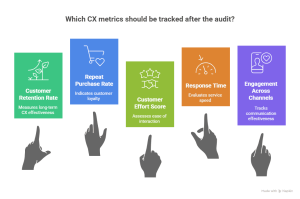
1. Customer Retention Rate
Retention tells you if CX changes are working long-term.
Why it matters:
- Retention is cheaper than acquisition
- Loyal customers forgive small mistakes
Example:
You improve onboarding clarity.
Retention rises from 70% to 78%.
That’s CX paying dividends.
Tip:
Track retention before vs after CX fixes—not in isolation.
2. Repeat Purchase Rate
Repeat purchases signal:
- Trust
- Convenience
- Satisfaction
Scenario:
After adding proactive delivery updates, repeat purchases increase.
Customers aren’t buying more because of discounts.
They’re buying because they feel confident.
Tip:
CX improvements often raise repeat purchases quietly—watch this metric closely.
3. Customer Effort Score (CES)
CES answers one question:
“How easy was it to get what you wanted?”
Low effort = high loyalty.
Example:
Customers struggle to find support.
You add WhatsApp quick replies.
CES improves dramatically.
Tip:
High effort drives churn—even when customers like your product.
4. Response Time Across Channels
Speed is perceived as care.
Track:
- First response time
- Resolution time
- Channel-wise differences
Scenario:
WhatsApp replies in minutes.
Email replies in hours.
That tells you:
- Which channels build trust
- Which need fixing
Tip:
Customers expect different speeds per channel—set realistic SLAs.
5. Engagement Across WhatsApp, Email, and SMS
Engagement shows relevance.
Track:
- Open rates
- Clicks
- Replies
- Completion actions
Example:
WhatsApp messages get 5x replies vs email.
That’s not a coincidence—that’s preference.
Tip:
Let engagement guide channel strategy—not assumptions.
Final Insight for This Section
CX metrics aren’t vanity numbers.
They’re signals of trust.
When:
- Retention rises
- Effort drops
- Response time improves
Your customer experience is working—even before revenue spikes.
Common CX Audit Mistakes to Avoid
A CX audit can unlock growth—or waste time.
The difference comes down to how you approach it.
Here are the most common mistakes businesses make—and how to avoid them.
❌ 1. Auditing Once and Forgetting
Many teams treat CX audits like:
- A one-time project
- A quarterly checkbox
- A “we’ll revisit this later” task
But customer expectations change constantly.
Scenario:
You audit CX in January.
By June, you add new channels, run new campaigns, and launch new offers.
Your CX map is already outdated.
Fix:
Turn CX audits into a routine:
- Light audits monthly
- Deep audits quarterly
- Micro-checks after major changes
CX is a living system—not a static report.
❌ 2. Fixing Symptoms, Not Root Causes
It’s easy to react to visible problems:
- Low conversions
- High churn
- Poor NPS
But those are outcomes, not causes.
Example:
Problem: High cart abandonment
Quick fix: Add discounts
Real cause:
- Hidden fees
- Confusing checkout
- No delivery clarity
Fix:
Always ask “Why did this happen?” before fixing anything.
Solve friction, not just metrics.
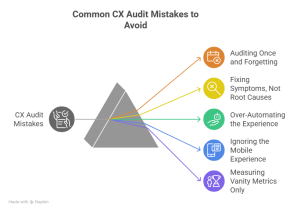
❌ 3. Over-Automating the Experience
Automation feels efficient.
But over-automation feels cold.
Scenario:
- Chatbot answers everything
- No human option
- Generic responses during emotional moments
Customers feel processed—not cared for.
Fix:
Use automation for:
- Speed
- Repetitive tasks
- Information retrieval
Use humans for:
- Objections
- Complaints
- Emotional or complex issues
Automation supports CX. Humans create trust.
❌ 4. Ignoring the Mobile Experience
Most CX audits are done on desktops.
Most customers are not.
Scenario:
Your website looks perfect on a laptop.
On mobile:
- Buttons are hard to tap
- Checkout fields misalign
- Pages load slowly
That’s silent conversion loss.
Fix:
Audit CX on:
- Mobile phones
- Tablets
- Different screen sizes
Especially:
- Checkout
- Forms
- CTAs
- WhatsApp flows
If mobile CX breaks, the journey ends.
❌ 5. Measuring Vanity Metrics Only
High traffic.
High impressions.
Low complaints.
None of these guarantee good CX.
Example:
Your ads get clicks.
Your site gets visits.
But conversions stay flat.
The problem isn’t visibility—it’s experience.
Fix:
Focus on experience metrics, not surface metrics:
- Retention
- Repeat purchases
- Effort score
- Response time
- Engagement depth
What customers do matters more than what they see.
Final Takeaway:
Most customers won’t complain when something feels off—they simply disengage and leave.
A customer experience audit uncovers this silent friction hiding across touchpoints, journeys, and channels.
When you fix the right gaps, small improvements compound into higher retention, stronger trust, and better conversions.
In today’s competitive market, the businesses that listen beyond words—and act on experience—are the ones that win.
Here’s the uncomfortable truth:
Most unhappy customers never complain.
They:
- Leave
- Stop engaging
- Quietly choose a competitor
No angry email.
No bad review.
Just silence.
CX Audits Expose Silent Friction
A CX audit helps you see:
- Where customers hesitate
- Where trust breaks
- Where effort increases
- Where clarity disappears
These moments don’t show up in dashboards easily—but they destroy growth quietly.
Example:
Customers drop off after pricing.
No feedback.
No complaints.
A CX audit reveals:
- Confusing plans
- Unclear value
- No reassurance at the decision point
Small Improvements Compound Into Big Wins
CX isn’t about perfection.
It’s about progress.
Even small fixes can lead to:
- Higher retention
- Better conversions
- Stronger loyalty
- More referrals
Scenario:
- Faster WhatsApp replies
- Clearer checkout steps
- Better post-purchase communication
Together, these changes transform how customers feel—without rebuilding your business.
Final Thought
CX audits don’t just fix problems.
They reveal opportunities.
They help you:
- See your business through your customer’s eyes
- Prioritize what truly matters
- Build trust at every touchpoint
Customers won’t always tell you what’s wrong.
A CX audit will.


